AI Storyboard Generator
Eliminates the need for drawing skills, enabling quick and easy storyboard creation.
Key Takeaways
- What it is
- Eliminates the need for drawing skills, enabling quick and easy storyboard creation.
- Pricing
- Freemium
- Best for
- Simple Versioning
- Automatic Animatics
- Collaborative Workspace
- Rating
- 4.8/5
What is AI Storyboard Generator?
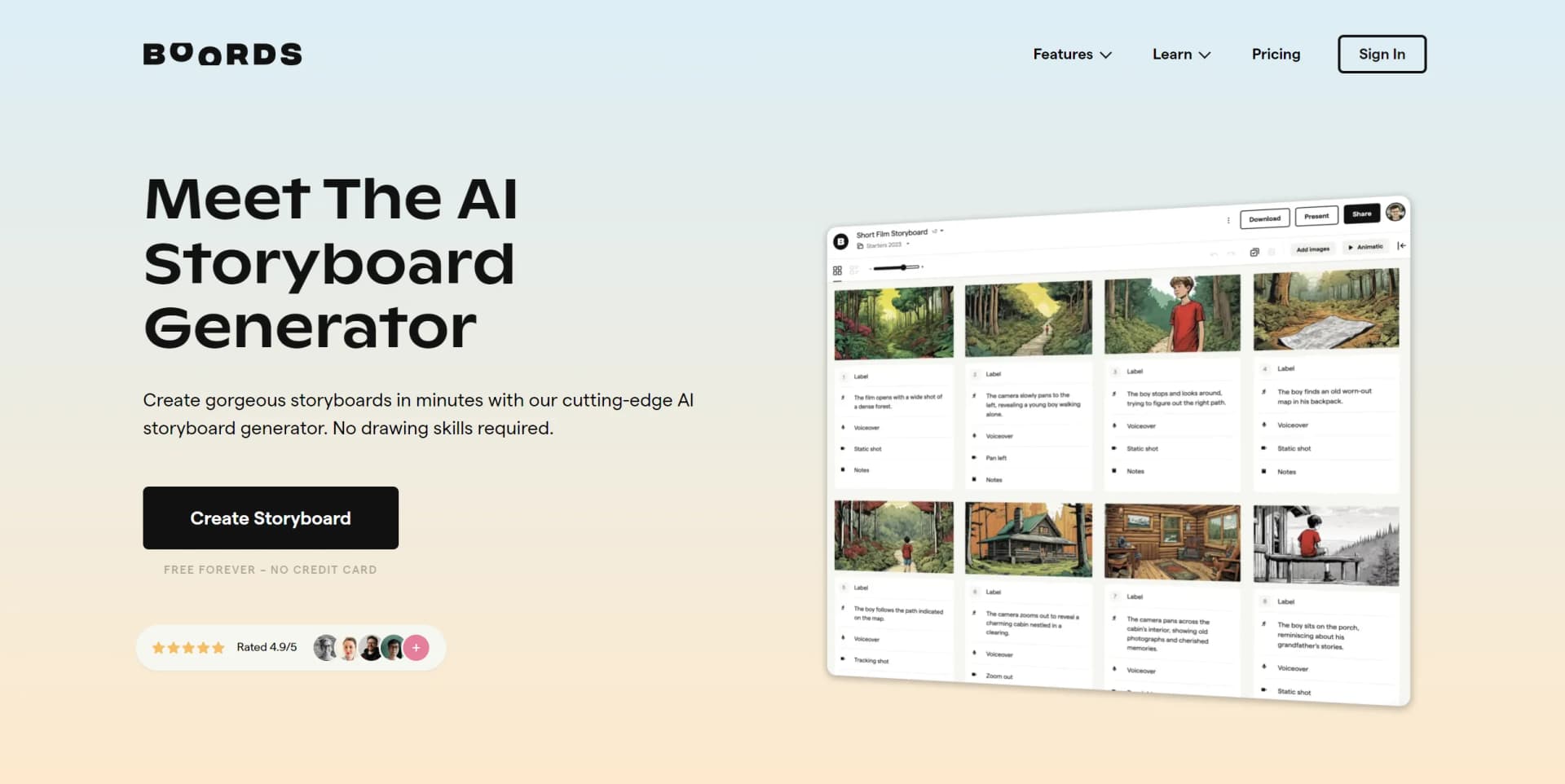
AI Storyboard Generator is an innovative online tool designed to streamline the process of creating storyboards for various creative projects. This tool is part of the Boords suite, which is highly regarded by video professionals for its ease of use and comprehensive set of features. AI Storyboard Generator is specifically tailored to assist in the rapid development of storyboard scripts and visuals, allowing users to bring their narratives to life with efficiency and precision. It is an essential asset for professionals in film, animation, advertising, and other creative industries who require a reliable and intuitive storyboard solution.
AI Storyboard Generator distinguishes itself with its AI Scriptwriting Assistant, a feature that significantly enhances the efficiency of creating storyboard scripts. This tool's focus on collaborative storyboarding and version control also sets it apart, providing a seamless experience for teams working on creative projects.
AI Storyboard Generator excels in providing a collaborative and intuitive platform for storyboard creation, making it an indispensable tool for creative professionals. Its AI Scriptwriting Assistant offers a significant advantage in generating scripts, while the tool's emphasis on version control and collaborative features ensures that projects remain organized and teams stay in sync. With high ratings across the board for reliability, ease of use, and support, AI Storyboard Generator is a top choice for those seeking to enhance their storytelling and pre-production processes.
Who is Using AI Storyboard Generator?
Film and Animation Studios
Adopting the tool to streamline the storyboard creation process for films and animated features.
Advertising Agencies
Using AI Storyboard Generator to quickly draft and revise storyboards for client pitches and campaigns.
Content Creators
Leveraging the tool to plan out video content for platforms like YouTube and Vimeo.
Educators
Incorporating the tool into curriculum for teaching film and media courses.
Uncommon Use Cases
Non-profit organizations use it to visualize narratives for awareness campaigns; Podcasters utilize it to storyboard visual accompaniments for episodes.
Key Features
Rating Breakdown
Pricing Plans
Free Tier
Free
- Access Boords and the AI Storyboard Generator for free
- No credit card required
Subscription Plans
- Additional pricing details for advanced plans could be available on the website
Which AI Storyboard Generator plan should you pick?
Start with Solo for individual work; upgrade to Pro, Team, or Agency when you need more seats, AI images, and team controls.
Solo
Good for one person who needs unlimited storyboards and scripts with 250 AI images per month.
Pro
Good for teams of up to five users who need 1,000 AI images per month.
Team
Good for teams of up to ten users who need advanced team controls and 2,000 AI images per month.
Agency
Good for agencies of up to thirty users who need priority support and 3,000 AI images per month.
Enterprise
Good for larger organizations needing custom seats, signed contracts, dedicated support, and procurement-focused security infrastructure.
AI Storyboard Generator Use Cases
Script-to-storyboard conversion
Upload or paste a script and convert scenes into structured storyboard frames.
Outcome: A structured storyboard with scene text and image prompts.
AI visual development
Generate, restyle, reframe, and refine storyboard images with prompts and references.
Outcome: Consistent visual references for production planning.
Client review and approval
Share review links, collect frame-level comments, and track approval statuses.
Outcome: Centralized feedback and clearer sign-off.
Animatic planning
Add timing and audio to preview storyboard pacing before production.
Outcome: An animatic that helps test timing before filming or animation.
Production handoff
Export approved boards as PDFs, images, videos, shot lists, or spreadsheets.
Outcome: Production-ready assets from the approved storyboard.
Workflow Ideas with AI Storyboard Generator
Brief to approved storyboard
- 1Paste a brief or import a script
- 2Generate and refine storyboard frames
- 3Share the board for comments and approval
Consistent character development
- 1Create character reference images
- 2Save characters to the team asset library
- 3Reuse references across storyboard scenes
Automated production synchronization
- 1Create an API token
- 2Use API endpoints to create or update storyboard data
- 3Receive webhook events when projects, frames, or comments change
How AI Storyboard Generator fits into your stack
Project-Level Access Control
Fine-tune who can see and edit storyboards within your team.
Password-Protected Sharing
Securely share your storyboards with clients and stakeholders.
Export Flexibility
Compatibility with multiple export formats caters to a variety of professional needs.
Confidentiality Assurance
All content is kept private unless you choose to share it, ensuring security and discretion.
Pros
- +Streamlined Workflow: Boords' storyboard generator simplifies the pre-production process, making it faster and less painful.
- +Highly Collaborative: The tool is built with remote teams in mind, facilitating clear and efficient communication across different locations.
- +Professional Presentation: Share storyboards and animatics with clients using password-protected presentations that reflect a sleek, professional image.
- +Versatile Export Options: Export storyboards in various formats like PDF, MP4 for animatics, Excel, Docx, and even After Effects.
Cons
- −Specialized Use: The tool is highly specialized for storyboarding, which might limit its use for those seeking broader design functionalities.
- −Learning Curve: New users may need some time to familiarize themselves with the tool's specific features and workflow.
- −Dependency on Internet: Being an online tool, it requires a stable internet connection for optimal performance.
Limitations & when to consider alternatives
Known limitations
- Script import size limits. Imported files must be no larger than 2 MB, 250 pages, or 60,000 words.
- Storyboard scene limit. Script-to-storyboard conversion supports between 1 and 250 scenes per conversion.
- Long scripts require ranges. Screenplay-length scripts are converted in scene ranges rather than as one enormous board.
- Script and storyboard are not synchronized. A converted storyboard is a snapshot; later script edits do not automatically update it.
- API availability requires a paid plan. The public API requires a paid Boords plan and an API token.
Look elsewhere when
- You need a native mobile editing app.
- You need a desktop installer rather than a browser application.
- You need programming-code generation.
How to Use AI Storyboard Generator
- 1
Boords offers a wealth of tutorials and learning resources to help users get the most out of AI Storyboard Generator, available on their website and potentially through other platforms like YouTube.
Who is AI Storyboard Generator For?
Video agencies
Create client-ready storyboards, gather feedback, and manage approvals in one workspace.
Brand teams
Storyboard commercials, branded content, and social campaigns before production.
Agency producers
Pitch concepts quickly without spending extensive creative hours on manual boards.
Marketing teams
Visualize social advertisements and branded videos rapidly from scripts or briefs.
Freelance videographers
Show clients the planned video before filming begins.
Frequently Asked Questions
How can I start a new storyboard?
Start with an AI-generated script, import an existing script, or build from an empty storyboard.
Which script file formats can I upload?
Boords supports PDF, plain text, Markdown, CSV, and HTML script files.
Can I generate images with AI?
Yes. Generate images from prompts, layouts, existing frames, styles, and reference images.
Can I upload my own images?
Yes. Upload JPG and PNG images, use team assets, or import video clips for GIF frames.
Can teams collaborate in real time?
Yes. Users with edit access can co-edit, comment, review, and manage project access.
Can I export storyboards?
Export storyboards as PDFs, images, videos, shot lists, and other production formats.
Community reviews
Be the first to share your experience.
Sign in to leave a review for AI Storyboard Generator.
AI Storyboard Generator Alternatives
Looking for alternatives to AI Storyboard Generator? Here are similar tools in the same category: