
Smartschool
Revolutionizes math education with instant, AI-driven feedback.
Key Takeaways
- What it is
- Revolutionizes math education with instant, AI-driven feedback.
- Best for
- Instant AI Feedback
- Integration with LMS and SIS
- Learning and Grading Modes
- Rating
- 4.5/5
What is Smartschool?
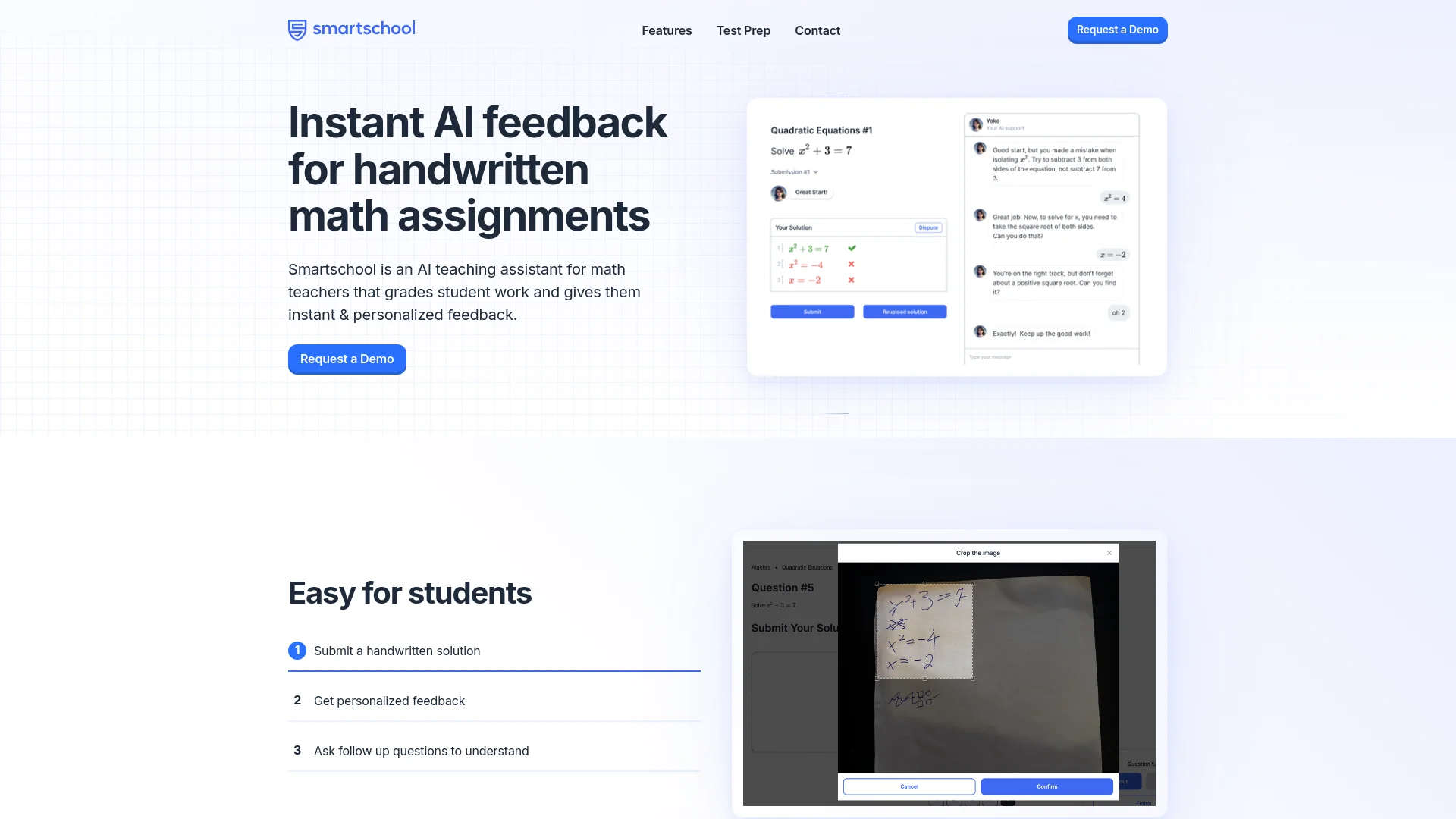
Smartschool is a revolutionary AI teaching assistant specifically designed for math educators. It streamlines the grading process by providing instant and personalized feedback on handwritten math assignments. This tool not only enhances the learning experience for students by allowing them to receive immediate responses to their queries but also significantly eases the workload for teachers by automating the grading process. Aimed at making educational interactions more efficient and effective, Smartschool is transforming the way educational content is delivered and managed in classrooms.
Smartschool stands out by offering real-time, AI-powered feedback on handwritten assignments—a feature that is especially unique in the realm of educational tools. Its ability to integrate seamlessly with major Learning Management Systems and provide feedback in multiple languages sets it apart from other educational aids.
Smartschool excels in providing efficient, personalized feedback for math learning, making it an indispensable tool for educators and students alike. Its standout feature of instant feedback on handwritten submissions offers an unmatched advantage in educational technology, fostering a more engaging and supportive learning environment.
Who is Using Smartschool?
Math Teachers
Primary users, utilizing the tool to streamline grading and provide personalized feedback.
Students
Benefiting from instant feedback on homework and tests, making learning more interactive.
School Administrators
Employing this tool to enhance the overall educational process and track student performance efficiently.
Educational Institutions
Integrating Smartschool into their systems to provide a more inclusive and adaptive learning environment.
Uncommon Use Cases
Utilized by tutoring centers for real-time feedback during sessions; adopted by homeschooling parents to enhance educational support at home.
Smartschool is versatile, catering to a wide range of educational professionals
Key Features
Rating Breakdown
Pricing Plans
Subscription Model
- Specific pricing details are available upon request through the Smartschool website
Free Trial
- Institutions can explore the features of Smartschool through a demo before committing to a subscription
Which Smartschool plan should you pick?
Start with Self-Paced for independent SAT preparation; upgrade to Live Course or Private Tutoring for live instruction or one-on-one support.
Self-Paced
Good for students and families who need independent SAT preparation with adaptive study plans, lessons, questions, and practice tests.
Live Course
Good for students who need structured live instruction alongside Smartschool’s SAT preparation materials.
Private Tutoring
Good for students who need individualized one-on-one tutoring and flexible scheduling.
Smartschool Use Cases
Classroom practice
Teachers assign in-class math practice after a lesson.
Outcome: Students receive guided support while teachers identify learning needs.
Homework support
Teachers provide assignments for additional learning support at home.
Outcome: Students can continue practicing with AI tutoring outside class.
Formative assessment
Teachers use quick assessments to track progress during learning.
Outcome: Teachers get data to identify gaps and differentiate instruction.
Learning-gap intervention
Teachers provide targeted support for students who need remediation.
Outcome: Students receive immediate reteaching and personalized guidance.
SAT preparation
Students use practice questions, full-length tests, lessons, and an adaptive study plan.
Outcome: Students prepare for the SAT with personalized practice and tutoring.
Workflow Ideas with Smartschool
Create and assign differentiated math practice
- 1Choose standards-aligned questions from the content library
- 2Differentiate the assignment into easy, medium, or hard levels
- 3Assign it for classroom practice or homework
Review handwritten student work
- 1Have students upload photos of handwritten solutions
- 2Let Smartschool analyze graphs, drawings, tables, and written steps
- 3Review feedback and identify students needing additional support
Run a targeted intervention cycle
- 1Use real-time progress data to identify learning gaps
- 2Assign targeted remediation or adaptive practice
- 3Monitor student progress and adjust instruction
How Smartschool fits into your stack
Google Classroom Integration
Enhances user experience by integrating smoothly with Google Classroom.
Canvas LMS Support
Works effortlessly with Canvas LMS, broadening its usability.
API Access
Offers API access for more customized integrations according to school needs.
Flexible Platform Integration
Requests for integration with other platforms are considered, making it highly adaptable.
Pros
- +Enhanced Student Engagement: Provides a non-intimidating environment for students to ask questions and receive feedback at their own pace.
- +Efficiency in Grading: Teachers can grade faster with AI-assisted mistake marking and pre-grading comments.
- +Customizable Feedback: Teachers have the ability to override AI feedback, ensuring that the nuances of human judgment are not lost.
- +Accessibility: Makes learning more accessible and personalized, especially for shy students or those who require more time to grasp concepts.
Cons
- −Dependency on Handwritten Input: Relies on the clarity of students' handwriting, which can vary greatly.
- −Initial Setup and Integration: May require time and effort to integrate smoothly with existing systems at educational institutions.
- −Limited Subject Support: Currently focused primarily on mathematics, which may not cater to schools looking for a more comprehensive tool across subjects.
Limitations & when to consider alternatives
Known limitations
- United States focus. The service is primarily intended for users and institutions in the United States. Users outside the US should expect personal information to be transferred to and stored on US servers.
- No absolute security guarantee. Smartschool states that no method of electronic storage or internet transmission is 100% secure and does not guarantee absolute security.
- Age restriction. The consumer terms state that Smartschool does not permit users under 18 to use the service.
- Free-trial billing risk. A free trial may require billing information, and the subscription can automatically charge when the trial expires unless cancelled.
- School-managed deletion. For school-managed accounts, data-deletion requests must generally be directed to the school or district administration.
How to Use Smartschool
- 1
Explore an array of tutorials on Smartschool's official website, covering everything from setup to advanced features, aimed at both teachers and students to maximize the tool's potential.
Who is Smartschool For?
Teachers
Teachers get standards-aligned questions, lesson preparation, AI tutoring support, and student progress insights.
Schools
Schools get administrative accounts, curriculum mapping, professional development, and LMS integration.
Districts
Districts get district-wide support, privacy agreements, integrations, and a dedicated success manager.
K–12 students
Students receive guided math tutoring, adaptive practice, feedback, and support for handwritten work.
SAT students and families
Self-paced, live-course, and private-tutoring plans provide SAT preparation for students and families.
Frequently Asked Questions
Which grade levels does Smartschool support?
Smartschool is an AI math tutor for K–12 schools and districts.
Which subjects does Smartschool support?
The documented core offering focuses on mathematics, including algebra, geometry, and calculus practice.
Does Smartschool support LMS integrations?
Yes. Smartschool supports integrations including Clever, EdLink, Canvas, Google Classroom, and Schoology.
Can students upload handwritten work?
Yes. Students can upload photos of handwritten solutions, including graphs, drawings, and tables.
Does Smartschool support multilingual learners?
Yes. The platform supports learners in more than 200 languages.
Is there a free option?
Teachers can get started for free; school and district plans are available through contact-based pricing.
Community reviews
Be the first to share your experience.
Sign in to leave a review for Smartschool.
Smartschool Alternatives
Looking for alternatives to Smartschool? Here are similar tools in the same category:
Learn to Master Smartschool
With Skill Leap courses
Get in-depth training on Smartschool and 50+ other AI tools with our expert-led video courses.
Start 7-Day Free Trial