
FuseBase AI
AI-driven tool for seamless client collaboration and project management.
Key Takeaways
- What it is
- AI-driven tool for seamless client collaboration and project management.
- Pricing
- Freemium
- Best for
- AI-Powered Assistance
- Content Creation and Refinement
- Task Management
- Rating
- 4.4/5
What is FuseBase AI?
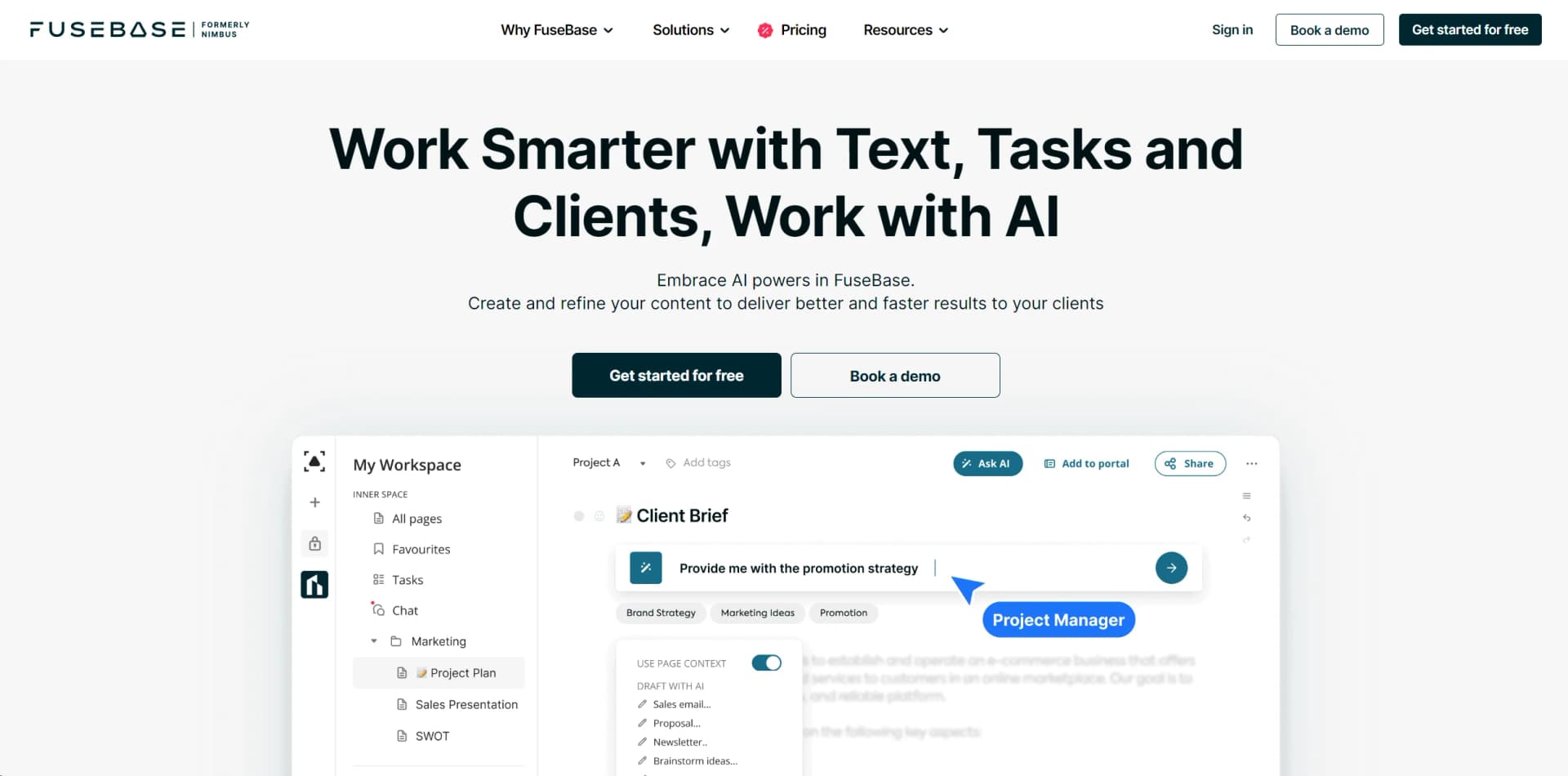
FuseBase AI, formerly known as Nimbus, is an innovative AI tool designed to enhance client collaboration, project management, and knowledge management within a professional workspace. This AI-driven assistant integrates seamlessly into your working hub, offering a comprehensive suite of features that streamline processes and improve efficiency. Tailored for digital agencies, consulting firms, and individual consultants, FuseBase AI simplifies the complexities of client interactions and project workflows, making it an invaluable asset for businesses aiming to optimize their operations.
FuseBase AI distinguishes itself with its integration capabilities within your working hub, allowing users to ask AI questions and save responses directly in their workspace. This eliminates the need to switch between multiple tools and tabs. Additionally, its ability to provide personalized responses based on stored knowledge and insights sets it apart, making it a powerful tool for delivering high-quality client services efficiently.
FuseBase AI is a transformative tool for businesses seeking to enhance their workflow and client interactions. With its robust AI-driven features, it offers a seamless experience that not only saves time but also enhances the quality of output across various tasks and projects. Whether you're a digital agency, a consulting firm, or an individual consultant, FuseBase AI provides the tools needed to stay competitive and deliver exceptional results.
Who is Using FuseBase AI?
Digital Agencies
Employing the tool for developing strategies and accelerating client success.
Consulting Firms
Analyzing client cases more efficiently and providing effective solutions.
Individual Consultants and Coaches
Enhancing client service capabilities by handling more requests efficiently.
Project Managers
Using the tool to streamline project workflows and improve team collaboration.
Uncommon Use Cases
Wedding Planners: Organizing and managing event details seamlessly.; Educational Institutions: Teaching project management techniques through real-world applications.
Key Features
Rating Breakdown
Pricing Plans
Free Tier
Free
- Unlimited time on the free plan to explore FuseBase AI's capabilities
Which FuseBase AI plan should you pick?
Start with the Free plan to test FuseBase AI with 20 prompts, then choose Solo, Essentials, Advanced, or Unlimited based on members, AI requests, automation, and collaboration needs.
Solo
Good for personal use and small-scale experimentation with AI Agents and 1,000 monthly AI requests.
Essentials
Good for small teams that need 10,000 monthly AI requests, more portals, clients, storage, and automation.
Advanced
Good for organizations scaling AI usage, permissions, portals, white labeling, and FuseBase Work.
Unlimited
Good for organizations needing unlimited members, AI requests, portals, automation runs, and transcriptions.
FuseBase AI Use Cases
Draft client content
Generate sales emails, follow-up emails, blog posts, and other written material from prompts.
Outcome: Content is produced faster and can be refined for tone, length, and audience.
Summarize meetings and discussions
Analyze team discussions, meeting transcripts, and workspace content to identify key points and action items.
Outcome: Users receive concise summaries and clearer next steps.
Analyze documents and images
Use uploaded office files, PDFs, images, and other sources as inputs for agents.
Outcome: Users can extract information, answer questions, and interpret visual content.
Create client-support agents
Build agents that answer questions using selected folders, pages, files, or knowledge-base content.
Outcome: Teams can provide consistent, source-based answers to clients and members.
Automate cross-tool work
Connect agents to tools such as Slack, Google Calendar, Stripe, Airtable, Google Sheets, and Notion.
Outcome: Agents can send results, schedule meetings, create invoices, and coordinate related tasks.
Workflow Ideas with FuseBase AI
Client meeting to action plan
- 1Upload or capture the meeting transcript in FuseBase.
- 2Ask FuseBase AI to summarize decisions and identify action items.
- 3Save the response to a FuseBase page and convert follow-up items into tasks.
Knowledge-base support agent
- 1Select the workspace folders and pages that contain approved product information.
- 2Create an AI agent that answers questions using those sources.
- 3Publish the agent for organization members, portal clients, or website visitors.
Research-to-client update
- 1Create an agent with web search and workspace sources enabled.
- 2Ask it to gather relevant research and format the findings.
- 3Send the results to Slack or save them as a FuseBase page for client delivery.
How FuseBase AI fits into your stack
Browser
FuseBase AI Assistant runs as a Chromium browser extension, analyzing the current screen and answering questions from company documents, spreadsheets, and PDFs.
Docs and writing
The web workspace embeds AI into pages and the editor for drafting, rewriting, proofreading, summarizing, and transforming selected text.
Knowledge and files
FuseBase combines collaborative workspaces, knowledge bases, file uploads, documents, images, and AI agents grounded in stored organizational content.
Automation and APIs
Trigger-and-action automations connect FuseBase with services such as Monday and Slack, while FuseBase Work exposes API-key-based agent access and MCP integrations.
Pros
- +Time Efficiency: Significantly reduces the time spent on content creation and project management, allowing users to focus on creative tasks.
- +User-Friendly Interface: Intuitive design makes it easy for users of all technical backgrounds to navigate and utilize its features.
- +Comprehensive Data Security: Ensures that all user data is private and encrypted, providing peace of mind regarding data privacy.
- +Versatile Use Cases: Suitable for a wide range of industries, from digital marketing to consulting, due to its customizable and flexible nature.
Cons
- −Initial Learning Curve: Some users may require time to fully understand and utilize the full range of advanced features.
- −Limited Language Support: While English is supported robustly, other languages may not have the same level of quality and accuracy.
Limitations & when to consider alternatives
Known limitations
- Free AI usage is limited. The free plan provides 20 prompts for testing; paid plans impose monthly AI-request quotas unless using Unlimited.
- Language quality varies. English is the primary model language, and FuseBase does not guarantee equal quality for other languages or dialects.
- Agent editing is limited. The current editor-agent version adds new content but does not replace existing page content.
- Plan limits apply to automation. Automation runs vary by plan, from 1,000 monthly runs on Solo to unlimited runs on Unlimited.
- Mobile availability is not for FuseBase AI. The vendor documents mobile apps as Nimbus Note rather than a dedicated FuseBase AI mobile application.
Look elsewhere when
- You need a dedicated FuseBase AI iOS or Android app.
- You need SSO or SAML support.
- You need model fine-tuning on your own data.
How to Use FuseBase AI
- 1
Create or open a FuseBase workspace
Sign up or log in, then choose the workspace containing the pages, files, and tasks you want the AI to use.
- 2
Start an AI request
Use Ask AI, the FuseBase AI object, or highlight page text and choose Use AI.
- 3
Add relevant sources
Select pages, folders, files, tasks, images, documents, or video transcripts so the response has the right context.
- 4
Create an AI Agent
Define the agent’s task in natural language, add input fields or sources, and publish it for your organization or portal users.
- 5
Connect integrations
Add supported services such as Slack, Google Calendar, Stripe, Airtable, Google Sheets, or Notion through the integrations area.
- 6
Save or automate the result
Insert responses into pages, save them as new documents, or add agents to automations and workflows.
Who is FuseBase AI For?
Digital agencies
FuseBase AI helps agencies develop client strategies, generate content, and deliver work faster.
Consulting firms
Consultancies can analyze client cases, summarize information, and suggest solutions.
Individual consultants and coaches
Solo service providers can handle more client requests by accelerating research, writing, and follow-up work.
Service businesses
FuseBase is positioned for professional-services organizations needing collaboration, portals, workflows, and AI assistance.
Frequently Asked Questions
How do I start using FuseBase AI?
Sign up for FuseBase, then use Ask AI, the FuseBase AI menu option, or highlight text and select Use AI.
What does FuseBase AI do?
It generates and refines content, summarizes discussions, analyzes documents and images, translates text, and creates task-related outputs.
How many free AI responses are available?
The free plan provides 20 prompts for testing the AI models.
Which languages does FuseBase AI support?
English is the primary language, while other languages are supported with no guarantee of equal quality across languages and dialects.
Can FuseBase AI use workspace content?
Agents can use pages, folders, files, tasks, office documents, images, and video transcripts as sources.
Is FuseBase AI available in a browser extension?
Yes. FuseBase AI Assistant and AI Agents work in Chromium-based browsers, including Chrome, Edge, and Opera.
Community reviews
Be the first to share your experience.
Sign in to leave a review for FuseBase AI.
FuseBase AI Alternatives
Looking for alternatives to FuseBase AI? Here are similar tools in the same category:
Learn to Master FuseBase AI
With Skill Leap courses
Get in-depth training on FuseBase AI and 50+ other AI tools with our expert-led video courses.
Start 7-Day Free Trial