
PromptFolder
Centralize and streamline AI prompt management with organizational tools and a Chrome extension.
Key Takeaways
- What it is
- Centralize and streamline AI prompt management with organizational tools and a Chrome extension.
- Pricing
- Freemium
- Best for
- Prompt Management
- Chrome Extension
- Advanced Editor
- Rating
- 4.2/5
What is PromptFolder?
PromptFolder is an innovative AI prompt management tool that has been designed to cater to users of AI language models such as ChatGPT and Midjourney. At its core, the platform offers a centralized space where users can create, organize, and store prompts, streamlining the process of interacting with different AI tools and enhancing productivity.
PromptFolder stands out with its specialized focus on organizing and managing AI prompts, a niche but increasingly important task as AI becomes more integrated into our daily workflows. Its Chrome extension, which allows for direct interaction with ChatGPT, is a unique feature that enhances user experience significantly.
PromptFolder excels as a specialized tool for managing AI prompts, delivering a streamlined and organized experience that can save users significant time. Its Chrome extension and compatibility with popular AI models make it a valuable asset for anyone regularly engaging with AI for content creation, research, or social media management. The platform's user-friendly interface and community-driven approach to prompt sharing also contribute to its appeal, making it a worthy consideration for those looking to enhance their AI interactions.
Who is Using PromptFolder?
Content Creators
Streamlining the process of generating writing prompts and ideas.
SEO Specialists
Organizing keyword prompts for AI-assisted content creation.
Social Media Managers
Saving and categorizing prompts for generating engaging posts.
Researchers
Keeping track of various inquiry prompts used in academic or market research.
Uncommon Use Cases
Podcasters using prompts for show topics; Teachers incorporating prompts for classroom AI demonstrations.
Key Features
Rating Breakdown
Pricing Plans
Free Tier
Free
- Start with PromptFolder at no cost with basic prompt management features
Subscription Plans
- Additional details on tiered pricing are available on the PromptFolder website
Which PromptFolder plan should you pick?
Start with the free account for basic prompt storage and reuse, then upgrade to PromptFolder Pro when you need private prompts, optimization, image uploads, or bulk import/export.
Free account
Good for users who need basic prompt saving, organization, browsing, and Chrome-extension access.
PromptFolder Pro
Good for users who need unlimited private prompts, AI prompt optimization, advanced privacy settings, a Midjourney image uploader, and bulk import/export.
PromptFolder Use Cases
Reuse email subject-line prompts
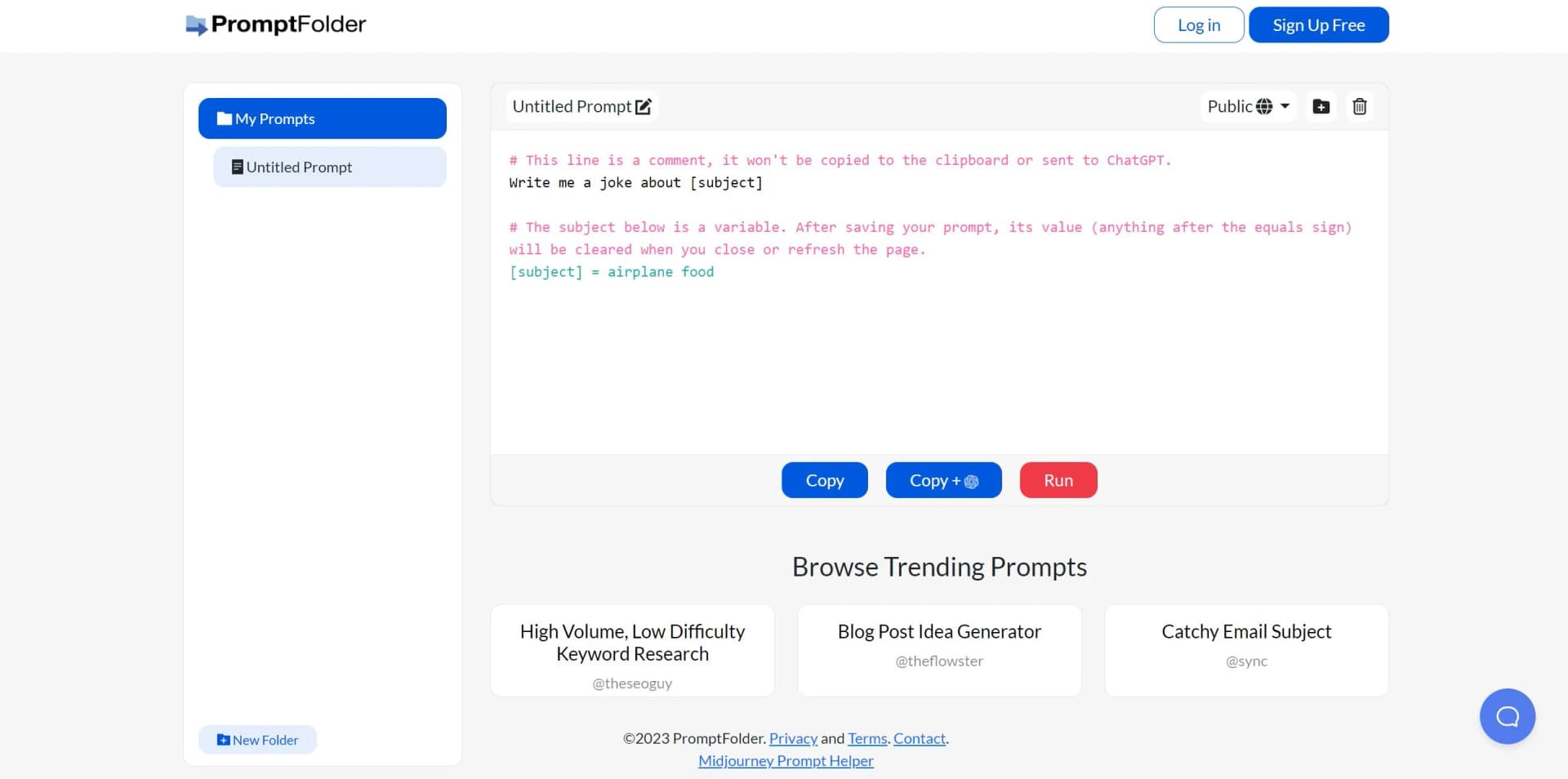
Store a prompt with a variable such as [subject], then replace the topic whenever a new email campaign is needed.
Outcome: Reusable subject-line generation without rewriting the prompt.
Manage SEO prompts
Save prompts for SEO meta titles, low-difficulty keyword research, and related content tasks.
Outcome: A centralized library of repeatable SEO workflows.
Insert prompts into ChatGPT
Install the Chrome extension, sign in, type a slash in ChatGPT, and select a saved prompt.
Outcome: Faster prompt reuse without switching between browser tabs.
Create Midjourney prompts
Use the Midjourney prompt helper to add concepts, aspect ratios, chaos, style presets, and weighted terms.
Outcome: Structured Midjourney prompts ready to copy and run.
Organize prompt collections
Save prompts into folders, browse trending prompts, and adjust prompt privacy settings.
Outcome: Easier retrieval and management of reusable prompt assets.
Workflow Ideas with PromptFolder
Create and reuse a variable prompt
- 1Write a reusable prompt with bracketed variables such as [topic].
- 2Enter a new value for the variable.
- 3Reuse the prompt while PromptFolder clears the variable value on refresh.
Use saved prompts in ChatGPT
- 1Install the PromptFolder Chrome extension.
- 2Sign in with a PromptFolder account.
- 3Type a slash in ChatGPT and select the saved prompt.
Build a Midjourney image prompt
- 1Enter the main image concept in the Midjourney prompt helper.
- 2Select parameters, style presets, and weighted terms.
- 3Copy the generated prompt and run it in Midjourney.
How PromptFolder fits into your stack
Browser
PromptFolder is primarily a web-based prompt library. Its Chrome extension lets users search saved prompts with a slash command and insert them directly into ChatGPT and other AI tools.
Knowledge and files
PromptFolder stores prompts in the cloud, organizes them into folders, supports privacy settings and variables, and provides a Midjourney image uploader on its Pro plan.
Pros
- +Enhanced Organization: Keeps all your prompts neatly categorized for easy access.
- +Time-Saving: Quickly find and reuse prompts, reducing the need to rewrite or remember complex inputs.
- +User-Friendly Interface: Intuitive design that simplifies interaction with AI models.
- +Community-Driven Insights: Benefit from prompts that have been successful for other users, fostering a collaborative environment.
Cons
- −Dependency on Internet Connectivity: Requires a stable internet connection for optimal use.
- −Learning Curve: New users may need some time to become familiar with the tool's advanced features.
- −Chrome-Specific Extension: Currently, the browser extension is limited to Chrome users, potentially excluding those who prefer different browsers.
Limitations & when to consider alternatives
Known limitations
- No documented developer API. PromptFolder is presented as a web application, and the official site does not publish API keys, endpoints, or developer API documentation.
- No native mobile or desktop application documented. The official terms describe PromptFolder as a web application, while the documented browser-based extension is the primary access enhancement.
- No documented team workspace. The documented paid features focus on private prompts, optimization, privacy, image upload, and import/export rather than shared workspaces or user roles.
- No documented SSO support. The official feature description does not mention SSO, SAML, Okta, Azure AD, or single sign-on.
- Security details are limited. The privacy policy says PromptFolder uses commercially acceptable protection but does not specify encryption at rest, encryption in transit, TLS, or AES-256.
Look elsewhere when
- You need a documented developer API.
- You need a native mobile or desktop app.
- You need SSO or SAML.
- You need encryption specifications such as TLS or AES-256.
How to Use PromptFolder
- 1
Create an account
Register for a free PromptFolder account so prompts can be saved and accessed later.
- 2
Save or browse prompts
Create prompts, browse trending prompts, and organize saved prompts into folders.
- 3
Add reusable variables
Place variable names in brackets, such as [topic], so the same prompt can be reused with different inputs.
- 4
Install the Chrome extension
Add the official extension and sign in to make saved prompts available inside ChatGPT.
- 5
Insert prompts into ChatGPT
Type a slash in ChatGPT, filter the saved prompts, and select one to insert it into the chat.
- 6
Upgrade when needed
Choose PromptFolder Pro for unlimited private prompts, optimization, advanced privacy, image upload, and bulk import/export.
Who is PromptFolder For?
Casual AI users
PromptFolder provides a simple way to save and reuse frequently used prompts across AI tools.
Professionals
Professionals can organize reusable prompts with folders, variables, privacy settings, and browser access.
ChatGPT users
The Chrome extension lets ChatGPT users retrieve saved prompts directly inside the ChatGPT interface.
Midjourney users
The Midjourney prompt helper provides style presets, parameters, weighting, and prompt-saving features.
Frequently Asked Questions
What is PromptFolder?
PromptFolder is a prompt manager for ChatGPT, Midjourney, and other AI tools. Users can save, organize, edit, and reuse prompts.
Does PromptFolder have a free plan?
Yes. PromptFolder provides free account registration, while PromptFolder Pro adds paid features.
How does the Chrome extension work?
After signing in, type a slash in ChatGPT to search saved PromptFolder prompts and insert one into the chat.
What are PromptFolder variables?
Variables are bracketed placeholders such as [topic]. Their values can be changed and are cleared when the prompt is refreshed or reused.
How much does PromptFolder Pro cost?
The official PromptFolder comparison page lists PromptFolder Pro at $8 per month.
What does PromptFolder Pro include?
Pro includes unlimited private prompts, AI prompt optimization, advanced privacy settings, a Midjourney image uploader, and bulk import and export.
Community reviews
Be the first to share your experience.
Sign in to leave a review for PromptFolder.
PromptFolder Alternatives
Looking for alternatives to PromptFolder? Here are similar tools in the same category:
Learn to Master PromptFolder
With Skill Leap courses
Get in-depth training on PromptFolder and 50+ other AI tools with our expert-led video courses.
Start 7-Day Free Trial