Midjourney Prompt Generator
Build Midjourney-ready image prompts with tailored styles and generation settings.
Key Takeaways
- What it is
- Build Midjourney-ready image prompts with tailored styles and generation settings.
- Pricing
- $8 per month
- Best for
- Midjourney Parameters
- Style Presets
- Weighted Prompt Parts
- Rating
- 4.2/5
What is Midjourney Prompt Generator?
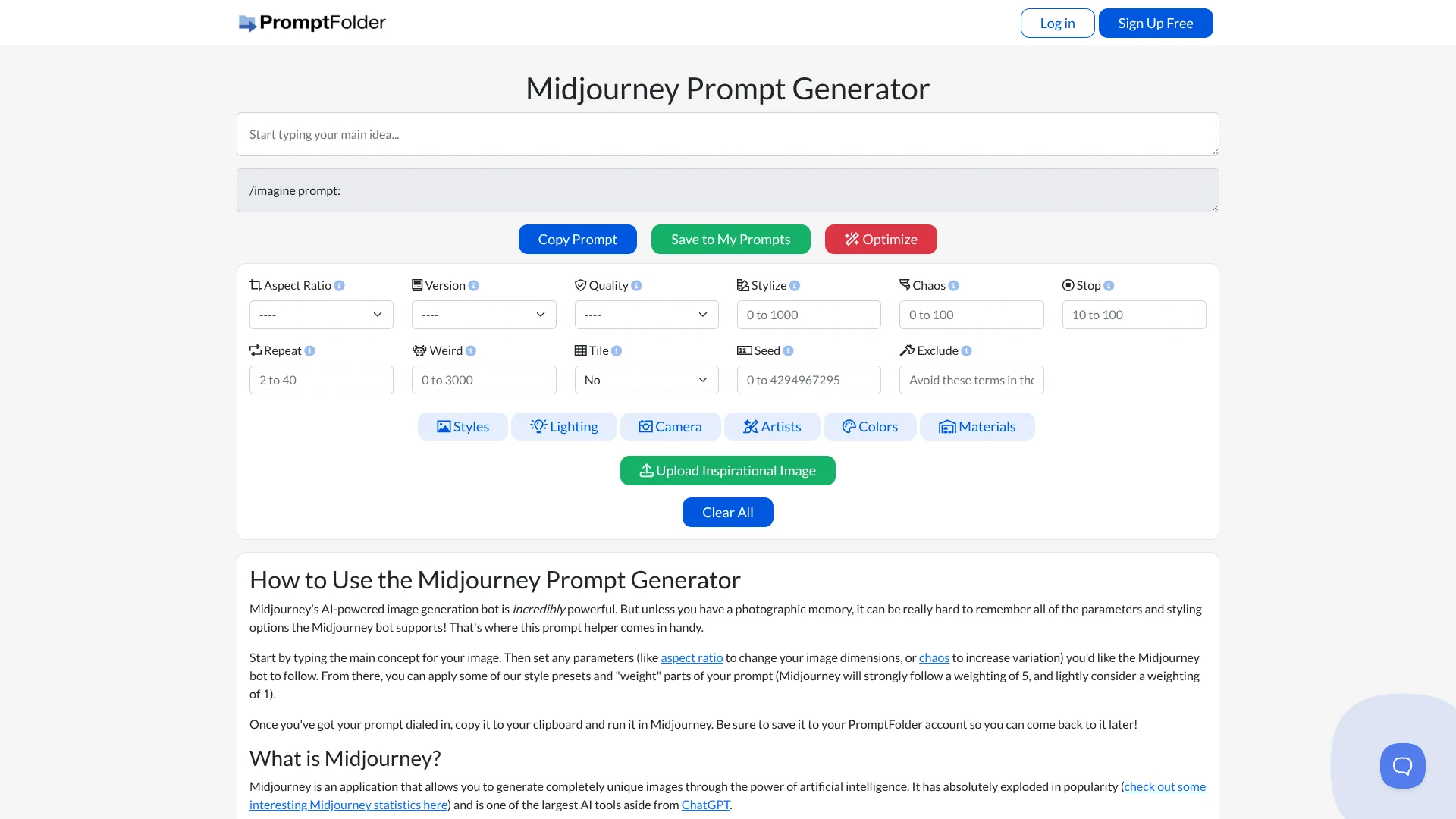
A Midjourney image idea can become a ready-to-copy /imagine prompt with this browser-based builder. PromptFolder's helper is for people who want to set image shape, version, quality, and creative variation without memorizing Midjourney's command options. It also offers style presets and an Optimize control; the finished text is copied into Midjourney, where image generation happens.
The builder combines Midjourney-specific parameter fields with selectable presets for lighting, camera effects, and art styles, then formats the choices into a prompt line. That helps turn visual direction into prompt settings and syntax instead of starting with a blank text box.
Midjourney users who want more control over a prompt's look and settings are the clearest fit. The helper does not generate images itself, and saved prompts require a PromptFolder account, so it works best as a prompt-building step before a separate Midjourney session.
Who is Using Midjourney Prompt Generator?
Illustrators
Art-style and lighting presets help illustrators describe a visual treatment before generating an image.
Concept Artists
Aspect ratio, chaos, and style choices help concept artists test different directions for a scene.
Visual Designers
Color and material presets give designers specific visual details to include in Midjourney prompts.
Creative Hobbyists
The parameter fields make it easier to experiment with Midjourney settings without memorizing command syntax.
Uncommon Use Cases
Tile settings for repeating image patterns; seed settings for reusing a starting value in prompt experiments.
Key Features
Rating Breakdown
Pricing Plans
PromptFolder Pro
$8 per month
- Unlimited private prompts
- AI prompt optimization
- Advanced privacy settings
- Midjourney image uploader
- Bulk import and export
Which Midjourney Prompt Generator plan should you pick?
Start with the free generator for manual prompt building, and consider PromptFolder Pro if you want AI prompt optimization or the other Pro features.
Free Tools
Good for Midjourney users who want to build and copy prompts using parameter fields and style presets.
PromptFolder Pro
Good for users who want AI prompt optimization, a Midjourney image uploader, and unlimited private prompts.
Midjourney Prompt Generator Use Cases
Set Image Dimensions
A selected aspect ratio adds the image shape to the Midjourney prompt.
Outcome: A prompt configured for the desired image proportions.
Explore Visual Styles
Lighting, camera, artist, color, and material presets provide options for shaping an image's look.
Outcome: A prompt with selected visual direction.
Control Variation
Chaos, stylize, weird, and seed settings let you adjust how Midjourney interprets an idea.
Outcome: A prompt with chosen variation settings.
Keep Prompts for Later
Saved prompts are available again through a PromptFolder account.
Outcome: A reusable collection of saved Midjourney prompts.
Workflow Ideas with Midjourney Prompt Generator
Build and Run an Image Prompt
- 1Enter the main image idea in the prompt field.
- 2Choose the Midjourney parameters and style presets that fit the intended image.
- 3Copy the completed prompt and run it in Midjourney.
Save a Prompt for Reuse
- 1Finish the prompt and select Save to My Prompts.
- 2Sign in to a PromptFolder account if needed.
- 3Return to the saved prompt when you want to reuse or revise it.
Review an AI-Optimized Prompt
- 1Enter the initial image idea.
- 2Select Optimize to request an AI rewrite.
- 3Review the optimized version and accept it or cancel.
How Midjourney Prompt Generator fits into your stack
Prompt Builder
The browser page is where you enter an image idea and configure Midjourney parameters and visual presets.
Midjourney
The helper outputs prompt text for you to copy and run in Midjourney, which handles image generation.
PromptFolder Account
Saved prompts can be kept in a PromptFolder account for later access.
Pros
- +Midjourney syntax: Builds a formatted /imagine prompt from the settings you select.
- +Visual controls: Covers prompt details such as aspect ratio, lighting, and artist style.
- +Prompt reuse: Saved prompts can be revisited through a PromptFolder account.
- +Free builder: The site lists the generator among its free tools.
Cons
- −Separate image generation: The helper prepares prompt text, while Midjourney creates the image.
- −Manual choices: You select the parameters and style presets rather than getting a finished prompt from the idea alone.
Limitations & when to consider alternatives
Known limitations
- Does not generate images. The helper builds prompt text; the site instructs users to copy it and run it in Midjourney.
- Saving prompts requires an account. The site directs users to save prompts to a PromptFolder account to return to them later.
- AI optimization is a Pro feature. PromptFolder lists AI prompt optimization among the features unlocked by PromptFolder Pro.
Look elsewhere when
- You want a tool that generates the image as well as the prompt.
- You need a prompt builder that does not depend on Midjourney's prompt format.
How to Use Midjourney Prompt Generator
- 1
Enter the image idea
Write the main subject or scene in the prompt field so the helper has a starting point.
- 2
Choose Midjourney settings
Set options such as aspect ratio, version, quality, or chaos to guide the generated prompt.
- 3
Add visual direction
Select style presets and adjust the weighting of prompt parts to emphasize particular ideas.
- 4
Optimize if needed
PromptFolder Pro includes AI prompt optimization; review the rewritten prompt before accepting it.
- 5
Copy or save the prompt
Copy the formatted prompt to run in Midjourney, or save it to a PromptFolder account for later.
Who is Midjourney Prompt Generator For?
Midjourney Image Makers
The parameter controls help people who want more direction over how Midjourney interprets an image idea.
PromptFolder Members
People who save and revisit prompts can keep their Midjourney ideas in a PromptFolder account.
Frequently Asked Questions
Does the Midjourney Prompt Generator create images?
No. It formats prompt text that you copy and run in Midjourney.
Can I use the prompt builder for free?
PromptFolder lists the Midjourney Prompt Generator as a free tool. Saving prompts requires a PromptFolder account.
Does it offer AI prompt optimization?
Yes. PromptFolder Pro includes AI prompt optimization, which provides an optimized prompt for you to review.
How much does PromptFolder Pro cost?
PromptFolder lists PromptFolder Pro at $8 per month.
Community reviews
1 review from people who use Midjourney Prompt Generator.
Sign in to leave a review for Midjourney Prompt Generator.
Vex Watson
Midjourney Prompt Generator Alternatives
Looking for alternatives to Midjourney Prompt Generator? Here are similar tools in the same category: