
InsightBase
AI-driven analytics, no-code interface, custom coding options.
Watch InsightBase in Action
Key Takeaways
- What it is
- AI-driven analytics, no-code interface, custom coding options.
- Best for
- AI-Powered Analytics
- Visual Builder
- Custom SQL and Javascript
- Rating
- 4.6/5
What is InsightBase?
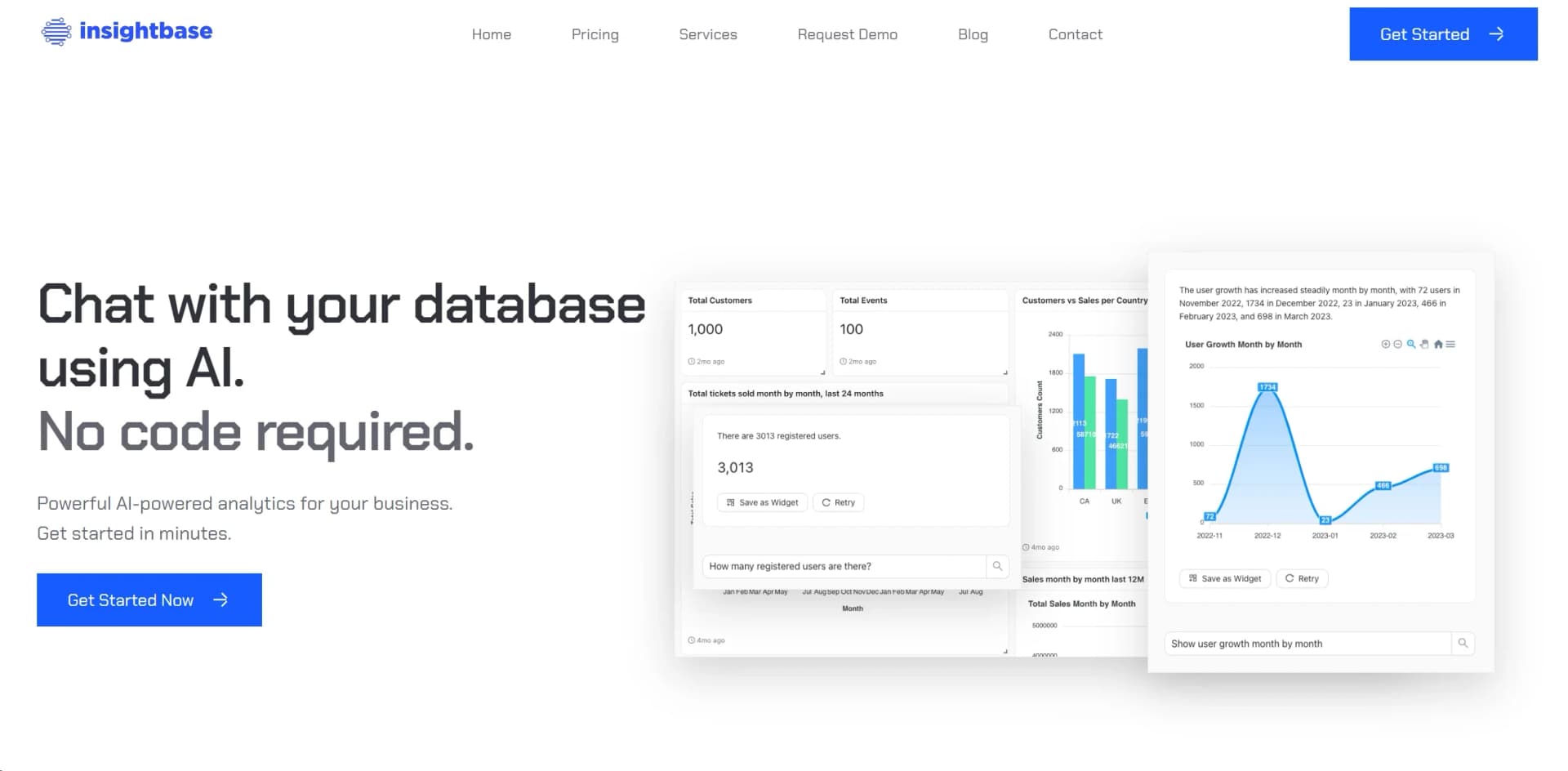
InsightBase is a revolutionary AI-powered analytics platform designed to simplify data analysis for executives, data scientists, and non-technical users alike. It offers a no-code approach, allowing users to interact with databases using plain English and advanced features like custom SQL and Javascript for power users. InsightBase accelerates data processing, provides real-time insights, and supports robust visualizations, making it a versatile tool for enhancing decision-making and productivity.
InsightBase stands out with its no-code, AI-driven analytics approach, democratizing data analysis for users across skill levels. It provides real-time insights and supports extensive customization, setting it apart from traditional analytics tools.
InsightBase excels in providing streamlined, efficient, and accessible data analytics capabilities with its AI-driven, no-code platform. It empowers users to derive actionable insights quickly and effortlessly, making it a valuable tool for enhancing decision-making across various sectors.
Who is Using InsightBase?
Executives
For quick insights and decision-making.
Data Scientists and Analysts
Creating detailed, custom analytics reports.
Non-Technical Users
Understanding data trends easily.
Marketing Teams
Monitoring real-time data for campaign adjustments.
Uncommon Use Cases
Educational institutions and startups for agile data monitoring.
Key Features
Rating Breakdown
Pricing Plans
Free Trial
- Robust trial available for initial exploration
Subscription Plans
- Tiered pricing based on user needs and company sizes
Which InsightBase plan should you pick?
Start with Individual for a small analytics setup, then upgrade as you need more data sources, users, dashboards, or API and embedding capabilities.
Individual
Good for individuals who need a small database connection and basic analytics.
Starter
Good for small teams who need additional users, data sources, projects, and dashboards.
Professional
Good for growing teams that need more capacity plus API access and advanced analytics deployment.
Enterprise
Good for organizations needing unlimited scale, embedded analytics, self-hosting, and API access.
InsightBase Use Cases
KPI tracking
Track important business KPIs through saved widgets, dashboards, and monitoring alerts.
Outcome: Teams stay updated on changing metrics.
Product development
Analyze product data, track trends, and understand how customers use the product.
Outcome: Product decisions are informed by usage data.
Customer support
Query orders, shipment status, and customer-specific information from connected databases.
Outcome: Support teams can retrieve customer information faster.
Product analytics
Explore customer behavior and identify whether users are fully using a product.
Outcome: Teams gain insight into adoption and product usage.
Business analytics
Connect business databases and ask questions about the information most important to the organization.
Outcome: Users extract actionable business insights without relying exclusively on technical teams.
Workflow Ideas with InsightBase
Build a monitored KPI dashboard
- 1Connect a supported business database
- 2Ask KPI questions and save the responses as widgets
- 3Group widgets into a dashboard and configure monitoring alerts
Investigate customer orders
- 1Connect the database containing customer and order records
- 2Ask questions about orders, shipments, or customer status
- 3Save useful answers as widgets for repeat access
Create a product-usage report
- 1Connect product-usage data
- 2Ask questions about trends and feature adoption
- 3Arrange resulting widgets into a dashboard for ongoing review
How InsightBase fits into your stack
API Access
Integrates with various applications via API.
Supported Databases
MongoDB, PostgreSQL, MySQL, MSSQL.
Real-Time Data Sync
Ensures data accuracy across platforms.
Security Features
Advanced protocols for data protection.
Pros
- +Efficiency: Accelerates data processing and analysis, saving significant time.
- +Accessibility: Simplifies complex analytics tasks without coding knowledge.
- +Customization: Offers advanced customization options through SQL and Javascript.
- +Security: Ensures data security with advanced protocols.
Cons
- −Limited Database Support: Currently supports MongoDB, PostgreSQL, MySQL, and MSSQL.
- −Learning Curve: Advanced features like custom SQL may require time to master.
- −Dependency on Internet Connectivity: Being cloud-based, it requires a stable internet connection.
Limitations & when to consider alternatives
Known limitations
- Supported databases are limited. The official site lists MongoDB, PostgreSQL, MySQL, and MSSQL, while noting that more databases are coming soon.
- Query quality depends on precise questions. The help center recommends asking specific questions and explaining definitions to improve responses.
- Not every widget supports downloads. CSV or JSON downloads are available only for supported widgets.
- Advanced customization requires technical skills. Plain-English querying is available, but SQL and JavaScript are used when users need maximum flexibility.
Look elsewhere when
- You need native mobile apps.
- You need file-based analysis.
- You need image understanding.
How to Use InsightBase
- 1
Explore tutorials on setup and advanced features on InsightBase’s website and YouTube channel.
Who is InsightBase For?
Executives
Executives can ask questions in plain English and get business answers without writing queries.
Non-technical users
Non-technical users can explore connected database information through natural-language questions.
Data scientists
Data scientists can use dashboards, SQL, JavaScript, and database-connected analytics.
Data analysts
Analysts can build dashboards, save query results as widgets, and monitor important metrics.
Engineers
Engineers can connect supported databases and use SQL or JavaScript for additional flexibility.
Frequently Asked Questions
What is InsightBase?
InsightBase is a business-intelligence tool that lets users analyze database data with artificial intelligence and natural-language questions.
How does InsightBase work?
Connect a database, ask questions in natural language, and receive answers, visualizations, or saved widgets.
What are projects, dashboards, and widgets?
Projects organize dashboards and data sources. Dashboards group widgets, which are saved responses to questions.
Can InsightBase monitor data changes?
Yes. Widgets can refresh automatically, and data-monitoring alerts can send Slack notifications when data changes.
Can users download results?
Supported widgets can be downloaded as CSV or JSON.
Do users need SQL knowledge?
No. InsightBase supports plain-English questions, while SQL and JavaScript are available for users who need more flexibility.
Community reviews
Be the first to share your experience.
Sign in to leave a review for InsightBase.
InsightBase Alternatives
Looking for alternatives to InsightBase? Here are similar tools in the same category:
Learn to Master InsightBase
With Skill Leap courses
Get in-depth training on InsightBase and 50+ other AI tools with our expert-led video courses.
Start 7-Day Free Trial