
ZoomMate
Elevate Zoom meetings with AI-driven summaries, task automation, and real-time assistance.
Watch ZoomMate in Action
Key Takeaways
- What it is
- Elevate Zoom meetings with AI-driven summaries, task automation, and real-time assistance.
- Best for
- Meeting Summaries and Recaps
- Chat Message Summarization
- Email and Calendar Assistance
- Rating
- 4.6/5
What is ZoomMate?
Zoom IQ is an innovative AI companion designed to enhance the productivity and collaboration of professionals across various industries. As a seasoned reviewer, I've had the opportunity to explore the depths of what Zoom IQ offers, and I'm excited to share my findings. This smart companion integrates seamlessly with the Zoom platform, offering features that streamline communication, automate mundane tasks, and provide valuable insights into meetings and team interactions.
Zoom IQ stands out for its deep integration with a widely-used communication platform, Zoom. Its ability to provide real-time assistance and after-action reports within the same environment where meetings and collaborations happen makes it a unique and valuable asset for enhancing workplace efficiency.
Zoom IQ is a powerful AI assistant that elevates the Zoom experience to new heights of productivity and collaboration. Its integration within the Zoom platform makes it an indispensable tool for users looking to automate mundane tasks and focus on more impactful work. With its unique features like meeting recaps, chat summarization, and real-time assistance, Zoom IQ is poised to become a go-to companion for professionals aiming to enhance their communication and organizational skills.
Who is Using ZoomMate?
Corporate Teams
Enhancing meeting efficiency and communication within projects.
Sales Professionals
Using conversation intelligence to improve sales strategies.
HR Departments
Streamlining interview scheduling and candidate communication.
Project Managers
Organizing project details and follow-ups post-meeting.
Uncommon Use Cases
Educational institutions may use it for administrative meetings; non-profits could leverage it to coordinate volunteer activities more effectively.
Key Features
Rating Breakdown
Pricing Plans
Included with Paid Plans
- Zoom IQ comes at no additional cost with eligible paid Zoom plans
Which ZoomMate plan should you pick?
Start with ZoomMate Basic for limited experimentation, then upgrade to ZoomMate when you need AI credits, agents, connected applications, and advanced workflows.
ZoomMate Basic
Good for individuals and small teams who need limited meeting assistance, AI queries, agentic search, and Zoom-only workflow runs.
ZoomMate
Good for users who need AI credits, agentic task completion, custom agents, third-party integrations, deep research, and advanced workflows.
ZoomMate Use Cases
Meeting follow-up
Use meeting context to identify actions, draft follow-ups, and create deliverables.
Outcome: Less manual post-meeting work.
Connected enterprise search
Search Zoom content, the web, and connected third-party systems using conversational prompts.
Outcome: Relevant information gathered without switching tools.
Workflow automation
Create workflows that respond to meetings, messages, schedules, webhooks, and other triggers.
Outcome: Repeatable processes run automatically.
Document and presentation creation
Generate documents, slide decks, spreadsheets, and other work products from conversation and enterprise context.
Outcome: Faster creation of first drafts and deliverables.
Third-party task execution
Connect applications such as Salesforce, Jira, Slack, Google Drive, and OneDrive so ZoomMate can retrieve information and perform actions.
Outcome: Work gets completed across connected systems.
Workflow Ideas with ZoomMate
Meeting summary to Slack
- 1Trigger the workflow when a meeting ends
- 2Generate an AI-powered meeting summary
- 3Send the summary to a Slack channel
Meeting outcomes to Salesforce
- 1Monitor selected meetings
- 2Generate structured summaries, decisions, action items, and follow-ups
- 3Save the results as Salesforce notes
Automated approval routing
- 1Trigger the workflow from a form, message, schedule, or webhook
- 2Evaluate the request and route it to the appropriate approver
- 3Notify participants and record the approval result
How ZoomMate fits into your stack
Zoom Platform Integration
Zoom IQ is built into the Zoom ecosystem, providing a unified experience.
Email and Calendar Systems
It works with common email and calendar services to manage communications and scheduling.
Digital Whiteboards
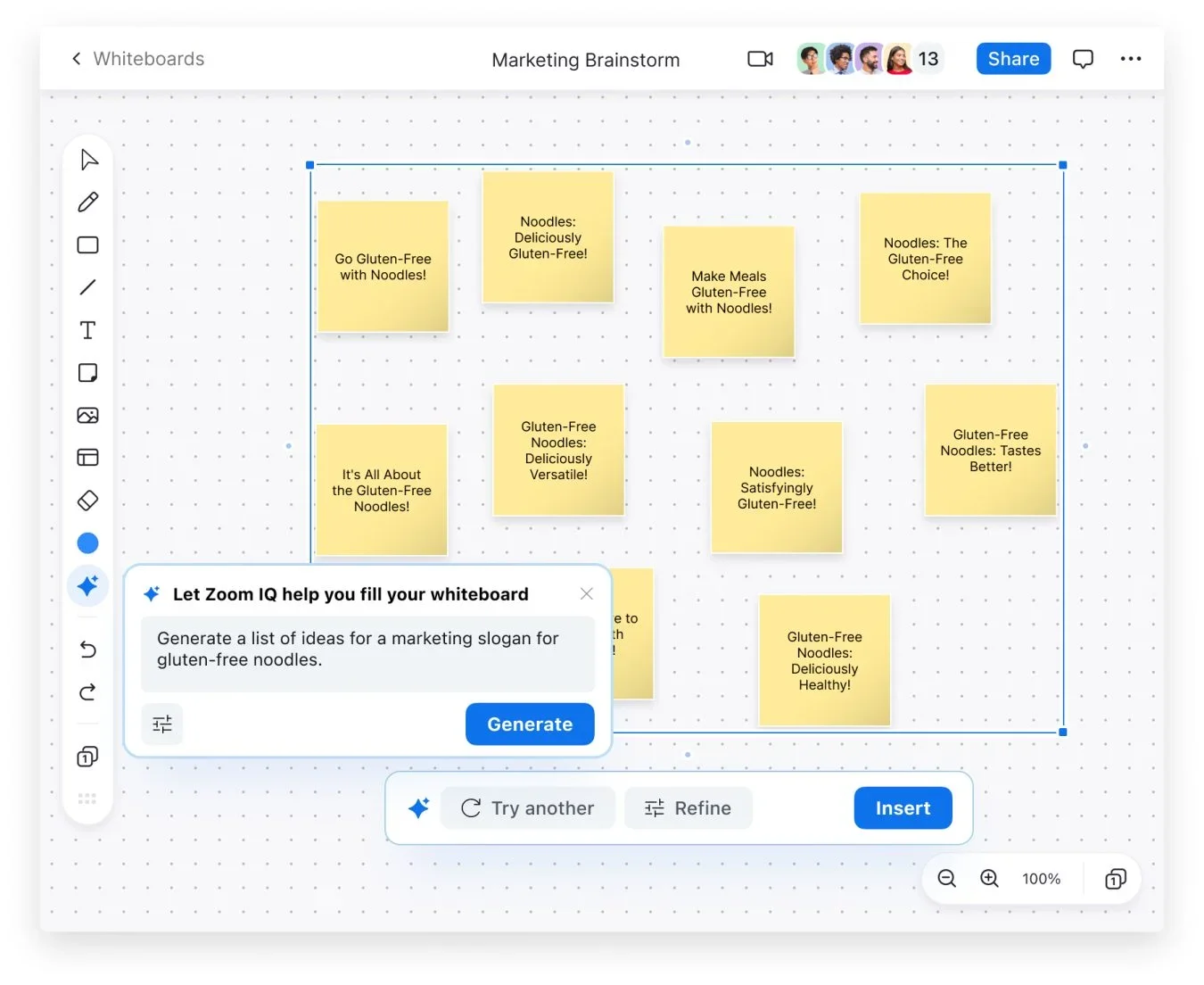
Zoom IQ integrates with digital whiteboard features for enhanced brainstorming sessions.
Federated AI Approach
Utilizes Zoom's own large language model and other industry-leading models for diverse AI capabilities.
Pros
- +Enhanced Productivity: Zoom IQ's features are designed to save time by automating repetitive tasks, allowing users to focus on more strategic work.
- +Improved Collaboration: With meeting summaries and chat message organization, team members can stay aligned and informed, regardless of their availability during actual meetings.
- +User-Friendly Interface: The tool is integrated within the familiar Zoom platform, making adoption and usage straightforward for existing Zoom users.
- +Personalized Assistance: Zoom IQ can adapt to your specific needs, providing help that is tailored to your particular tasks and communication style.
Cons
- −Platform Dependency: The tool's functionalities are tied to the Zoom ecosystem, so its benefits are limited if your organization uses a different communication platform.
- −Learning Curve: While the interface is user-friendly, there may be a learning curve associated with maximizing the AI's capabilities.
- −Feature Limitations: Some of Zoom IQ's advanced features may still be in development and not immediately available to all users.
Limitations & when to consider alternatives
Known limitations
- Regional and industry availability. ZoomMate may not be available to customers in select regions or industry verticals.
- AI credit requirements. Advanced and metered capabilities consume AI credits and may be limited when the available balance is depleted.
- Cloud Browser limitation. The Cloud Browser feature is currently supported only with Chrome.
- Free-tier limits. ZoomMate Basic limits meeting summaries, AI queries, agentic search, and workflow runs.
- Third-party connector setup. Third-party services must be enabled, authenticated, and configured by the account or user before ZoomMate can access them.
Look elsewhere when
- You need a dedicated native mobile app.
- You need fine-tuning or model-weight training on proprietary data.
How to Use ZoomMate
- 1
Zoom provides a Learning Center with courses and tutorials to help users get acquainted with Zoom IQ and make the most of its features.
Who is ZoomMate For?
AI for any role
Knowledge workers can perform research, analysis, communication, and other role-specific tasks with conversational AI.
Executive leaders
Leaders can use context from conversations and connected systems to support decisions, manage resources, and track follow-through.
Students
Students can tackle group projects, create study guides, and quiz themselves on complex subjects.
Teachers
Teachers can draft lesson plans and recommendation letters and recap class discussions.
Parents
Parents can organize household tasks, plan activities, and help children with homework.
Frequently Asked Questions
What is ZoomMate?
ZoomMate is an AI-powered work companion that searches connected information, executes workflows, and turns conversations into completed work.
Where can I use ZoomMate?
ZoomMate is available through the Zoom Workplace desktop app and Zoom web portal.
Does ZoomMate support third-party applications?
Yes. Users can connect supported applications such as Google Drive, OneDrive, Jira, Salesforce, Asana, and Box.
Can ZoomMate automate workflows?
Yes. Users can create workflows with templates, natural-language prompts, or a low-code visual builder.
Does ZoomMate use customer content to train AI models?
Zoom states that it does not use customer content to train Zoom's or third-party AI models.
Are ZoomMate features available everywhere?
Availability may vary by region, industry vertical, account type, license, and AI credit balance.
Community reviews
Be the first to share your experience.
Sign in to leave a review for ZoomMate.
ZoomMate Alternatives
Looking for alternatives to ZoomMate? Here are similar tools in the same category:
Learn to Master ZoomMate
With Skill Leap courses
Get in-depth training on ZoomMate and 50+ other AI tools with our expert-led video courses.
Start 7-Day Free Trial