Yobi
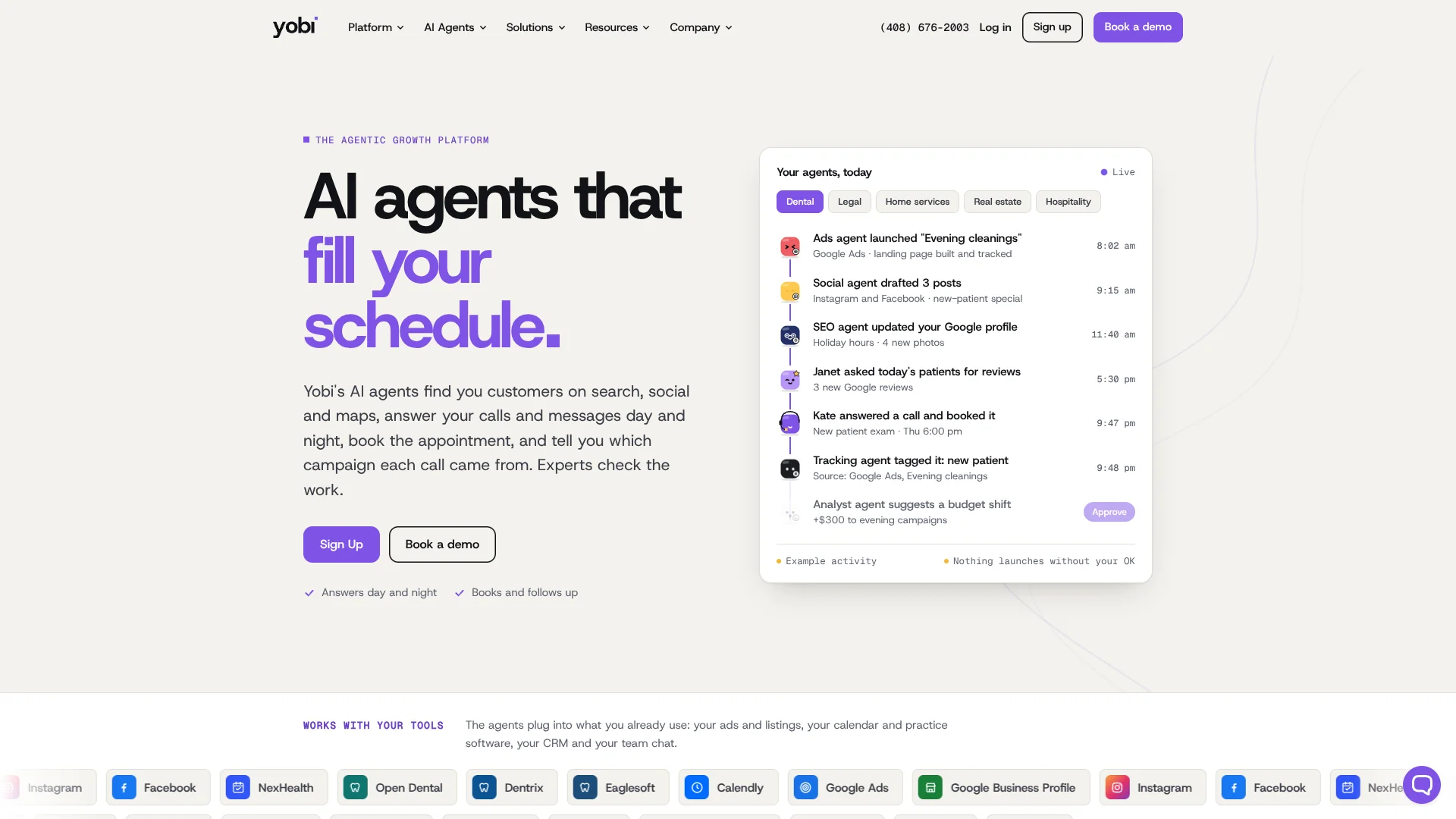
AI phone agents helping dental and medical offices capture missed calls.
Watch Yobi in Action
Key Takeaways
- What it is
- AI phone agents helping dental and medical offices capture missed calls.
- Pricing
- $29 per month · $150 per month · $300 per month · $600 per month
- Best for
- AI Voice Agents
- AI Studio
- Appointment Scheduling
- Rating
- 4.2/5
What is Yobi?
Yobi gives businesses AI employees that answer calls, handle website and social messages, book appointments, and keep customer records updated. Its strongest fit is for dental practices, medical offices, and service businesses where missed calls or slow follow-up cost revenue. Yobi also includes tools for team chat, tasks, forms, scheduling, and call analysis.
Yobi can connect an AI agent to phone, website chat, email, SMS, and social channels while preserving business context across those conversations. Its AI Studio lets teams train agents on their own facts, FAQs, instructions, voice, and workflows without coding.
Yobi is best for companies that rely on inbound calls, appointment scheduling, or repeated customer questions. It is less suited to people seeking a standalone writing or research tool, and its strongest scheduling features are focused on business systems such as dental practice software. Yobi fits when customer communication needs to keep moving after the staff goes home.
Who is Using Yobi?
Practice Managers
The goal is fewer missed calls, cleaner appointment handoffs, and a clear record of what each caller needs.
Dental Receptionists
AI handles routine calls, availability checks, confirmations, and summaries so the front desk can focus on patients in the office.
Marketing Managers
Call tags, campaign tracking numbers, and conversion data show which ads, listings, and social posts produce qualified inquiries.
Customer Support Leads
Call recordings, transcripts, quality flags, and automated summaries make it easier to review conversations and coach teams.
Operations Managers
Tasks, team chat, scheduling, and AI handoffs keep customer work moving between automated agents and staff.
Uncommon Use Cases
Outbound appointment reactivation and emergency call routing; browser-based voice calls through Yobi's website widget.
Key Features
Rating Breakdown
Pricing Plans
AI Chat Widget
$29 per month
- AI chat assistant
- Website chat widget
- Visitor lead capture
- 24/7 availability
Yobi Forms
$29 per month
- New patient intake forms
- Custom form builder
- HIPAA-compliant submissions
- Email and SMS form links
Directory Listings
$29 per month
- Listing on local.yobi.com
- Visibility in AI answer engines
- Structured data for ChatGPT and Claude
- AI chat agent on your listing
Online Scheduler
$150 per month
- PMS integration
- Online appointment booking
- Appointment scheduling and rescheduling
- Automated patient reminders
Review Solicitation
$150 per month
- Automated review requests
- Custom timing and cadence
- SMS and email requests
- Google and Yelp review tracking
AI Essentials
$300 per month
- Build unlimited AI agents
- Inbound phone calls with 15 simultaneous lines
- Website conversations and social media messaging
- Multilingual support for 30 languages
- Unlimited calls and minutes
- Call recording and transcription
AI Integrated (Dental PMS)
$600 per month
- Everything in AI Essentials
- PMS integration with 15 or more systems
- Appointment scheduling and rescheduling
- Appointment confirmations
- Real-time data sync
- Advanced reporting and priority support
Which Yobi plan should you pick?
Start with a $29 Starter Tool for one focused need, choose AI Essentials for calls and messaging, or move to AI Integrated when your dental practice needs scheduling and PMS connections.
AI Chat Widget
Good for businesses that want website conversations, visitor lead capture, and automated answers without adopting the full phone system.
AI Essentials
Good for teams that need AI agents across phone, website, and social channels with multilingual support and unlimited calls and minutes.
AI Integrated (Dental PMS)
Good for dental practices that need appointment scheduling, real-time PMS sync, confirmations, and advanced reporting.
Yobi Use Cases
After-Hours Call Answering
Customer calls receive an immediate answer when the regular team is unavailable, with transfers or follow-up tasks for issues needing staff.
Outcome: Fewer missed opportunities outside business hours.
Appointment Booking
The AI agent checks connected calendars or practice systems, applies booking rules, confirms the visit, and can send follow-up messages.
Outcome: Appointments booked during the first conversation.
Lead Intake
Prospects can receive answers, provide details, and request a consultation through phone, chat, email, or social messaging.
Outcome: More complete lead information before staff follow-up.
Marketing Source Tracking
Tracked numbers and AI call tags connect calls to campaigns and classify outcomes such as new patient, booked, spam, or existing customer.
Outcome: A clearer view of which marketing sources generate real conversations.
Customer Follow-Up
Automated messages can handle appointment confirmations, reminders, review requests, and selected outbound calls.
Outcome: More consistent follow-up without adding manual steps.
Workflow Ideas with Yobi
After-Hours Appointment Workflow
- 1A caller reaches the business after hours.
- 2Yobi answers questions and checks the connected schedule.
- 3The appointment is booked, confirmed, and summarized for staff.
Campaign-to-Call Workflow
- 1A campaign receives its own tracked number or landing page.
- 2Yobi transcribes and tags qualifying calls by source and outcome.
- 3Conversion data is sent to the advertising workflow for review.
Human Handoff Workflow
- 1An AI agent handles the initial request and gathers context.
- 2The agent transfers complex cases or creates a task for staff.
- 3The human team receives the conversation details and next steps.
How Yobi fits into your stack
Phone and Messaging
Yobi sits between customers and your team across phone, SMS, email, web chat, and social messaging. It can answer routine questions, collect information, and route conversations.
Calendars and Practice Systems
The Online Scheduler and AI Integrated plan connect appointment workflows with supported practice management systems, including Dentrix, Eaglesoft, and Open Dental.
CRM and Customer Records
CRM connections can capture conversation summaries, customer history, and next steps so staff do not need to re-enter call details.
Marketing Measurement
Tracked numbers, call tags, and campaign reporting connect customer calls to advertising sources and outcomes.
Team Operations
Yobi Chat, Yobi Tasks, shared channels, and AI handoffs give staff a place to review work and take over when automation reaches its limit.
Pros
- +After-hours coverage: AI agents can answer calls and messages around the clock.
- +Appointment handling: The dental plan can book and reschedule visits through connected practice systems.
- +Custom agent setup: AI Studio supports business-specific instructions, knowledge, voice, and workflows.
- +Call visibility: Recordings, transcripts, summaries, and outcome tags help teams review customer interactions.
- +Channel reach: Agents can work across phone, web, email, SMS, and social messaging.
Cons
- −Business focus: Yobi is built around customer communication and operations rather than open-ended personal AI use.
- −Pricing level: The main AI plans start at $300 per month, which may be high for very small teams.
- −Dental emphasis: The deepest scheduling integrations and workflows are aimed at dental practices.
Limitations & when to consider alternatives
Known limitations
- Phone concurrency. AI Essentials supports inbound phone calls with up to 15 simultaneous lines.
- Social account connections. Yobi currently supports connecting one account per social media channel.
- Text message fair-use limit. Unless an order form says otherwise, a customer plan includes a limit of 3,000 text messages per user per calendar month.
- Practice management scope. Appointment scheduling and real-time practice data features are part of the AI Integrated dental plan and depend on supported systems.
- LinkedIn messaging. LinkedIn messaging may have limitations because of LinkedIn API restrictions.
Look elsewhere when
- You need a general-purpose AI tool for writing, research, or coding.
- Your business has no recurring customer calls, messages, or appointment workflows.
- Your scheduling system is not supported by Yobi's available integrations.
- Your team needs a public developer API with documented endpoints and keys.
How to Use Yobi
- 1
Choose the communication plan
Start with a Starter Tool for a focused need, AI Essentials for phone and messaging, or AI Integrated when practice management connections are required.
- 2
Build an agent in AI Studio
Set the agent's identity, voice, instructions, business facts, skills, and boundaries before connecting it to customers.
- 3
Connect customer channels
Link the agent to phone, website chat, email, SMS, or supported social channels so it can respond where customers already contact you.
- 4
Add scheduling and CRM connections
Connect calendars, practice management systems, or CRM tools when the agent needs to book appointments or update customer records.
- 5
Review conversations and tasks
Check recordings, transcripts, summaries, quality flags, tasks, and handoffs to catch problems and improve the agent's instructions.
- 6
Expand the workflow
Add forms, review requests, call tracking, outbound calls, or additional agents as the customer process becomes clearer.
Who is Yobi For?
Dental Practices
Dental teams can let AI answer calls, book visits through supported practice systems, request reviews, and track which campaigns produce new patients.
Medical Offices
Medical offices can automate routine communication, appointment requests, reminders, and staff handoffs.
Home Services
Service companies can capture calls, handle urgent inquiries, schedule service windows, and send follow-up tasks to staff.
Law Firms
Legal teams can use AI agents for lead intake, consultation scheduling, call handling, and source tracking.
Real Estate and Hospitality
These teams can manage inquiries, messages, showings, reservations, and review requests across customer channels.
Frequently Asked Questions
Does Yobi have a free plan?
Yobi offers a 7-day free preview for testing AI agents, but the public pricing page lists paid Starter Tools and Core Plans rather than a permanent free plan.
What is Yobi's lowest paid price?
The AI Chat Widget, Yobi Forms, and Directory Listings each cost $29 per month. The AI Essentials plan costs $300 per month.
Which Yobi plan includes phone calls?
AI Essentials includes inbound phone calls with up to 15 simultaneous lines, unlimited calls and minutes, recordings, transcriptions, and spam filtering.
Which plan connects to dental practice software?
AI Integrated includes PMS integration with 15 or more systems, appointment scheduling, confirmations, real-time data sync, and connections such as Dentrix, Eaglesoft, and Open Dental.
Can Yobi work in multiple languages?
AI Essentials includes multilingual support for 30 languages.
Does Yobi have mobile and desktop apps?
Yobi provides iOS and Android apps plus Windows and Mac desktop apps.
Community reviews
Be the first to share your experience.
Sign in to leave a review for Yobi.
Yobi Alternatives
Looking for alternatives to Yobi? Here are similar tools in the same category: