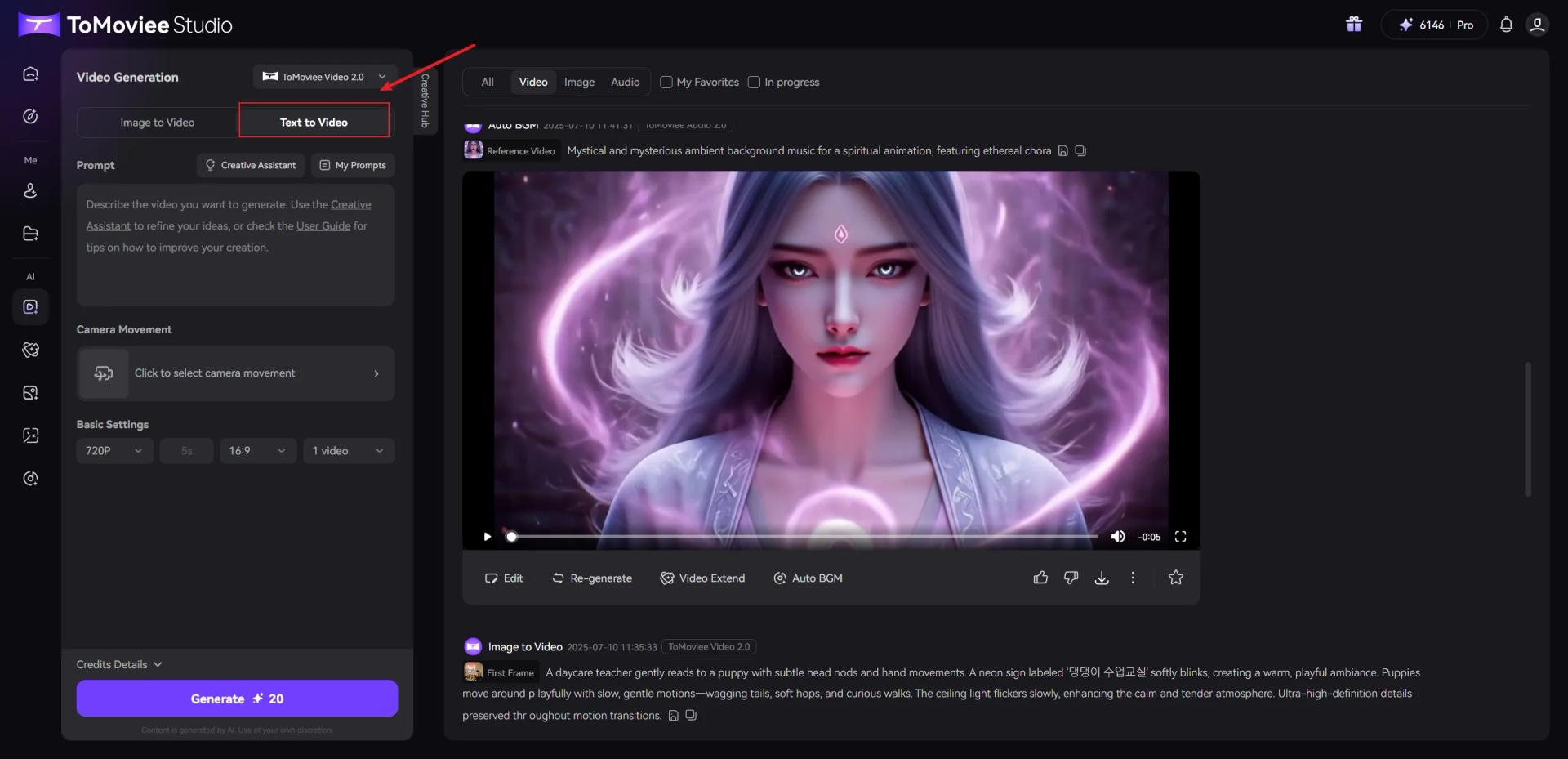
WonderShare ToMoviee AI
Direct AI-generated video clips with detailed camera movement controls.
Watch WonderShare ToMoviee AI in Action
Key Takeaways
- What it is
- Direct AI-generated video clips with detailed camera movement controls.
- Best for
- Text to Video
- Image to Video
- Text to Image and Reference to Image
- Rating
- 4.1/5
What is WonderShare ToMoviee AI?
ToMoviee turns written prompts or reference images into short AI-generated videos, with tools for making still images, music, sound effects, and voiceovers too. It is aimed at video creators, designers, marketers, and filmmakers who want to make visual and audio assets without producing every element from scratch. Camera movement controls and image-based video generation give creators ways to guide the result.
Its video guide documents 29 camera movements, from pans and tilts to more advanced shots, that creators can select for generated clips. That gives users a specific way to direct camera motion instead of relying only on a text prompt.
ToMoviee suits creators building short videos and campaign assets who also want generated audio in the same creative workflow. Its documented text-to-video output is fixed at five seconds, so longer projects may need video extension or another editor; it is best viewed as a generation tool, not a full replacement for editing software.
Who is Using WonderShare ToMoviee AI?
Social Video Creator
Short clips and animated photos give daily posts visual material to build around.
Video Editor
Generated scenes and video extension can provide shot ideas or material for an edit.
Graphic Designer
Reference images and partial repainting help explore and revise visual concepts.
Content Marketer
Prompt-based video and audio generation can supply assets for campaign concepts.
Uncommon Use Cases
A sound-effects creator can turn text into scene-specific audio; a virtual-character creator can make visuals and voiceovers.
Key Features
Rating Breakdown
Pricing Plans
Membership plans
- ToMoviee offers paid membership plans separately from credit top-ups.
Credit top-ups
- 100 credits cost $1.50.
- AI features consume credits, with the amount varying by model, feature, and settings.
- Purchased top-up credits cannot be refunded or redeemed for cash.
Which WonderShare ToMoviee AI plan should you pick?
Start with the account's gift credits to try the creation tools, then compare membership options in the live pricing page before paying because current U.S. plan prices could not be confirmed.
WonderShare ToMoviee AI Use Cases
Draft a cinematic shot
A text prompt, chosen camera movement, and aspect ratio shape a short scene for a video concept.
Outcome: A generated five-second clip.
Animate a still image
A reference image provides the starting point for a moving scene.
Outcome: A short video based on the supplied image.
Build campaign visuals
Prompt-based image and video generation gives a marketing concept visual material to test.
Outcome: Generated image and video assets.
Add sound to a video idea
Generated music, sound effects, or automatic background music can shape the mood of a scene.
Outcome: Audio assets for a video.
Revise part of an image
Partial repainting targets a selected area rather than requiring a new image from scratch.
Outcome: A revised image region.
Workflow Ideas with WonderShare ToMoviee AI
Turn a scene idea into a short clip
- 1Write the subject, action, setting, and visual mood in the prompt.
- 2Choose a camera movement, video mode, and aspect ratio.
- 3Check the displayed credit cost and generate the clip.
Animate a reference image
- 1Choose Image to Video and provide a reference image.
- 2Describe the motion or provide start and end frames.
- 3Review the credit cost and generate the video.
Prepare a video with generated audio
- 1Generate or select a video scene.
- 2Create music or sound effects from a text description, or try Auto BGM.
- 3Review the audio and video outputs for the intended mood.
How WonderShare ToMoviee AI fits into your stack
Web creation studio
ToMoviee Studio is the browser-based place to generate video, images, and audio. The guide describes a five-second default for text-to-video.
Mobile creation
The vendor offers ToMoviee AI apps for iOS and Android, and account credits are shared across the studio and app.
Video production
Text-to-video, image-to-video, and video extension can supply scenes or starting material for a separate editing process.
Audio for visual content
Text-to-music, text-to-sound, and Auto BGM generate audio intended to accompany creative projects.
Pros
- +Camera direction: The text-to-video guide offers 29 selectable camera movements.
- +Multiple media types: Video, images, music, sound effects, and voice generation are available.
- +Reference-guided creation: Images can guide video generation and image creation.
- +Mobile access: Native iOS and Android apps are listed by the vendor.
Cons
- −Short default clips: The text-to-video guide specifies a fixed five-second duration.
- −Credit-based use: Paid AI features consume credits, and the amount varies by model and settings.
- −Prompt effort: The guide recommends describing the subject, motion, scene, and visual details to shape results.
Limitations & when to consider alternatives
Known limitations
- Text-to-video duration. The user guide lists text-to-video duration as fixed at five seconds.
- Prompt language support. The text-to-video guide lists prompts in nine languages: English, Chinese, German, Japanese, Spanish, French, Italian, Korean, and Portuguese.
- Credits vary by generation. Credit use depends on the model, feature, and settings; the amount shown in the app or web studio determines consumption.
- Subscription credits expire. Membership credits are valid for one subscription month, while top-up credits have a two-year validity period.
Look elsewhere when
- You need a full timeline editor for assembling and finishing longer projects.
- You need documented API access or named third-party integrations.
- Your video prompts need to be in a language outside the nine listed in the guide.
How to Use WonderShare ToMoviee AI
- 1
Choose a creation tool
Select video, image, or audio generation in ToMoviee Studio based on the asset you need.
- 2
Describe the result
For video, include the subject, motion, and scene; add camera, lighting, or mood details when they matter.
- 3
Set generation options
Choose available settings such as camera movement, video mode, or aspect ratio.
- 4
Check credit use
Review the displayed credit cost before generating, since consumption varies by model and settings.
- 5
Generate and review
Create the asset and refine the prompt or settings if the result needs another direction.
Who is WonderShare ToMoviee AI For?
Video Creators
Short-form creators can generate scenes, animate photos, and add sound for social videos.
Filmmakers and Video Editors
Camera movement controls and video extension can help develop cinematic shots and story ideas.
Design Teams
Image, video, and audio generation can support early concepts and visual design work.
Brand and Marketing Teams
Generated campaign visuals, clips, and audio can help produce creative assets from copy and prompts.
Frequently Asked Questions
Can I try ToMoviee without paying?
The vendor says new accounts receive gift credits to try features. Some features may be free during a trial period and later require credits.
How does ToMoviee charge for AI features?
Paid AI features use credits. Credit use varies by model, feature, and settings, and the current amount is shown in the app or web studio.
Do ToMoviee credits expire?
Subscription credits expire at the end of their subscription month. Top-up credits are valid for two years.
Does ToMoviee have a mobile app?
Yes. The vendor lists ToMoviee AI apps for iOS and Android.
Can I use generated video prompts in languages other than English?
The guide lists nine supported text-to-video prompt languages: English, Chinese, German, Japanese, Spanish, French, Italian, Korean, and Portuguese.
Community reviews
Be the first to share your experience.
Sign in to leave a review for WonderShare ToMoviee AI.
WonderShare ToMoviee AI Alternatives
Looking for alternatives to WonderShare ToMoviee AI? Here are similar tools in the same category: