
Vimi
Turn photos into playful animated memories.
Key Takeaways
- What it is
- Turn photos into playful animated memories.
- Best for
- AI-Powered Photo Animation
- Style Collections & Themes
- Template-First Workflow
- Rating
- 4.2/5
What is Vimi?
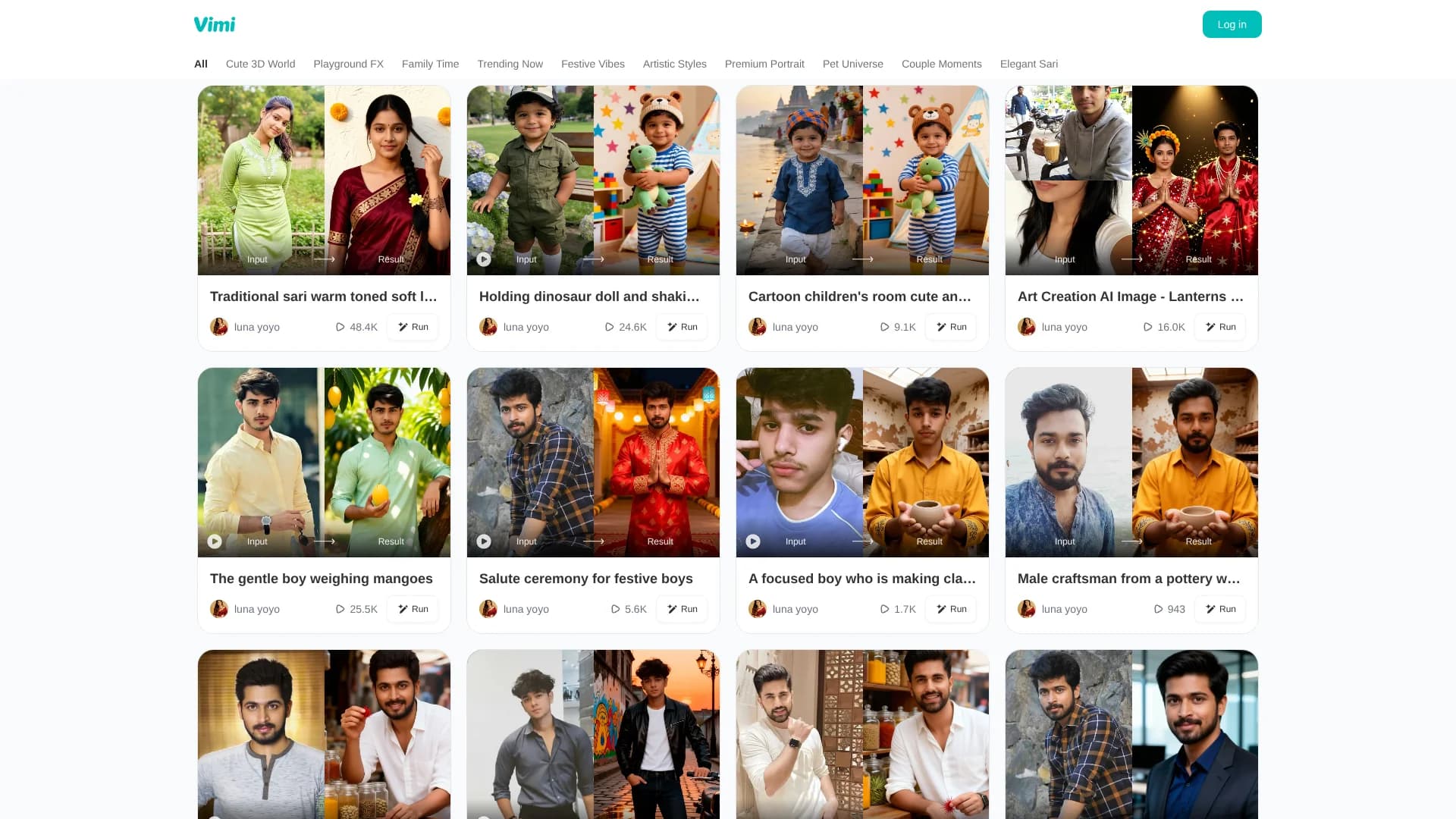
Vimi is a mobile AI photo app that turns static images into “living moments,” focusing on playful, emotional short clips and stylized visuals. Accessed via the Google Play link on its site, it is built for everyday users who want quick, fun transformations rather than complex editing. The home page and navigation labels such as Cute 3D World, Family Time, Pet Universe, Couple Moments, and Elegant Sari make it clear that Vimi leans into themed, story-like templates that add motion, effects, and stylization to photos for sharing on social media or preserving special memories.
Vimi leans hard into themed, emotionally oriented styles rather than generic filters. The presence of collections like Premium Portrait, Couple Moments, and Elegant Sari signals attention to both relationship storytelling and cultural aesthetics, while Cute 3D World and Playground FX cater to playful, almost toy-like visuals. This focus on “living moments” built from templates makes Vimi feel more like a memory-creation toy than a traditional editor, which will appeal to users who care more about feelings and fun than about technical controls.
Vimi offers a focused, fun path for turning photos into short, animated memories without the friction of full-scale editing software. Its AI-driven templates and themed collections foster creativity for families, couples, and pet owners while staying approachable for anyone with a smartphone. Those who want deep control, clear pricing tables, or broad desktop integrations may find it less suitable, yet for quick, emotional, social-ready moments, Vimi lands in a sweet spot between novelty and genuinely delightful results.
Who is Using Vimi?
Casual Smartphone Users
Turning selfies and everyday shots into fun animated snippets to share with friends.
Families and Parents
Breathing motion into children’s photos and group pictures for nostalgic keepsakes.
Couples
Creating romantic mini-scenes from engagement, wedding, or anniversary photos.
Pet Owners
Using Pet Universe styles to animate cats, dogs, and other pets in cute, shareable clips.
Uncommon Use Cases
Used by event organizers to generate animated visual loops for slideshows; adopted by small local brands to add motion to simple product shots without hiring a video editor.
Key Features
Rating Breakdown
Pricing Plans
Pricing information is unavailable; no public pricing details are provided.
Vimi Use Cases
Social media content creation
Select a trending template, upload a photo or text, and generate visual content for social platforms.
Outcome: Produce multiple posts quickly without complex editing software.
Personal branding
Create a series of styled portraits while preserving recognizable facial features.
Outcome: Maintain a consistent visual identity across profiles and posts.
Group and couple entertainment
Upload group photos and apply effects such as AI Hug or AI Kiss.
Outcome: Create shareable videos for group chats and social media.
Photo-to-video animation
Turn static photos into short clips with blinking, smiling, head-turning, or narrative effects.
Outcome: Create animated visual content without video-editing skills.
Style and character transformations
Apply templates such as anime, 3D clay, watercolor, cyberpunk, superhero, or historical styles.
Outcome: Generate themed images from text descriptions or uploaded photos.
Workflow Ideas with Vimi
Create a social post
- 1Open the Vimi mobile app
- 2Choose a style template
- 3Upload a photo or enter a text description
- 4Generate, download, and share the result
Make a group video
- 1Upload a couple or group photo
- 2Select a supported video template such as AI Hug or AI Kiss
- 3Generate the clip and share it to a group chat or social platform
Build a consistent profile series
- 1Choose a portrait or personal-branding template
- 2Upload photos featuring the same subject
- 3Generate multiple styled portraits
- 4Download or publish the completed set
How Vimi fits into your stack
Browser
The vimi.art web experience provides the product landing pages, effect gallery, account access, and generation entry points.
Mobile app
The primary creation workflow is mobile-first: choose a template, upload photos or text, generate an image or video, then download or share it.
Social media
Generated images and videos can be downloaded or shared to social platforms, including Instagram and Facebook.
Pros
- +Approachable for Non-Editors: Template-driven design means users do not need video-editing skills to create animated clips.
- +Emotion-Focused Categories: Sections like Family Time, Couple Moments, and Pet Universe encourage storytelling around relationships and pets.
- +Creative Variety: Themed collections, including 3D, artistic, and cultural looks such as Elegant Sari, keep experimentation fun.
- +Social-Ready Output: Short, eye-catching animations are well suited for Reels, TikTok, and Stories.
Cons
- −Limited Fine Control: Power users seeking frame-level editing or custom animation curves may find the template approach restrictive.
- −Platform Dependence: The product is currently surfaced via an Android app link; users on other platforms may need to wait or look for store-specific listings.
- −Pricing Transparency: No detailed pricing tiers are visible on the website, which may leave some users guessing about long-term costs.
Limitations & when to consider alternatives
Known limitations
- Public uploads may be used for model operations. The terms say publicly published original images grant Vimi rights to use them for model operations and learning purposes.
- Generated outputs may not be unique. Vimi states that other users may receive similar outputs from the service.
- Ownership of AI outputs is not guaranteed permanently. Vimi says laws governing AI-created works are still developing and it cannot guarantee permanent ownership rights.
- Sensitive information is prohibited. The terms prohibit uploading protected health, financial, government-identification, minor-related, and other sensitive information.
- Features depend on supported templates. Many transformations are template-based, so available effects and capabilities depend on the selected template.
Look elsewhere when
- You need a documented developer API.
- You need a desktop application.
- You need shared team workspaces.
How to Use Vimi
- 1
Install and open Vimi
Download the Vimi mobile app from Google Play, then register or log in to a Vimi account.
- 2
Choose a template
Browse portrait, animation, video, and trending-effect categories to find the desired creative style.
- 3
Upload content
Upload one or more photos, or provide a text description when the selected template supports text input.
- 4
Generate the result
Tap Generate and wait for Vimi to process the image or short video.
- 5
Review and save
Preview the result, then download it to the device gallery.
- 6
Share or publish
Share the creation to social media or publish it to the Vimi profile and community.
Who is Vimi For?
Content creators
They can quickly produce image and video posts for Instagram, TikTok, and Facebook using templates.
Individuals building personal brands
Vimi helps create consistent styled portraits for profile pictures, covers, and social posts.
Friends and couples
They can upload group photos and create playful couple or friend-group videos.
Game makers
Vimi's themed generators can help create character and visual concepts.
Authors and history fans
Themed generators can produce visual concepts such as soldiers, historical characters, and imaginative scenes.
Frequently Asked Questions
Is the Vimi app free to download?
Vimi can be downloaded and tried for free, with free credits available for initial generations.
What devices support the Vimi app?
Vimi is documented as a mobile app available through Google Play, with the official site also referencing iOS and Android devices.
Can I generate videos with the Vimi app?
Yes. Vimi turns static photos into moving videos and can generate short narrative clips from text scripts.
Does Vimi keep my facial features in generated images?
Vimi says it maintains facial features, including separately identifying faces in group photos.
How long does it take to generate content in Vimi?
The official app page says image results generally appear within 10 to 20 seconds.
Can I share my Vimi creations directly to social media?
Yes. Vimi documents downloading creations and sharing them directly to social media platforms and group chats.
Community reviews
Be the first to share your experience.
Sign in to leave a review for Vimi.
Vimi Alternatives
Looking for alternatives to Vimi? Here are similar tools in the same category:
Learn to Master Vimi
With Skill Leap courses
Get in-depth training on Vimi and 50+ other AI tools with our expert-led video courses.
Start 7-Day Free Trial