Superflows
AI chat that lets SaaS users act through product APIs.
Key Takeaways
- What it is
- AI chat that lets SaaS users act through product APIs.
- Pricing
- Freemium · $999 per month
- Best for
- Chat-to-API
- Chat-to-Docs
- Data analysis and plots
- Rating
- 3.8/5
What is Superflows?
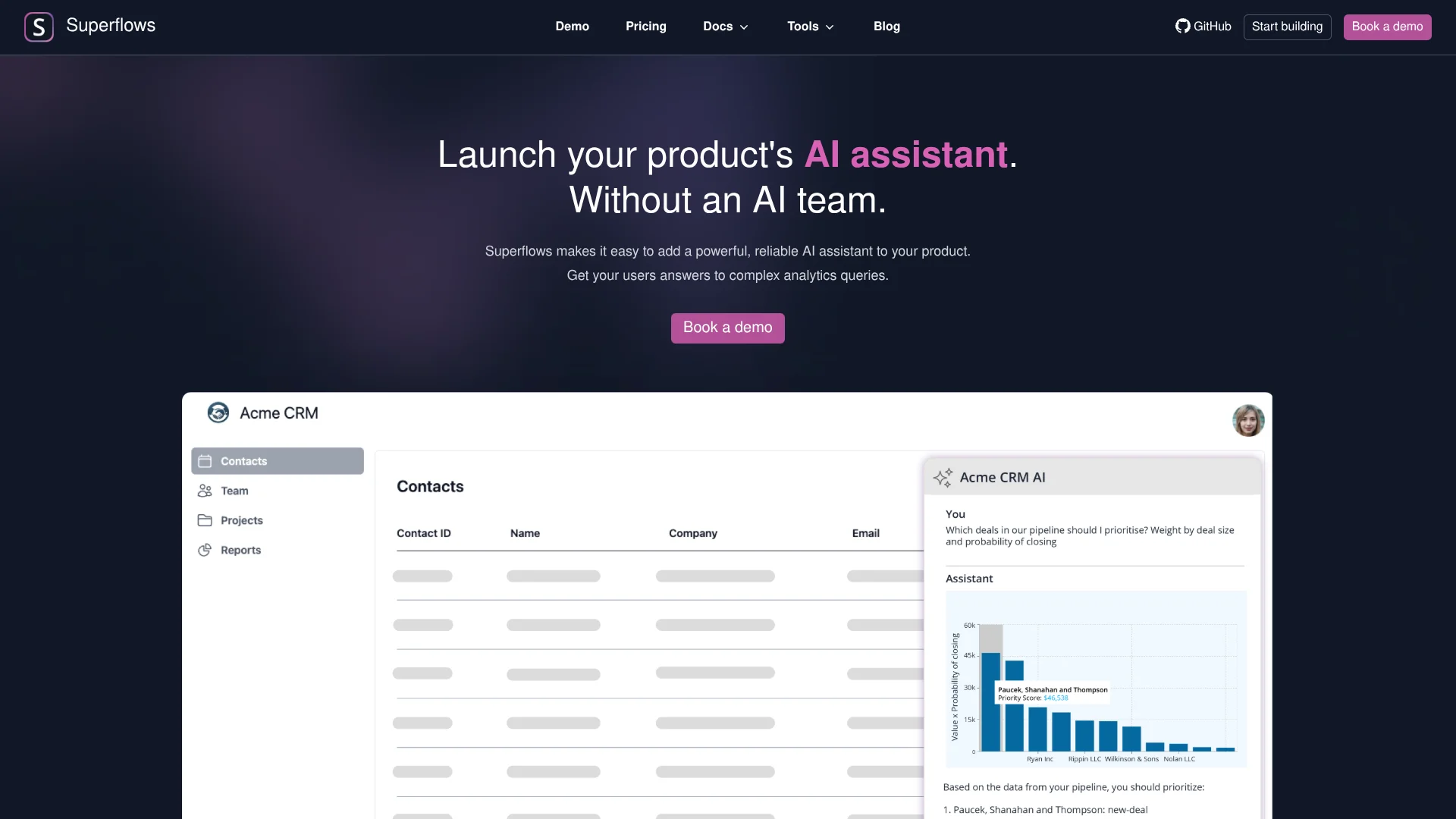
Superflows helps SaaS product teams add an AI chat feature that can answer questions using their product’s API and documentation. A user might ask for a chart of sales results or ask the assistant to prepare a task in a CRM. The product team connects its API, chooses which endpoints the assistant can access, and adds Superflows’ chat interface to its software.
A distinctive capability is that the assistant can call a product’s API, analyze the returned data, and create plots in response to a user’s question. It can also prepare actions and ask the user to confirm before completing them.
Superflows is best suited to product and engineering teams building AI features into SaaS software, especially analytics, CRM, and in-product help experiences. It requires a usable API and setup work from the product team, so it is not a ready-made chatbot for general customer conversations.
Who is Using Superflows?
Product manager
A faster path to testing an AI feature for customer questions or product tasks.
Software engineer
The API specification and React components help connect the assistant to a SaaS product.
CRM product designer
A CRM copilot can help users find deal information and prepare follow-up tasks through chat.
Customer support product lead
Product documentation can supply answers to common questions inside the software.
Uncommon Use Cases
Creating plots from product analytics queries; preparing CRM actions for user confirmation
Key Features
Rating Breakdown
Pricing Plans
Testing
Free
- Evaluate in test mode
- 50 queries in testing playground
- Set API endpoints assistant can access
- Single seat
- Community support
Scale
$999 per month
- 10,000 Chat-to-API queries
- 200,000 Chat-to-Docs queries
- Unlimited testing in playground
- Multi-tenant APIs
- Unlimited seats
- Custom setup
- Priority email support
Enterprise
- 10,000+ Chat-to-API queries
- 200,000+ Chat-to-Docs queries
- Access audit logs
- Custom setup
- Priority feature requests
Which Superflows plan should you pick?
Start with Testing to evaluate the assistant, then consider Scale when you need the published production query allowances and unlimited seats.
Testing
Good for product teams evaluating an assistant with up to 50 queries in the testing playground.
Scale
Good for teams launching with 10,000 Chat-to-API queries, 200,000 Chat-to-Docs queries, and unlimited seats.
Enterprise
Good for organizations that need the listed Enterprise features, including access audit logs and higher query allowances.
Superflows Use Cases
Ask questions about product data
A user asks a question about data in the software, and the assistant calls the product API to find and analyze relevant information.
Outcome: An answer with a plot of the requested data.
Prepare product actions
A natural-language request can trigger an approved API action, with confirmation requested before potentially damaging changes.
Outcome: A user-reviewed action carried out through the product.
Answer product documentation questions
The assistant refers to the product’s documentation when users need guidance in the software.
Outcome: In-product answers based on the product documentation.
Test an assistant before release
The product team tries user questions in the playground and adjusts assistant behavior before going live.
Outcome: A tested assistant configuration before product integration.
Workflow Ideas with Superflows
Launch an analytics copilot
- 1Add the product API specification and choose accessible endpoints.
- 2Try analytics questions in the testing playground.
- 3Add the chat interface to the product.
Build a confirmed CRM action
- 1Choose the CRM API endpoints the assistant may access.
- 2Test a request to prepare a follow-up task.
- 3Check that the user can confirm the action before it is completed.
Offer in-product documentation help
- 1Connect the product documentation.
- 2Test common user questions in the playground.
- 3Integrate the chat interface where users need help.
How Superflows fits into your stack
Product API
Superflows connects to the SaaS product’s API and uses selected endpoints to answer questions or carry out actions.
Product documentation
Connected documentation can serve as a source for in-product answers about how the software works.
Web product interface
React chat components provide a way to embed the assistant in the software’s frontend.
Developer dashboard
The dashboard and playground support configuring and testing assistant behavior before launch.
Pros
- +Product-specific answers: The assistant can retrieve and analyze information through the SaaS product’s own API.
- +Action safeguards: Users can confirm potentially damaging actions before they are carried out.
- +Early testing: The playground lets teams try assistant behavior before release.
- +Open-source code: Teams can inspect the code, and the vendor says self-hosting is possible for sensitive-data needs.
Cons
- −Developer setup: A product team needs to connect its API and integrate the chat interface.
- −Narrow purpose: Superflows is for adding AI features to software products, not a general-purpose chatbot.
- −High Scale price: The published Scale plan costs $999 per month.
Limitations & when to consider alternatives
Known limitations
- Testing plan query limit. The free Testing plan includes 50 queries in the testing playground.
- Scale query allowances. The Scale plan includes 10,000 Chat-to-API queries and 200,000 Chat-to-Docs queries.
- API-dependent setup. The assistant uses the product API, so the team must define the endpoints it can access and connect that API.
Look elsewhere when
- You need a standalone chatbot that works without connecting it to your software’s API.
- You need a mobile app, desktop app, or browser extension for end users.
How to Use Superflows
- 1
Start with Testing
The free Testing plan includes 50 queries in the testing playground, which lets you evaluate the assistant before a paid launch.
- 2
Connect the product API
Provide an API specification and select which endpoints the assistant can access.
- 3
Add product documentation
Connect documentation the assistant can reference when answering product questions.
- 4
Try real user requests
Test questions and actions in the playground, checking that responses fit the product and that actions require confirmation when needed.
- 5
Integrate the chat interface
Add Superflows’ React components or follow its integration guide to place chat in your software.
- 6
Choose a plan for production
Scale includes production query allowances and unlimited seats; contact the vendor about Enterprise if you need higher allowances or audit logs.
Who is Superflows For?
SaaS product teams
Teams can add AI answers and actions to their software for customers.
Product managers
A product manager can shape an in-product assistant around the questions and tasks users already have.
Software developers
Developers can connect product APIs and integrate the chat interface into their software.
Analytics product teams
Teams can let users ask questions about product data and receive plotted results.
Frequently Asked Questions
Does Superflows have a free plan?
Yes. The Testing plan is free and includes 50 queries in the testing playground, API endpoint setup, and a single seat.
How much does Superflows cost?
The Scale plan is $999 per month. Enterprise pricing is listed as custom.
What is a Chat-to-API query?
It is a message sent to the chat interface that triggers a query to your API.
Can Superflows take actions in my product?
Yes. It can prepare actions through the product API and ask users to confirm before completing potentially damaging actions.
Can my team test the assistant before launch?
Yes. Superflows provides a testing playground. The free Testing plan includes 50 playground queries, while Scale includes unlimited playground testing.
Community reviews
5 reviews from people who use Superflows.
Sign in to leave a review for Superflows.
Deepak Hv
Thibault BM
Matthew Phillips
Hristo Buyukliev
bela smith
Superflows Alternatives
Looking for alternatives to Superflows? Here are similar tools in the same category:
Learn to Master Superflows
With Skill Leap courses
Get in-depth training on Superflows and 50+ other AI tools with our expert-led video courses.
Start 7-Day Free Trial