
Snaptrude
Collaborative browser-based BIM for architects and interior designers.
Key Takeaways
- What it is
- Collaborative browser-based BIM for architects and interior designers.
- Pricing
- Freemium
- Best for
- Parametric Modeling and Multi Split
- Real-Time Collaboration
- 3D Rendering
- Rating
- 4.6/5
What is Snaptrude?
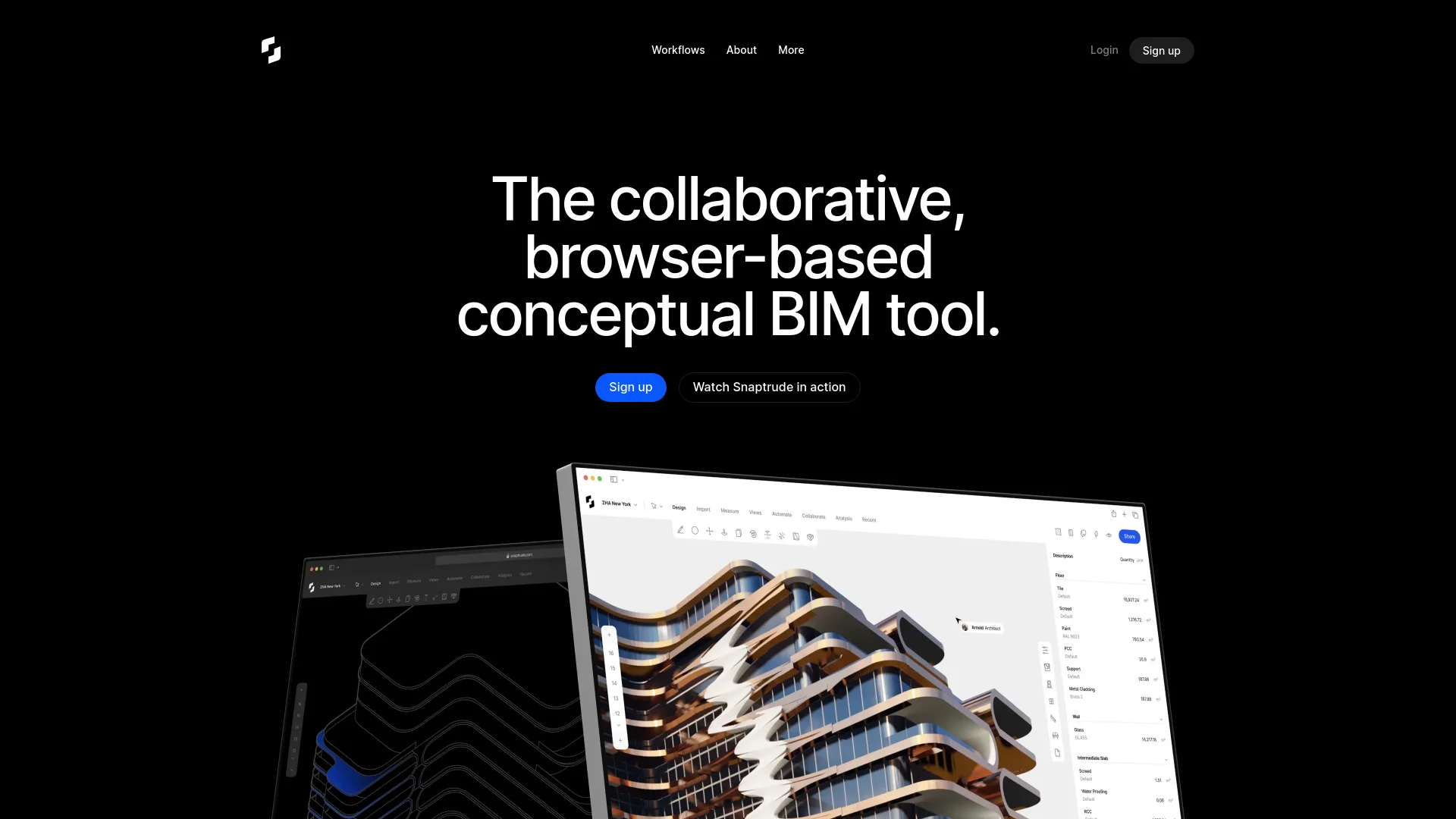
Snaptrude is a groundbreaking platform designed to revolutionize the way architects and interior designers approach building design. By combining smart, parametric modeling with easy in-browser collaboration and strong interoperability with Revit, Snaptrude offers a seamless experience for professionals looking to sketch and model better buildings faster. Tailored for architects, interior designers, and other design professionals, Snaptrude simplifies complex tasks and enhances design workflows through intelligent automation and real-time collaboration.
Snaptrude stands out with its browser-based, collaborative BIM capabilities, making it a game-changer for architectural and interior design applications. Its ability to integrate seamlessly with Revit and automate complex design tasks sets it apart from traditional BIM tools, offering unmatched efficiency and flexibility.
Snaptrude excels in providing a robust, collaborative platform for building design, making it an essential tool for architects and interior designers. Its unique browser-based BIM capabilities, coupled with intelligent automation and real-time collaboration, offer an unmatched advantage in the design process.
Who is Using Snaptrude?
Architects
Leveraging Snaptrude for efficient conceptual and detailed building design.
Interior Designers
Using the tool to enhance interior layouts and spatial planning.
Developers
Employing Snaptrude for project visualization and stakeholder presentations.
Contractors
Utilizing the tool for accurate BoQs and site data analysis.
Uncommon Use Cases
Adopted by urban planners for cityscape modeling; used by educational institutions for teaching advanced design methodologies.
Key Features
Rating Breakdown
Pricing Plans
Free Tier
Free
- Experience Snaptrude with a 14-day free trial
Which Snaptrude plan should you pick?
Start with Free for evaluation, choose Individual for solo professional work, Organization for collaborative teams, and Enterprise for SSO, API access, and larger deployments.
Free
Good for users who need a no-cost starting point with three projects and basic BIM/Revit export.
Individual
Good for solo professionals who need unlimited projects and presentation outputs without team features.
Organization
Good for small and mid-sized firms that need teams, collaboration, role management, and shared libraries.
Enterprise
Good for larger teams that need unlimited licenses, SSO, SAML, MFA, open API access, and premium support.
Snaptrude Use Cases
Concept design
Create early-stage architectural concepts, massing studies, layouts, and editable BIM models.
Outcome: A faster path from design intent to editable architectural concepts.
AI-assisted programming
Provide a project brief and use AI for site analysis, program creation, dimensioning, story assignment, and diagrams.
Outcome: A structured, editable architectural program and starting model.
Revit coordination
Import Revit models, edit them in Snaptrude, and export or reconcile changes back to Revit.
Outcome: A connected concept-to-documentation workflow with less rework.
Collaborative design review
Share models with stakeholders, invite users, manage permissions, and comment on shared projects.
Outcome: Real-time feedback and centralized project communication.
Architectural analysis
Use site, daylight, solar, weather, heatmap, shadow, and sustainability analysis tools.
Outcome: Design decisions informed by environmental and performance data.
Workflow Ideas with Snaptrude
Brief to editable concept
- 1Start a project with a natural-language brief.
- 2Run site analysis and generate the architectural program.
- 3Review the generated spaces, dimensions, stories, and diagrams.
Revit to Snaptrude and back
- 1Install Snaptrude Manager for Revit.
- 2Upload a Revit model into Snaptrude and edit it collaboratively.
- 3Export or reconcile the updated model back into Revit.
Team design review
- 1Create an organization and team workspace.
- 2Invite stakeholders and assign project permissions.
- 3Share the model for comments, review, and collaborative iteration.
How Snaptrude fits into your stack
Browser
Snaptrude is a cloud-native architectural design and BIM workspace used directly in a Chromium-based browser. It supports modeling, program creation, site analysis, rendering, collaboration, and exports without a local installation.
Knowledge and files
Teams can upload RFPs, PDFs, images, spreadsheets, CAD files, and 3D models for architectural programming and design workflows. Organization Knowledge can query connected Google Drive, Google Sheets, Dropbox, and Box sources.
Automation and APIs
The Snaptrude Plugin API lets developers create plugins that query and modify BIM geometry, programs, presentations, analysis data, and project organization. Enterprise plans include Open API access.
Pros
- +Time Efficiency: Significantly speeds up the design process with intelligent automation and parametric modeling.
- +User-Friendly: Muscle memory shortcuts and intuitive design make it easy for users transitioning from other tools like SketchUp.
- +Collaborative: Facilitates real-time collaboration and feedback, ensuring all team members are on the same page.
- +Interoperability: Strong compatibility with Revit and other tools like AutoCAD, SketchUp, and Rhino, ensuring no data loss during imports and exports.
Cons
- −Initial Learning Curve: Requires some time to familiarize with advanced features and parametric design concepts.
- −Browser Dependency: Performance may vary depending on browser capabilities and internet connection stability.
Limitations & when to consider alternatives
Known limitations
- Free plan project limit. The Free plan allows three projects and has limited presentation outputs.
- AI workflow upload limitation. Excel attachments are not supported in RFP uploads for the documented AI Design Workflow.
- AI re-prompting limitation. Geometry, dimensions, and story edits cannot currently be re-prompted in the AI Design Workflow.
- Commercial-use restriction for students. The student license is for educational purposes; commercial or professional work requires a professional license.
- Revit upload limitation. Uploading a Revit model into an existing Snaptrude project is not currently supported; each upload creates a new project.
Look elsewhere when
- You need a native mobile application.
- You need an installable desktop application.
- You need a programming-code generation tool.
How to Use Snaptrude
- 1
Create your account
Sign up through the Snaptrude web app, verify your email, and complete the account setup.
- 2
Choose a workspace
Work in a personal workspace or create an organization and team when shared projects and permissions are needed.
- 3
Start or import a project
Create a new project or import supported PDFs, images, Revit models, Rhino files, or RFA assets.
- 4
Build the design
Use modeling, space planning, BIM, program, analysis, and presentation tools to develop the concept.
- 5
Use AI workflows
Provide a written brief and run the AI workflow for site analysis, program creation, dimensioning, story assignment, and inspiration.
- 6
Share or export
Invite collaborators, manage permissions, share the project, or export to Revit, Rhino, and supported file formats.
Who is Snaptrude For?
Architects
Use Snaptrude for concept design, BIM modeling, space planning, analysis, visualization, and documentation.
Architecture firms
Use shared libraries, custom Revit families, team workflows, and firm-specific AI standards.
Architecture and design students
Eligible students receive professional modeling, collaboration, AI, and presentation features for educational work.
Educators and faculty
Use education workspaces to teach architectural design and collaborate with students.
Academic institutions and student clubs
Create shared educational environments for workshops, studios, design challenges, and initiatives.
Frequently Asked Questions
What is Snaptrude?
Snaptrude is a cloud-native architectural design platform combining intelligent space planning, massing, BIM, analysis, visualization, and real-time collaboration.
Does Snaptrude have a free plan?
Yes. The Free plan costs $0 and includes three projects, basic BIM and Revit export, and limited presentation outputs.
Can teams collaborate in Snaptrude?
Yes. Organization and Enterprise workspaces support teams, shared projects, invitations, permissions, libraries, and real-time collaboration.
Does Snaptrude work with Revit and Rhino?
Yes. Snaptrude supports bi-directional interoperability with Revit and Rhino, including importing, editing, and exporting models.
Is Snaptrude browser-based?
Yes. Snaptrude is a cloud-native platform designed to run in the browser without installing heavy desktop software.
Who can use Snaptrude for free?
Eligible students, educators, academic institutions, and student clubs can apply for the free education plan.
Community reviews
Be the first to share your experience.
Sign in to leave a review for Snaptrude.
Snaptrude Alternatives
Looking for alternatives to Snaptrude? Here are similar tools in the same category:
Learn to Master Snaptrude
With Skill Leap courses
Get in-depth training on Snaptrude and 50+ other AI tools with our expert-led video courses.
Start 7-Day Free Trial