
Singify
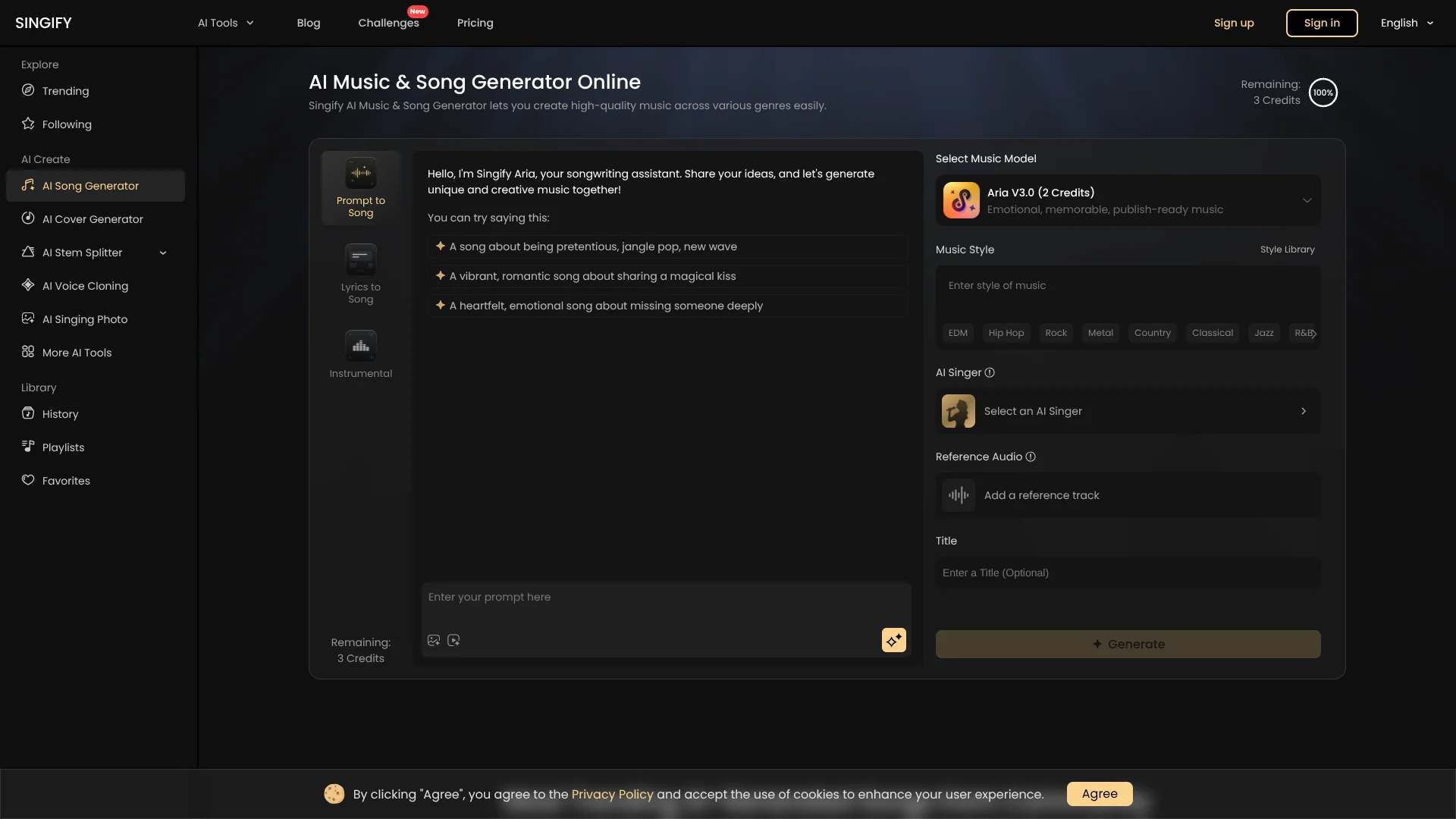
Turn lyrics and ideas into songs with customizable AI singers.
Watch Singify in Action
Key Takeaways
- What it is
- Turn lyrics and ideas into songs with customizable AI singers.
- Pricing
- Freemium · $8.99 per month · $16.99 per month · $29.99 per month
- Best for
- AI Music & Song Generator
- AI Cover Generator
- Custom AI Singer
- Rating
- 4.1/5
What is Singify?
Singify turns text, lyrics, images, videos, and audio references into songs, background music, and covers. You choose a music model, style, and AI singer, then preview and download the result as MP3 or FLAC. It is aimed at musicians, content creators, educators, filmmakers, game developers, and hobbyists who want music without arranging every part by hand.
Singify combines original song generation with AI cover creation, custom singing voice cloning, and instrument separation in the same browser workspace. That lets a producer move from a rough lyric to a vocal demo, backing track, and separated stems using connected music tools from Fineshare.
It fits people who need fast musical drafts, royalty-free background tracks, karaoke versions, or experimental covers more than detailed control over every note and mix decision. Free output is limited to non-commercial use with attribution, and Singify warns that generated tracks may resemble other users' work. Its strongest use is rapid idea-to-audio production with selectable AI singers and music styles.
Who is Using Singify?
Songwriters
Lyrics and text prompts become melody, harmony, vocals, and a complete draft for further writing.
Music Producers
Separated stems, music extension, key and BPM tools, and downloadable audio support remix and arrangement work.
Video Creators
Custom background tracks can match the mood of videos without commissioning a new score.
Cover Artists
AI singers and voice cloning provide alternate vocal treatments for cover-song experiments.
Music Teachers
Generated examples make concepts such as genre, arrangement, harmony, and vocal style easier to demonstrate.
Uncommon Use Cases
Karaoke track creation from separated vocals and instruments; turning a portrait into a singing video with AI Singing Photo.
Key Features
Rating Breakdown
Pricing Plans
Free
Free
- 3 AI Music & Song Generator credits
- 1,200 AI Cover Generator credits
- 5 AI Stem Splitter credits
- 1 AI Music Extender credit
- Song downloads not included
Basic Plan
$8.99 per month
- $71.99 billed annually
- 30 AI Music & Song Generator credits
- 120,000 AI Cover Generator credits
- 12 custom AI singers
- 30 AI Stem Splitter credits
- Unlimited song downloads
- Commercial Use License
Pro Plan
$16.99 per month
- $99.99 billed annually
- 100 AI Music & Song Generator credits
- Unlimited AI Cover Generator credits
- 100 custom AI singers
- 100 AI Stem Splitter credits
- Unlimited song downloads
- Commercial Use License
Enterprise Plan
$29.99 per month
- $251.88 billed annually
- 200 AI Music & Song Generator credits
- Unlimited AI Cover Generator credits
- Unlimited custom AI singers
- 200 AI Stem Splitter credits
- Unlimited song downloads
- Commercial Use License
Which Singify plan should you pick?
Start with Free for occasional experiments, choose Basic for regular song creation, and move to Pro or Enterprise when your monthly credits or custom singer capacity run out.
Free
Good for testing the music generator, cover tool, stem splitter, and music extender before paying.
Basic Plan
Good for individual creators who need 30 music-generation credits, 30 stem-splitter credits, and 12 custom AI singers each month.
Pro Plan
Good for frequent creators who need 100 music-generation credits, unlimited AI cover credits, and 100 custom AI singers.
Enterprise Plan
Good for heavier production needs requiring 200 AI Music & Song Generator credits and unlimited custom AI singers.
Singify Use Cases
Song Demos from Lyrics
A written lyric becomes a full musical draft with a selected genre, model, and AI singer.
Outcome: A downloadable song demo in MP3 or FLAC format.
Royalty-Free Background Music
Text, images, or video ideas guide the creation of music for content and visual projects.
Outcome: A custom background track for videos, audio, or images.
AI Cover Experiments
An existing song can be reinterpreted with a library voice, custom singer, duet, or chorus.
Outcome: An AI-generated cover or alternate vocal version.
Stem Separation
An uploaded audio file or YouTube source is separated into vocals, instruments, drums, bass, piano, guitar, or other available tracks.
Outcome: Isolated stems for remixing, practice, karaoke, or editing.
Longer Music Clips
A short song or instrumental is extended when a video, loop, or scene needs more music.
Outcome: An expanded music clip with additional generated material.
Workflow Ideas with Singify
Lyric to Demo
- 1Paste lyrics or describe the song idea.
- 2Choose an AI music model, genre, and singer.
- 3Preview versions and download the selected track.
Song to Remix Stems
- 1Upload a song or add a YouTube link.
- 2Select vocal, instrumental, drum, bass, piano, guitar, or another stem mode.
- 3Preview and download the separated audio.
Custom Voice Cover
- 1Create a custom AI singer from an eligible voice recording.
- 2Choose a cover song and vocal style.
- 3Generate, preview, and export the cover.
How Singify fits into your stack
Idea development
Singify sits at the start of a music workflow, turning text, lyrics, images, and reference audio into musical drafts.
Audio preparation
The AI Stem Splitter, Vocal Remover, Reverb Remover, and Acapella Extractor prepare source tracks for practice, remixing, or editing.
Voice and cover creation
AI Cover Generator and AI Singing Voice Cloning provide alternate vocal treatments before a final production pass.
Export and editing
MP3 and FLAC downloads, optional stems, and music-extension tools make the output suitable for continued work in an external audio editor or DAW.
Pros
- +Broad music toolkit: Covers song generation, AI covers, voice cloning, stem separation, lyrics, and music extension.
- +Flexible inputs: Accepts prompts, lyrics, images, videos, audio references, and uploaded tracks.
- +Useful free access: Includes free credits for song generation, covers, stem splitting, and music extension.
- +Export options: Generated tracks can be downloaded as MP3 or FLAC.
Cons
- −Browser-based only: There is no confirmed native mobile or desktop Singify app.
- −Credit limits: Paid plans still cap song generation, stem splitting, voice cloning, and music extension credits.
- −Output uncertainty: Generated music may resemble other users' work and may not qualify for copyright registration.
Limitations & when to consider alternatives
Known limitations
- Free output restrictions. Free users do not own generated output and may use it only for lawful, internal, non-commercial purposes with clear Singify attribution.
- No uniqueness guarantee. Singify states that AI-generated output may resemble work created by other users.
- Copyright uncertainty. Singify does not guarantee that generated output will qualify for copyright registration.
- Uploaded-content responsibility. You must own or have permission for uploaded audio, video, images, lyrics, and voices, including permission to clone a person's voice.
- Stem splitter input limits. The AI Stem Splitter supports files up to 20 minutes and 30 MB.
Look elsewhere when
- You need detailed note-level editing or a full digital audio workstation.
- You need native mobile or desktop software.
- Your team needs shared workspaces, user roles, or enterprise sign-in.
- You need guaranteed exclusive copyright ownership for every generated track.
How to Use Singify
- 1
Choose a creation mode
Start with Prompt to Song, Lyrics to Song, instrumental music, AI Cover Generator, or a sound-processing tool.
- 2
Add your source material
Enter a prompt or lyrics, or upload an image, video, audio file, or reference track depending on the selected tool.
- 3
Set the musical direction
Pick an AI model, style, genre, title, and AI singer; model choice affects credit use.
- 4
Generate and compare
Create a track, preview it, then revise the lyrics, model, style, or singer when the first version misses the target.
- 5
Export the result
Download finished songs in MP3 or FLAC, or save separated stems for later editing.
Who is Singify For?
Songwriters and Musicians
Useful for turning lyrics, melodies, and rough concepts into vocal demos or alternate arrangements.
Content Creators and Marketers
Helpful for making background music and custom tracks for videos, campaigns, and branded content.
Educators and Students
Provides an accessible way to demonstrate songwriting, arrangement, vocals, and audio separation.
Filmmakers and Game Developers
Supports quick soundtrack ideas, scene-specific music, and instrumental variations.
Personal Users and Hobbyists
A practical fit for experimenting with genres, AI singers, covers, and playful music projects.
Frequently Asked Questions
Does Singify have a free plan?
Yes. The Free plan includes 3 AI Music & Song Generator credits, 1,200 AI Cover Generator credits, 5 AI Stem Splitter credits, and 1 AI Music Extender credit.
What does a paid Singify plan include?
Paid plans include monthly credits for music generation, stem splitting, and music extension, plus AI cover credits, custom AI singer capacity, unlimited song downloads, and priority customer service.
Can Singify create music from images or videos?
Yes. Singify states that its music generator accepts text, lyrics, images, videos, and audio inputs.
Can I use Singify output commercially?
The pricing page lists a Commercial Use License for paid plans. Singify's terms separately restrict free output to non-commercial use with attribution and state that users must follow the applicable service terms.
What files can the AI Stem Splitter process?
The Stem Splitter accepts uploaded audio and video sources, including MP3, WAV, and M4A audio files, with a maximum duration of 20 minutes and a maximum size of 30 MB.
Does Singify have a mobile app?
Singify is presented as a browser-based online service. No official iOS or Android Singify app was confirmed in the app-store search.
Community reviews
Be the first to share your experience.
Sign in to leave a review for Singify.
Singify Alternatives
Looking for alternatives to Singify? Here are similar tools in the same category:
Learn to Master Singify
With Skill Leap courses
Get in-depth training on Singify and 50+ other AI tools with our expert-led video courses.
Start 7-Day Free Trial