Salesforce AI
AI agents that act on Salesforce data, workflows, and permissions.
Key Takeaways
- What it is
- AI agents that act on Salesforce data, workflows, and permissions.
- Pricing
- Freemium · $500 per 100,000 credits · $2 per conversation · $125 per user per month · $150 per user per month · $5 per user per month · $50 per user per month
- Best for
- Agentforce Builder
- Agentforce Coworker
- AIforce
- Rating
- 4.3/5
What is Salesforce AI?
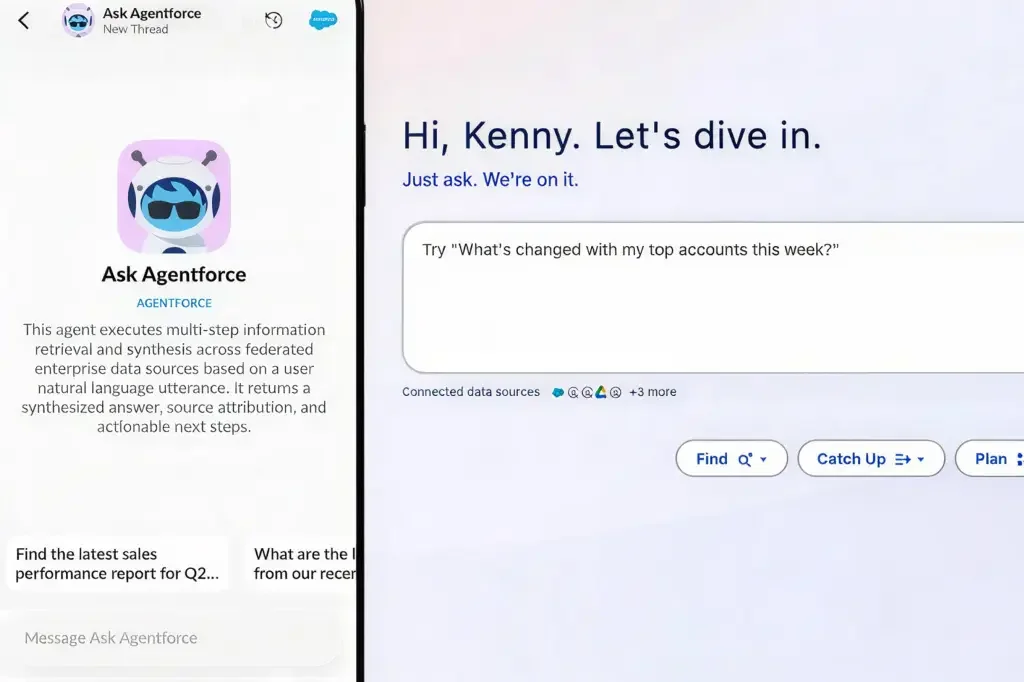
Salesforce AI brings customer data, business rules, workflows, and AI agents into the places Salesforce users already work. Agentforce handles tasks such as resolving service cases, updating records, answering employee questions, and qualifying leads, while AIforce extends Salesforce capabilities into Slack, Claude, Microsoft Teams, mobile, and custom interfaces.
Its defining capability is governed action across external AI interfaces: each request can use Salesforce identity, permissions, business logic, and workflows, so agents can act on live business data without creating a separate access model.
Salesforce AI is best for organizations already invested in Salesforce that want agents for sales, service, field operations, employee support, or industry workflows. It is less suitable for individuals or teams without a Salesforce environment, especially when they need a standalone chatbot or low-cost personal AI tool.
Who is Using Salesforce AI?
Sales Representatives
Pipeline updates, account context, prospecting research, and follow-up preparation happen from Salesforce or connected AI surfaces.
Service Agents
Case history, customer questions, troubleshooting steps, and escalation actions are brought into the service workflow.
Field Service Coordinators
Scheduling and work-order information help coordinators move technician requests forward.
Salesforce Administrators
Admins configure agent topics, permissions, prompts, actions, and approved business processes.
Developers and Architects
Custom interfaces can connect Salesforce data and actions to applications, AI tools, and internal systems.
Uncommon Use Cases
New-employee onboarding questions answered from company knowledge; voice-based service interactions connected to Salesforce records.
Key Features
Rating Breakdown
Pricing Plans
Salesforce Foundations
Free
- Agentforce Builder
- Prompt Builder
- Agent Script
- Agentforce Coworker
- Agentforce Vibes
- Available for Enterprise Edition and above
Flex Credits
$500 per 100,000 credits
- Pay per action as Agentforce scales
- Supports customer-facing agents, employee-facing agents, Agentforce Voice, Digital Wallet, Agentforce Vibes, and Slackbot
- A standard Agentforce action uses 20 Flex Credits
Conversations
$2 per conversation
- Pay per conversation as Agentforce scales
- Supports customer-facing agents and Digital Wallet
- Conversation pricing cannot be used with Flex Credits in the same org
Agentforce add-ons
$125 per user per month
- Available for Sales, Service, Field Service, and Operations
- Unmetered Agentforce usage for employees
- Includes AI-powered analytics, Prompt Builder, and more
Agentforce Industries add-ons
$150 per user per month
- Available for Industries Clouds
- Unmetered Agentforce usage for employees
- Includes industry-specific AI and the Sales Cloud and Service Cloud add-ons
Max Edition
- Available for Sales, Service, Sales/Service, and Industries
- Agentforce add-on included
- 2.75 million Flex Credits per org per year
Agentforce User License
$5 per user per month
- Requires Flex Credits
- Provides Agentforce access to every employee
- Includes access to limited Salesforce CRM objects
- Agentforce usage is metered
Agentforce Coworker User License
$50 per user per month
- All Coworker searches included
- Salesforce security, governance, and access policies apply
- Includes 30 MB of indexing per user per month for connected enterprise data
Which Salesforce AI plan should you pick?
Start with Salesforce Foundations if your organization qualifies and you are testing Agentforce, then choose Flex Credits, Conversations, a user license, or an edition based on whether your work is action-based, conversation-based, employee-focused, or industry-specific.
Salesforce Foundations
Good for eligible Salesforce customers testing Agentforce Builder, Prompt Builder, Agent Script, Coworker, and Vibes at no listed subscription cost.
Flex Credits
Good for organizations that want usage-based pricing across customer-facing, employee-facing, voice, Slackbot, and custom agent actions.
Conversations
Good for customer-facing agents where paying per completed conversation is easier to forecast than paying per action.
Agentforce User License
Good for giving employees access to Agentforce with a per-user price while metering their agent usage through Flex Credits.
Agentforce Coworker User License
Good for teams that want a per-user AI teammate with Salesforce search, governance, and enterprise data indexing.
Max Edition
Good for organizations that want an edition with Agentforce included and a large annual Flex Credit allocation.
Salesforce AI Use Cases
Customer Self-Service
A customer-facing agent authenticates a customer, retrieves order information, and returns a delivery update.
Outcome: Customers get order answers without waiting for a service representative.
Service Case Management
An employee-facing agent identifies a customer, finds related cases, and adds comments to the record.
Outcome: Service representatives spend less time searching and updating case records.
Sales Pipeline Hygiene
Salesforce in Claude provides sales skills for prospecting and pipeline updates using live Salesforce context.
Outcome: Sales work can move forward from Claude while approved changes return to Salesforce.
Employee Onboarding
An agent searches a knowledge base to answer questions from new employees.
Outcome: Employees receive answers without routing every question to an internal support team.
Voice Service Support
Agentforce Voice handles phone interactions and performs connected actions for service workflows.
Outcome: Voice conversations can produce Salesforce actions and records instead of remaining separate from the CRM.
Workflow Ideas with Salesforce AI
Automated Customer Inquiry
- 1Receive a customer question through a web, app, or voice channel
- 2Authenticate the customer and retrieve relevant Salesforce records
- 3Answer the question or complete an approved record action
Sales Opportunity Review
- 1Search account activity, pipeline records, and related conversations
- 2Summarize risks, next steps, and missing information
- 3Update the opportunity or trigger a follow-up workflow
Employee Knowledge Request
- 1An employee asks a question in Salesforce, Slack, Claude, or another connected surface
- 2Agentforce Coworker searches permitted business sources
- 3Return an answer with context or activate a specialized agent
How Salesforce AI fits into your stack
CRM and customer data
Salesforce AI sits directly on Salesforce records, account history, cases, knowledge, and business context. Agents can use that information to answer questions or update records.
Collaboration tools
Slackforce and Salesforce integrations for Claude bring Salesforce context and actions into collaboration and AI conversations.
Automation and workflows
Agentforce can call flows, perform record actions, activate specialized agents, and follow Salesforce business logic.
Developer stack
The Headless Toolkit exposes Salesforce MCPs, APIs, plug-ins, skills, and developer tools for custom AI interfaces and applications.
Mobile and voice
Agentforce Coworker is available across mobile and other work surfaces, while Agentforce Voice connects phone interactions to Salesforce actions.
Pros
- +Permission-aware actions: Agents operate within Salesforce access controls and business rules.
- +Salesforce context: Customer records, activity, cases, and workflows provide grounded answers and actions.
- +Flexible pricing: Organizations can choose Flex Credits, Conversations, user licensing, or editions with included usage.
- +Broad work surfaces: Salesforce AI can reach users through Salesforce, Slack, Claude, Microsoft Teams, mobile, and custom interfaces.
- +Enterprise controls: Digital Wallet provides visibility into usage and Flex Credit consumption.
Cons
- −Salesforce dependence: The strongest experience assumes your data and workflows already live in Salesforce.
- −Usage complexity: Flex Credits, Conversations, user licenses, and add-ons can make total cost difficult to estimate.
- −Enterprise setup: Building governed agents often requires Salesforce administrators, builders, or developers.
Limitations & when to consider alternatives
Known limitations
- Edition requirements. Salesforce Foundations is available for Enterprise Edition and above, and some agent features require specific Salesforce editions or add-ons.
- Usage does not roll over. Unused Flex Credits do not roll over into later subscription terms.
- Consumption varies. Actual cost depends on activity, feature use, and the number of actions or conversations completed.
- File upload availability. File uploads for Service and Employee agents require supported editions, Salesforce experiences, and supported web clients.
Look elsewhere when
- You need a standalone AI chatbot that does not depend on Salesforce.
- Your team wants predictable flat pricing without metered actions or conversations.
- You need a personal writing or research tool rather than enterprise CRM automation.
- Your organization does not already use Salesforce data, permissions, and workflows.
How to Use Salesforce AI
- 1
Choose the work to automate
Start with a focused process such as case resolution, order status, sales research, employee onboarding, or field service scheduling.
- 2
Prepare Salesforce context
Confirm that the required records, knowledge, permissions, flows, and business rules are available to the agent.
- 3
Build the agent
Use Agentforce Builder, Prompt Builder, Agent Script, or a ready-made Agentforce experience to define topics and actions.
- 4
Set access and guardrails
Apply Salesforce permissions and business rules so the agent can only see and change approved information.
- 5
Choose the work surface
Deploy through Salesforce, Slack, Claude, Microsoft Teams, mobile, voice, a customer portal, or a custom interface.
- 6
Monitor usage and results
Review agent activity and Flex Credit consumption through Digital Wallet, then refine prompts, actions, and workflows.
Who is Salesforce AI For?
Sales Organizations
Sales teams can use agents for prospecting, pipeline hygiene, account research, and record updates.
Customer Service Teams
Service organizations can automate customer questions, case work, troubleshooting, and escalation.
Field Service Operations
Field teams can connect agents to scheduling, work orders, parts availability, and technician workflows.
Industry Cloud Customers
Organizations in industries supported by Salesforce can add industry-specific AI and employee agents.
Salesforce Builders
Admins, developers, architects, and builders can create agents and custom AI interfaces with Salesforce tools, APIs, MCPs, and skills.
Frequently Asked Questions
Does Salesforce AI have a free option?
Salesforce Foundations is listed at $0 and includes Agentforce Builder, Prompt Builder, Agent Script, Agentforce Coworker, and Agentforce Vibes for eligible Salesforce customers.
How is Agentforce priced?
Salesforce lists Flex Credits at $500 per 100,000 credits, Conversations at $2 per conversation, and several user-based add-ons and editions.
What is one Agentforce action worth?
A standard Agentforce action uses 20 Flex Credits, which equals $0.10 at the listed Flex Credit price.
Can Salesforce AI work in Slack or Claude?
Yes. Salesforce lists Slackforce and Salesforce in Claude as experiences that bring Salesforce context and actions into those tools.
Can Salesforce AI read uploaded files?
Supported Agentforce Service and Employee agents can process uploaded screenshots, receipts, and PDFs, including interpreting image or PDF content.
Can Salesforce AI generate code?
Agentforce Vibes is Salesforce's AI development experience for working with application code.
Community reviews
Be the first to share your experience.
Sign in to leave a review for Salesforce AI.
Salesforce AI Alternatives
Looking for alternatives to Salesforce AI? Here are similar tools in the same category: