
RNDRS
Turns architecture sketches into 4K images and flythroughs.
Key Takeaways
- What it is
- Turns architecture sketches into 4K images and flythroughs.
- Pricing
- Freemium · $29 per month · $49 per month · $119 per month · $149
- Best for
- Node-Based Canvas Workflows
- Architecture-Tuned Render Engine
- Eraser and Cleanup Tools
- Rating
- 4.2/5
What is RNDRS?
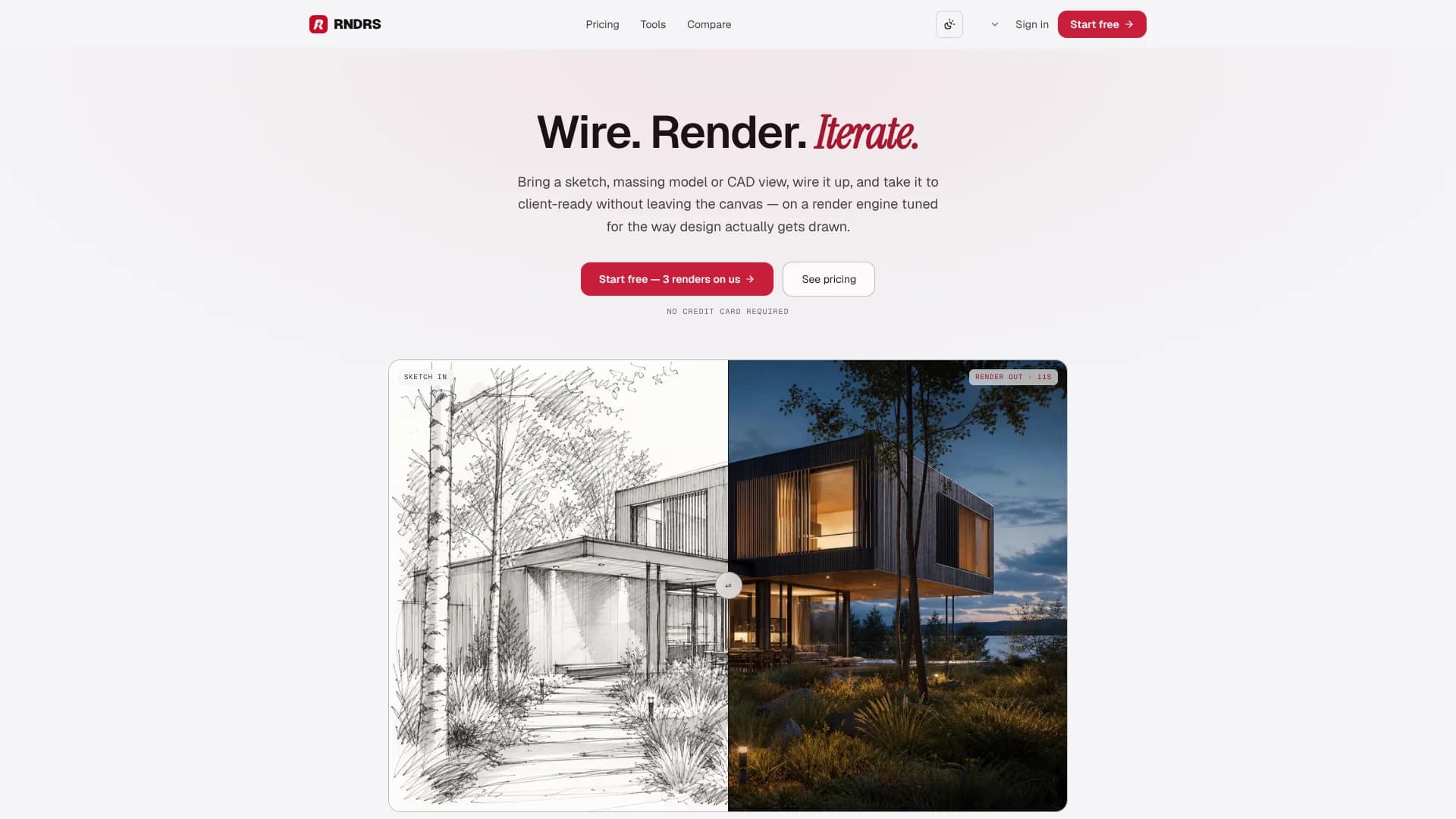
RNDRS is a node-based AI render studio for architects, interior designers, landscape architects, and masterplanners. It turns sketches, massing models, CAD exports, or site photos into client-ready images on a single visual canvas. Instead of bouncing between image tools, upscalers, and video apps, design teams wire prompts and operations as nodes, then iterate from first sketch to 4K visualization and short camera-move videos in one place.
RNDRS centers the entire AI rendering workflow on a branching node canvas built specifically for built-environment design. Instead of treating AI as a one-off “magic render” button, it lets teams wire sketch inputs, prompts, erasing, extending, upscaling, and video into repeatable graphs while running on a house-built architecture engine. That combination of node workflows plus discipline-tuned rendering differentiates it from generic text-to-image tools wearing an architecture label.
RNDRS gives architecture and design studios a dedicated AI render engine that mirrors how projects actually move from sketch to client presentation. Its node canvas and reusable workflows favor iterative exploration and consistent output, especially when teams juggle many variations under deadlines. It will not replace CAD, BIM, or full 3D visualization for detailed construction imagery, but as a design-focused rendering companion it offers strong value for practices that want fast, visually coherent iterations inside a single AI workspace.
Who is Using RNDRS?
Architects
Turn massing studies or SketchUp/Rhino/Revit viewports into client-ready exteriors and interiors in a few node hops.
Interior designers
Swap materials, moods, and lighting from basic CAD elevations or site photos without remodeling 3D geometry.
Landscape architects
Visualize planting, terrain, and site character from diagrams or photos so plans read as living places.
Masterplanners and urban designers
Produce aerials and site views that communicate streets, blocks, and public space beyond diagrammatic massing.
Uncommon Use Cases
Architecture educators generating fast crit visuals directly from student sketches; solo practitioners building portfolio images from simple clay models or site photographs.
Key Features
Rating Breakdown
Pricing Plans
Free Trial
Free
- 3 free renders, no credit card required, commercial license included
Essential
$29 per month
- Or $290 per year
- 30 credits per month (approximately 30 renders or 10 renders in 4K), node-based editor, all power tools, 2K output resolution, and commercial license
Studio
$49 per month
- Or $490 per year
- 100 credits per month (approximately 100 renders or 33 renders in 4K), node-based editor, all power tools, 4K output resolution, image-to-video generation, and commercial license
Firm
$119 per month
- Or $1,190 per year
- 300 credits per month (approximately 300 renders or 100 renders in 4K), everything in Studio, priority queue, priority support, and commercial license
One-Time Credits Pack
$149
- One-time purchase
- 300 credits that never expire and a commercial license
Which RNDRS plan should you pick?
Start with Essential for occasional real-project work, upgrade to Studio for weekly design production and 4K/video, and choose Firm for practices needing higher volume and priority support.
Essential
Good for designers trying RNDRS on real projects who need 30 monthly credits, the node-based editor and 2K output.
Studio
Good for designers shipping work weekly who need 100 monthly credits, 4K output and image-to-video.
Firm
Good for practices with constant deadlines that need 300 monthly credits, a priority queue and priority support.
One-time credits pack
Good for one-off projects or busy periods when you want 300 credits without a subscription; credits never expire.
RNDRS Use Cases
Sketch to render
Upload a photographed or scanned sketch, describe materials and lighting, then generate and review a visualization.
Outcome: A conceptual architectural image developed from the original sketch.
Interior restyling
Upload a room photo or 3D view, erase existing furniture, and render alternative palettes, materials and lighting.
Outcome: Photorealistic interior options for comparison and presentation.
Material studies
Use one source image with multiple render nodes to compare materials such as oak, walnut or micro-cement.
Outcome: Side-by-side material alternatives in the actual design context.
Virtual staging
Clear furniture and clutter from a site photo, then add a proposed furnishing and styling direction.
Outcome: A staged room image for design exploration or client discussion.
Presentation and review
Select preferred results, create comparison boards, export image bundles and invite focused review on selected images.
Outcome: A shareable set of design options and feedback.
Workflow Ideas with RNDRS
Sketch to presentation image
- 1Photograph or scan a clear sketch
- 2Upload it and describe the desired materials and lighting
- 3Review the result, refine it, upscale the selected version and export it
Interior material comparison
- 1Upload a room photograph or 3D view
- 2Erase existing furniture or clutter
- 3Wire multiple render nodes with different material prompts and compare the results
Client option review
- 1Generate alternatives from the same source image
- 2Create a comparison board and select the preferred direction
- 3Create a review link for invited email addresses and collect comments or decisions
How RNDRS fits into your stack
Browser
RNDRS is a browser-based workspace for uploading design images, describing visual changes, comparing versions and exporting results.
Knowledge and files
Teams can bring JPEG, PNG, WebP images or selected PDF pages into projects, retain source images and references, and export comparison boards or image bundles.
Pros
- +End-to-end on one canvas: Rendering, cleanup, extensions, upscaling, and video all live on the same node-based surface.
- +Discipline-specific tuning: Separate modes and marketing for architecture, interiors, landscape, and masterplanning reflect how each discipline actually draws.
- +Reusable workflows: Saved node graphs let studios standardize look-and-feel across projects and reuse prompts, styles, and pipelines.
- +Credit-based flexibility: Monthly plans plus non-expiring credit packs fit both occasional users and deadline-heavy periods.
Cons
- −Resolution limits on entry plan: The Essential plan caps outputs at 2K, which may be tight for large-format print boards.
- −Higher credit cost for premium outputs: 4K renders and upscales use two credits and video uses ten per 5 seconds, so advanced outputs consume budgets quickly on small plans.
- −Image and video only: Outputs are images and short videos, not 3D models, so RNDRS complements rather than replaces CAD or BIM rendering.
Limitations & when to consider alternatives
Known limitations
- Native CAD and BIM files are not edited. Native CAD and BIM files must be exported to supported image formats before upload.
- Generated geometry may be inaccurate. RNDRS may change geometry, proportions or details, so generated images are not construction documentation.
- Image delivery URLs can be public. Anyone with an image delivery URL can access that image, even though project pages require sign-in.
- Credit costs vary by operation. The displayed action cost depends on the operation and settings; one credit does not always correspond to one image.
- Motion is conceptual. Image-to-video creates short clips, but camera movement is not a measured walkthrough.
Look elsewhere when
- You need to edit native CAD or BIM geometry directly.
- You need construction-accurate visualization.
- Your workflow requires a native desktop application or plugin.
- You need API-based programmatic access.
How to Use RNDRS
- 1
Prepare a source image
Export a clear sketch, model view or site photograph as JPEG, PNG or WebP. Native CAD and BIM files must be exported first.
- 2
Create a project
Create an account, verify your email and open Studio to start a project.
- 3
Upload the source
Upload the image or select a page from an unencrypted PDF, then choose the image you want to work on.
- 4
Describe the change
Write what should change and what should stay. Use brush, lasso or polygon selection for local edits.
- 5
Review cost and generate
Check the proposed action, settings and credit cost before confirming generation.
- 6
Refine and export
Compare results with the source, continue from a selected version, then export an original, comparison board, image bundle or resized copy.
Who is RNDRS For?
Architects
RNDRS helps architects turn sketches, model views and site imagery into visual design directions and presentation images.
Interior designers
Interior designers can restyle rooms, remove existing furniture, compare materials and prepare client presentation imagery.
Landscape architects
Landscape architects can explore planting, materials, atmosphere and site concepts from images.
Masterplanners
Masterplanners can work from aerial views or masterplan images to explore conceptual spatial stories.
Design professionals
RNDRS is positioned as an image-based workspace for design professionals who need iterative visual exploration.
Frequently Asked Questions
What can I upload?
Upload JPEG, PNG or WebP images up to 20 MB, or select one page from an unencrypted PDF up to 20 MB and 100 pages. Native CAD and BIM files must be exported first.
Do I need to install a plugin or special software?
No installation is required. RNDRS works in the browser from supported image exports or screenshots.
Will my geometry and proportions stay accurate?
AI can change geometry or introduce details, so compare results with the source and verify dimensions separately.
Can I use the renders for client work?
Paid plans permit commercial use under RNDRS's terms, provided you have the necessary rights to uploaded material.
Can I make videos or walkthroughs?
Image-to-video creates short generated clips from stills. Camera movement is conceptual, not a measured walkthrough.
What happens if a request fails?
Review the project activity and billing credit history before retrying. Failed generations are automatically refunded.
Community reviews
Be the first to share your experience.
Sign in to leave a review for RNDRS.
RNDRS Alternatives
Looking for alternatives to RNDRS? Here are similar tools in the same category:
Learn to Master RNDRS
With Skill Leap courses
Get in-depth training on RNDRS and 50+ other AI tools with our expert-led video courses.
Start 7-Day Free Trial