
Read AI
Automated meeting summaries, transcriptions, and intelligent scheduling for productivity.
Key Takeaways
- What it is
- Automated meeting summaries, transcriptions, and intelligent scheduling for productivity.
- Pricing
- Freemium
- Best for
- Automated Summaries
- Transcription Services
- Intelligent Scheduling
- Rating
- 4.7/5
What is Read AI?
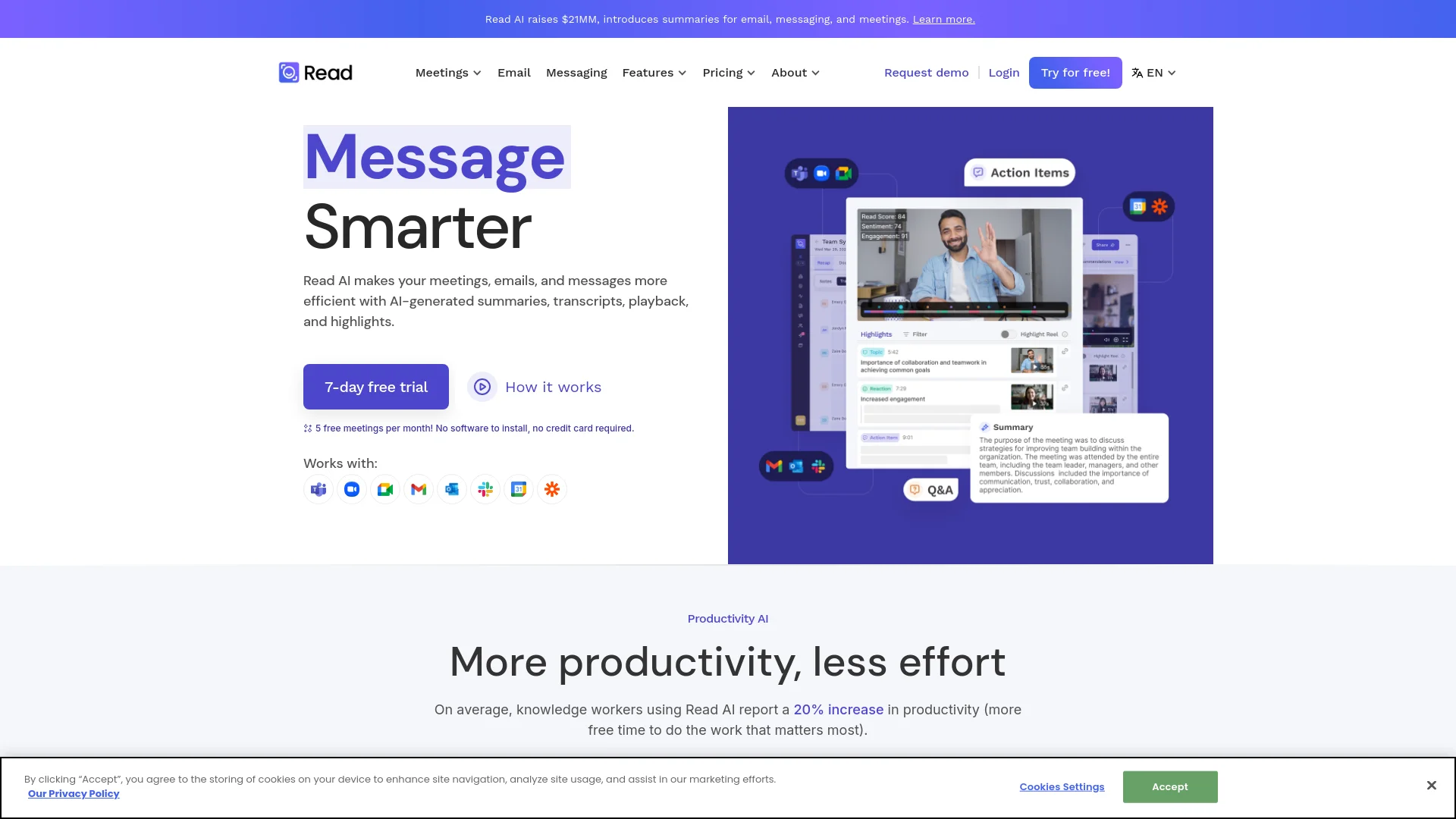
In today’s fast-paced world, efficiency in communication is key, and that's where Read AI comes into play. This AI-powered tool is designed to boost productivity by providing automated meeting reports, transcripts, notes, and video summaries. It's particularly beneficial for professionals overwhelmed by the volume of meetings and communications they handle daily. By integrating with popular platforms like Zoom, Google Meet, and Microsoft Teams, Read AI ensures that you can focus more on decision-making and less on sifting through information.
Read AI stands out by offering a comprehensive, all-in-one communication tool that not only provides summaries and transcripts but also integrates coaching and scheduling functionalities. Its ability to provide actionable insights and connect various communication platforms into one streamlined workflow sets it apart in the market.
Read AI excels in streamlining communication across multiple platforms, making it an indispensable tool for professionals across various industries. Its robust features like multilingual support, high-level data security, and seamless integrations with major platforms offer significant advantages, ensuring that it stands out as a top choice for enhancing productivity and communication efficiency.
Who is Using Read AI?
Corporate Teams
Enhancing collaboration and communication across departments.
Remote Workers
Managing and documenting virtual meetings efficiently.
Educators and Students
Utilizing transcription services for lectures and study groups.
Healthcare Professionals
Keeping track of patient meetings and important communications.
Uncommon Use Cases
Used by legal professionals for transcript generation during trials; adopted by podcasters for editing and summarizing episodes.
Key Features
Rating Breakdown
Pricing Plans
Free Tier
Free
Pro Tier
- More advanced features
- Pricing details available upon request
Which Read AI plan should you pick?
Start with Free for occasional meeting capture; upgrade to Pro for unlimited transcripts and integrations, Enterprise for playback, or Enterprise+ for organization-wide security controls.
Free
Good for individuals who need up to five meeting transcripts per month with summaries, search, coaching, basic integrations, and multilingual support.
Pro
Good for individuals and small teams who need unlimited meeting transcripts, file-upload credits, premium integrations, and workspace access.
Enterprise
Good for individuals and teams who need audio and video playback, highlights, additional upload credits, and premium support.
Enterprise+
Good for larger teams and organizations that need HIPAA compliance, SAML, SCIM, domain capture, custom retention, and workspace onboarding.
Read AI Use Cases
Meeting capture and recap
Record meetings on Zoom, Google Meet, Microsoft Teams, desktop, or mobile and generate transcripts, summaries, chapters, and action items.
Outcome: A searchable meeting report with decisions and follow-up items.
Cross-platform workplace search
Connect meetings, email, messaging, cloud files, and CRM systems so Ask Read can search across organizational context.
Outcome: Answers and insights across connected work data.
Sales follow-up
Use CRM integrations and Sales Funnel agents to identify recommended updates for HubSpot or Salesforce.
Outcome: More consistent CRM updates and follow-up activity.
Team knowledge sharing
Use Workspaces, shared reports, team metrics, and integrations to distribute meeting knowledge across an organization.
Outcome: Improved visibility into meetings, decisions, and action items.
Recurring briefings and recaps
Enable agents such as Monday Briefing, End of Week, and Post-Meeting Recap to summarize important work and next steps.
Outcome: Automated briefings and prioritized follow-up.
Workflow Ideas with Read AI
Meeting-to-project-task workflow
- 1Read captures and summarizes a meeting.
- 2Read extracts action items and key details.
- 3Read pushes tasks to Jira, Linear, Asana, or another connected tool.
Meeting-to-CRM workflow
- 1Read generates a meeting transcript and summary.
- 2Read identifies customer or sales follow-up information.
- 3Read recommends or applies updates in HubSpot or Salesforce.
Weekly decision digest
- 1Retrieve meetings from the previous week through Read or its MCP server.
- 2Synthesize decisions, open items, and recurring themes.
- 3Publish a formatted digest to a shared workspace or send it by email.
How Read AI fits into your stack
Zoom Integration
Enhances meeting efficiency with automated summaries directly within Zoom.
Google Meet and Teams Compatibility
Works smoothly with Google Meet and Microsoft Teams for seamless in-meeting support.
Outlook and Slack Integration
Integrates with email and messaging platforms for comprehensive coverage.
API Access
Allows for custom integrations to suit specific organizational needs.
Pros
- +Enhanced Productivity: Users report an average 20% increase in productivity, freeing up time for critical tasks.
- +Ease of Use: No software installation required, and it offers a user-friendly interface.
- +Data Security: Adheres to best practices with SOC II certification, ensuring data is handled securely.
- +Multilingual Support: Supports various languages, including English, Spanish, French, and more, broadening its usability.
Cons
- −Dependence on Internet Connectivity: Requires a stable internet connection to function optimally.
- −Learning Curve: New users might need some time to fully leverage all features.
- −Subscription Model: While there is a free trial, continued usage requires a subscription, which might be a barrier for some.
Limitations & when to consider alternatives
Known limitations
- Native meeting-platform coverage. Read natively joins Zoom, Microsoft Teams, and Google Meet. It cannot automatically join unsupported platforms such as Webex, GoToMeeting, or RingCentral.
- Uploaded-file formats. Direct meeting uploads are limited to MP4 video and M4A audio files, with a maximum size of 5 GB per file.
- Uploaded-report feature differences. Uploaded reports do not initially detect speaker names automatically and do not support Coaching, some engagement graphs, or Recommendations.
- Mixed-language meetings. Meetings containing multiple languages are not fully supported and may produce inconsistent results.
- Free-plan limits. The Free plan is limited to five meeting transcripts per month and does not include workspace membership or monthly upload credits.
Look elsewhere when
- You need native support for Webex, GoToMeeting, or RingCentral meetings.
- You need direct image-file understanding rather than audio or video processing.
How to Use Read AI
- 1
Explore detailed tutorials on the official website, covering everything from setup to advanced feature utilization, ensuring users can maximize the tool’s potential.
Who is Read AI For?
Individuals starting out
The Free plan is designed for individuals who need a limited number of meeting transcripts, summaries, search, and coaching.
Individuals and small teams
The Pro plan is positioned for users who need unlimited meeting transcripts, file uploads, premium integrations, and workspace access.
Individuals and teams
The Enterprise plan is aimed at users and teams that need audio and video playback, highlights, and additional support.
Larger teams and organizations
Enterprise+ is designed for organizations needing SAML, SCIM, HIPAA compliance, domain capture, retention policies, and onboarding.
Students and teachers
Read offers discounted EDU plans for verified students and faculty using eligible educational email addresses.
Frequently Asked Questions
Is there a free plan?
Yes. Read offers a Free plan with five meeting transcripts per month, summaries, transcription, search, coaching, basic integrations, and support for multiple languages.
Which meeting platforms does Read support?
Read natively supports Zoom, Microsoft Teams, and Google Meet. The desktop app can capture other computer audio, and MP4 or M4A recordings can be uploaded.
Does Read have mobile apps?
Yes. Read offers native iOS and Android apps for recording in-person conversations, viewing reports, receiving notifications, and using Search Copilot.
Does Read offer a desktop app?
Yes. Dedicated Windows and macOS desktop apps can capture computer audio, control meeting participation, provide notifications, and access Read reports.
Does Read support integrations?
Yes. Integrations include Slack, Microsoft Teams, Google Drive, OneDrive, Notion, Confluence, Jira, Linear, Asana, HubSpot, Salesforce, Zapier, webhooks, and others.
Does Read support enterprise security?
Read documents TLS 1.2 encryption in transit, AES-256 encryption at rest, SOC 2 Type 2, HIPAA support, SAML, SCIM, domain capture, and custom retention controls on higher plans.
Community reviews
Be the first to share your experience.
Sign in to leave a review for Read AI.
Read AI Alternatives
Looking for alternatives to Read AI? Here are similar tools in the same category:
Learn to Master Read AI
With Skill Leap courses
Get in-depth training on Read AI and 50+ other AI tools with our expert-led video courses.
Start 7-Day Free Trial