
Prezi
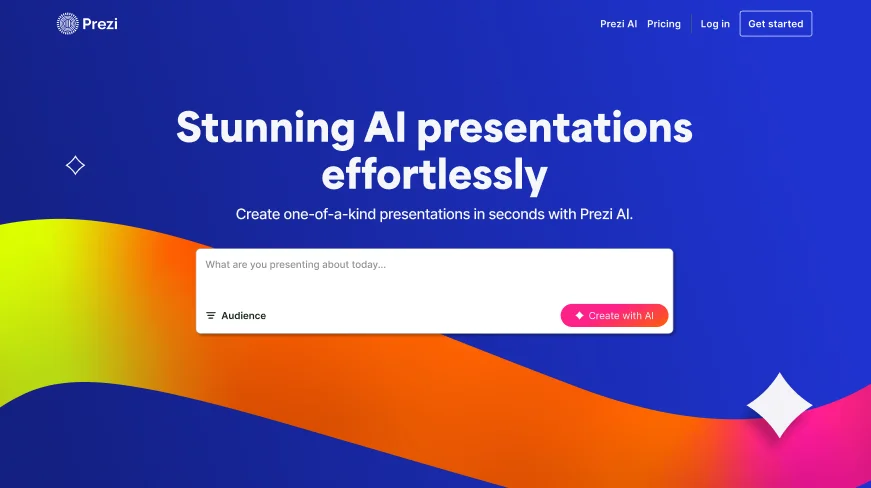
Create captivating presentations with dynamic, interactive visuals.
Key Takeaways
- What it is
- Create captivating presentations with dynamic, interactive visuals.
- Pricing
- $7 per month (billed annually). Ideal for personal use—create and share dynamic presentations · $19 per month (billed annually). Designed for expert communicators · $29 per month (billed annually). Best for business professionals—adds analytics
- Best for
- AI-Powered Design
- Dynamic Visuals
- Interactive Elements
- Rating
- 4.4/5
What is Prezi?
Prezi is a standout in the world of presentation tools, revolutionizing how we create and deliver presentations. Designed with AI technology, Prezi offers a unique approach that moves beyond traditional slide formats. It caters to a variety of audiences, whether you're presenting in a business setting, an academic environment, or even personal gatherings. Prezi simplifies the process of crafting visually compelling presentations that can captivate any audience.
Prezi stands out with its AI-driven design capabilities, allowing users to create presentations that are not only visually stunning but also highly interactive. This innovative approach to presentation design sets it apart, offering a fresh alternative to static slide decks. Its ability to transform ideas into engaging visual stories makes it a preferred choice for professionals looking to make a lasting impression.
Prezi offers a refreshing take on presentation software by integrating AI to elevate the design and delivery of content. Its unique features and user-friendly interface make it a powerful tool for anyone looking to enhance their presentation skills. While it may have a learning curve for those new to its format, the benefits of engaging, interactive presentations are well worth the effort. Prezi remains a top choice for professionals across various fields, providing the tools needed to create memorable and impactful presentations.
Who is Using Prezi?
Educators
Leveraging Prezi for creating interactive lessons that engage students and simplify complex concepts.
Corporate Trainers
Using the tool to design training modules that are both informative and visually stimulating.
Sales Professionals
Crafting impactful sales pitches that capture client interest and drive engagement.
Event Planners
Utilizing Prezi to present event plans and proposals in an appealing format.
Uncommon Use Cases
Employed by therapists to illustrate therapy sessions; Used by non-profits for visually compelling fundraising presentations.
Key Features
Rating Breakdown
Pricing Plans
Standard
$7 per month (billed annually). Ideal for personal use—create and share dynamic presentations
- Videos
- Infographics with privacy controls and unlimited projects
Plus
$19 per month (billed annually). Designed for expert communicators
- Includes unlimited Prezi AI, PowerPoint imports, PDF export, premium images, desktop access, and more
Premium
$29 per month (billed annually). Best for business professionals—adds analytics
- Advanced training
- Full Plus features
Which Prezi plan should you pick?
Start with Basic to try Prezi for free, choose Plus for offline desktop work and advanced creation features, and upgrade to Premium for analytics and advanced support.
Basic
Good for users who need free access to create presentations, videos, infographics, and try limited Prezi AI features.
Standard
Good for personal users who need privacy controls, unlimited projects, and basic AI presentation generation.
Plus
Good for users who need unlimited AI generation, PowerPoint import, PDF export, presentation recording, offline access, and the desktop app.
Premium
Good for business professionals who need everything in Plus plus presentation analytics and additional support.
Edu Plus
Good for eligible students and educators who need Plus features with education pricing.
Edu Pro
Good for eligible education users who need Edu Plus features plus analytics, advanced import integrations, and enhanced support.
Prezi Use Cases
AI presentation creation
Describe an idea or upload a PPTX, PDF, or DOCX file, then let Prezi AI create an editable presentation.
Outcome: A structured presentation draft with generated layouts, text, and visuals.
Interactive presentations
Present on a zoomable canvas and add live polls, quizzes, Q&A, and audience participation.
Outcome: A more engaging live presentation with audience feedback.
Training and onboarding
Create training content, deliver it live or asynchronously, and use quizzes or feedback to assess understanding.
Outcome: Training materials that support participation and post-session review.
Collaborative presentation development
Invite teammates, assign permissions, comment, and edit the same presentation together.
Outcome: A shared presentation workflow with controlled access.
Mobile presenting
Use Prezi Viewer on iOS or Android to view, practice, share, and present saved presentations.
Outcome: Presentation access and presenting capability away from a computer.
Workflow Ideas with Prezi
Turn a document into a presentation
- 1Upload a PPTX, PDF, or DOCX file to Prezi AI.
- 2Review and customize the generated outline.
- 3Create the presentation and refine it in the Prezi editor.
Build and deliver an interactive lesson
- 1Create or import a presentation in Prezi Present.
- 2Add polls, quizzes, or Q&A for audience participation.
- 3Present live and review responses or feedback afterward.
Create a collaborative team presentation
- 1Open the presentation sharing settings.
- 2Invite collaborators and assign view, comment, or edit permissions.
- 3Co-edit the presentation and resolve feedback through comments.
How Prezi fits into your stack
Browser
Prezi is primarily used as a web application for creating, editing, presenting, and sharing presentations, videos, and designs.
Desktop
The Prezi desktop app supports offline work, downloads, exports, and presentation delivery on Windows and macOS.
Team collaboration
Teams invite collaborators, assign view/comment/edit permissions, co-edit presentations, and leave comments in shared projects.
Team chat and notifications
The Prezi app for Slack supports sharing Prezi content, collaboration notifications, and commands for starting or sharing projects.
Pros
- +User-Friendly Interface: The intuitive design makes it accessible for users of all skill levels, reducing the time needed to create presentations.
- +Enhanced Engagement: Non-linear presentation style keeps the audience engaged, perfect for holding attention during complex topics.
- +Versatile Usage: Suitable for various purposes, from educational presentations to business pitches, offering flexibility in application.
- +Security and Privacy: SOC2 compliance ensures that your data is secure, with privacy controls to manage who can view and edit presentations.
Cons
- −Learning Curve for New Users: While intuitive, new users may initially find the non-linear format challenging compared to traditional slides.
- −Limited Third-Party Integrations: Currently, it offers limited integration with other software platforms.
- −Occasional Performance Issues: Users may experience occasional lag, particularly with large or highly detailed presentations.
Limitations & when to consider alternatives
Known limitations
- AI file character limit. Prezi AI file-based creation has a 170,000-character limit.
- Image-only documents. Uploaded documents need extractable text for the standard AI file workflow; documents containing only images may not work as expected.
- Desktop app plan requirement. The Prezi Present desktop app requires a paid plan, with offline access listed for Plus and higher plans.
- Mobile app scope. Prezi Viewer is primarily documented for viewing, practicing, sharing, and presenting presentations on mobile devices.
How to Use Prezi
- 1
Choose a starting point
From the dashboard, start with an AI prompt, upload a PPTX/PDF/DOCX file, select a template, or create from scratch.
- 2
Review the AI outline
If using Prezi AI, reorder, add, or remove talking points before generating the presentation.
- 3
Customize the design
Adjust colors, layouts, visuals, text, and structure in the Prezi AI workflow and editor.
- 4
Add interactive elements
For live sessions, add polls, quizzes, Q&A, or other audience engagement features.
- 5
Invite collaborators
Use sharing settings to invite people and grant view, comment, or edit access.
- 6
Present or export
Present online or from the desktop/mobile apps, or export to PDF, PPTX, or a portable presentation when supported by your plan.
Who is Prezi For?
Teachers
Prezi helps teachers create interactive lessons, engage students with polls and quizzes, and share material for later review.
Professors
Professors can use dynamic presentations and audience engagement features to make lectures more interactive.
Trainers
Training teams can create onboarding and training content with participation, review, and results tracking.
Business professionals
Business users can create presentations, import existing decks, collaborate with teams, and present live or remotely.
Marketing and sales teams
Marketing and sales teams can build branded presentations, present dynamically, and use analytics to understand viewer engagement.
Frequently Asked Questions
What is Prezi?
Prezi is a presentation platform for creating zoomable, dynamic presentations with Prezi Present, Prezi Video, and Prezi Design.
Can Prezi AI create presentations from files?
Yes. Prezi AI can start from PPTX, PDF, or DOCX files, extract text and ideas, create an outline, and generate a presentation.
Does Prezi support PowerPoint imports?
Yes. PowerPoint files can be imported directly or uploaded to Prezi AI for presentation generation.
Can multiple people collaborate on a presentation?
Yes. Owners can invite collaborators and assign view, comment, or edit permissions, including real-time co-editing.
Does Prezi support SSO?
Yes. Teams can configure SAML SSO with identity providers such as Okta, Microsoft Azure AD, OneLogin, and Google Workspace.
Can Prezi presentations be used offline?
Yes, offline access is available through the Prezi Present desktop app on eligible paid plans.
Community reviews
Be the first to share your experience.
Sign in to leave a review for Prezi.
Prezi Alternatives
Looking for alternatives to Prezi? Here are similar tools in the same category:
Learn to Master Prezi
With Skill Leap courses
Get in-depth training on Prezi and 50+ other AI tools with our expert-led video courses.
Start 7-Day Free Trial