Noodle Tomato
Keeps recurring faceless video series consistent from episode to episode.
Key Takeaways
- What it is
- Keeps recurring faceless video series consistent from episode to episode.
- Pricing
- $9 per month · $29 per month · $79 per month · $199 per month · $1,000 per month · $2,500 per month · $5,000 per month
- Best for
- Video Agent
- Project Memory
- NoodleTomato Motion
- Rating
- 4.1/5
What is Noodle Tomato?
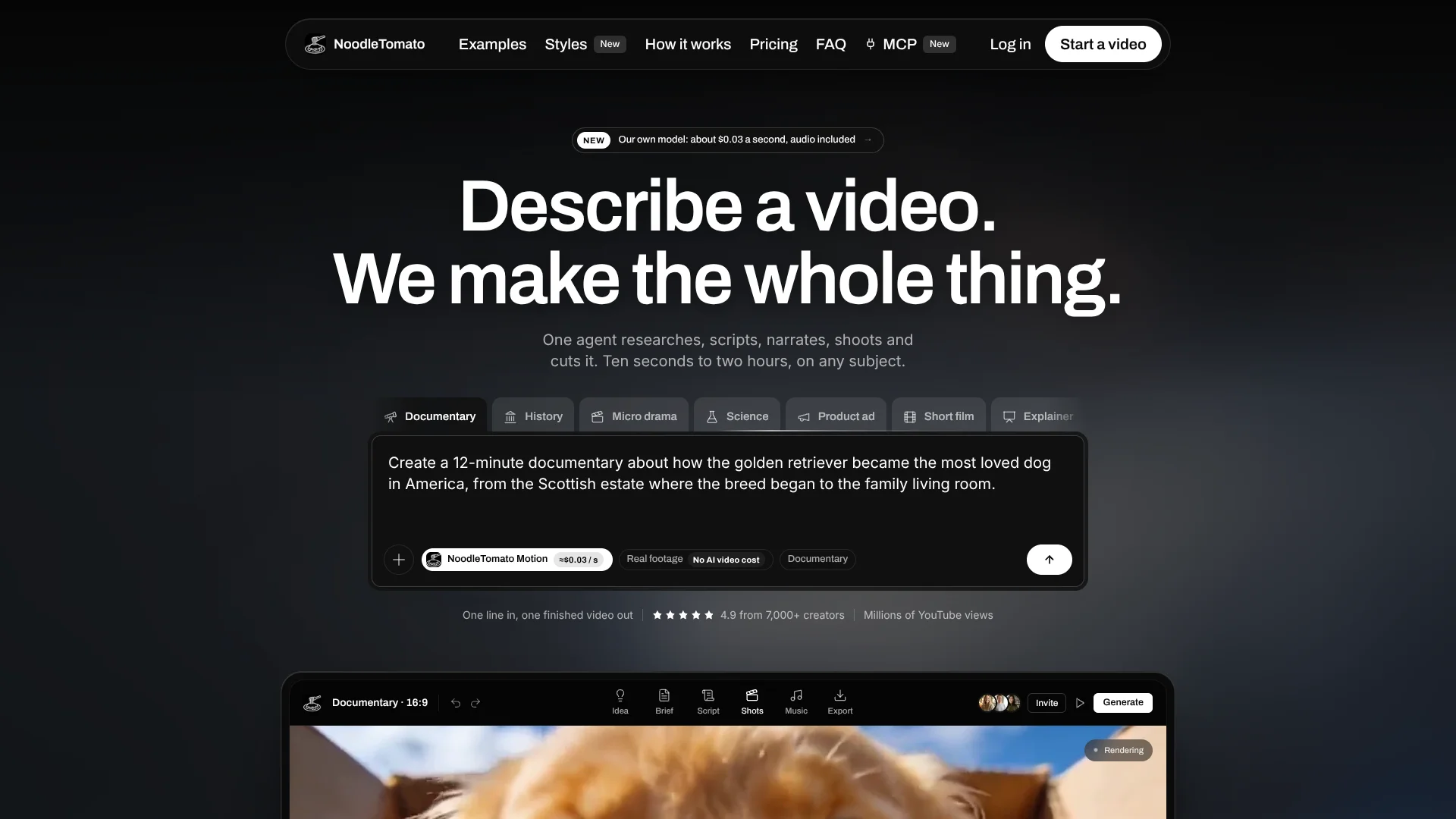
NoodleTomato turns a video idea into a finished production, including research, a brief, script, narration, visuals, music, and editing. It is built for long-form and faceless videos from 10 seconds to two hours, with formats for documentaries, explainers, courses, product ads, podcasts, and YouTube channels.
Its clearest distinction is project memory that carries a narrator, visual style, recurring characters, scripts, exports, and episode history into later videos. That lets a series continue from its previous ending instead of rebuilding its creative direction each time.
NoodleTomato fits creators running repeatable video series, channel operators, and teams producing client or educational content. It is less suited to people who want a free trial, manual timeline editing, or a low-cost tool for occasional short clips. The strongest reason to choose it is its channel-style production workflow for long videos.
Who is Using Noodle Tomato?
YouTube Channel Managers
A persistent project record keeps each channel’s narrator, visual direction, recurring characters, and episode continuity together.
Documentary Creators
Source-first research, a visible brief, and long-form rendering support documentary production before visuals are generated.
Course Producers
Course lessons can become narrated videos with generated visuals, subtitles, music, and a finished edit.
Agency Video Producers
Client projects benefit from repeatable style guides, voice choices, revisions, and downloadable finished exports.
Developers and Automation Builders
The API and MCP tools support quoted generations, uploaded references, asynchronous jobs, asset downloads, and rendered timelines.
Uncommon Use Cases
Serialized micro dramas with recurring characters; newsletter and podcast ideas turned into finished videos.
Key Features
Rating Breakdown
Pricing Plans
Starter
$9 per month
- 900 credits, with 100 credits equal to $1 of usage
- About 4 minutes of NoodleTomato Motion footage, sound included
- Includes the agent, both models, voices, MCP, and API
Creator
$29 per month
- 2,900 credits
- About 14 minutes of NoodleTomato Motion footage, sound included
- Includes the agent, both models, voices, MCP, and API
Studio
$79 per month
- 7,900 credits
- About 39 minutes of NoodleTomato Motion footage, sound included
- Includes the agent, both models, voices, MCP, and API
Scale
$199 per month
- 19,900 credits
- About 99 minutes of NoodleTomato Motion footage, sound included
- Includes the agent, both models, voices, MCP, and API
Business 1,000
$1,000 per month
- 100,000 credits
- About 8 hours of NoodleTomato Motion footage, sound included
- Includes the agent, both models, voices, MCP, and API
Business 2,500
$2,500 per month
- 250,000 credits
- About 20 hours of NoodleTomato Motion footage, sound included
- Includes the agent, both models, voices, MCP, and API
Business 5,000
$5,000 per month
- 500,000 credits
- About 41 hours of NoodleTomato Motion footage, sound included
- Includes the agent, both models, voices, MCP, and API
Which Noodle Tomato plan should you pick?
Start with Starter to test the agent and voice library, move to Creator for one weekly channel, and choose Studio, Scale, or a Business plan when production volume grows.
Starter
Good for trying the agent, NoodleTomato models, and voice library on a small monthly budget.
Creator
Good for one channel or series that publishes every week.
Studio
Good for repeated production across several projects with longer runtimes and more revisions.
Scale
Good for programmatic output through the API and MCP or several channels at once.
Business 1,000
Good for a larger recurring production budget at the same credit rate.
Business 2,500
Good for higher-volume video production across larger content operations.
Business 5,000
Good for the highest published recurring budget and large-scale output.
Noodle Tomato Use Cases
Faceless YouTube Documentaries
A researched topic becomes a long-form documentary with a brief, script, narration, generated visuals, music, subtitles, and a final edit.
Outcome: One finished video file ready for review or upload.
Serialized Video Shows
Series projects retain characters, voices, style rules, and previous episode details so new episodes can continue from the existing record.
Outcome: More consistent episodes with less repeated setup.
Podcast to Video
Podcast concepts can be developed into narrated videos with visual shots, music, subtitles, and a completed edit.
Outcome: A video version of audio-led content.
Course Lessons
Lesson topics can be researched, scripted, narrated, illustrated, and edited into publishable educational videos.
Outcome: Finished lesson videos from a topic brief.
Programmatic Video Generation
Developers can request quotes, submit media jobs, poll status, cancel queued work, and download results through the API.
Outcome: Automated media production connected to your own software.
Workflow Ideas with Noodle Tomato
Build a Documentary
- 1Describe the topic, length, format, and intended style.
- 2Review the research brief and full script before visuals render.
- 3Approve or revise the production, then download the finished video.
Continue a Video Series
- 1Open the existing project with its saved narrator, characters, and style guide.
- 2Describe the next episode and tell the agent where the previous episode ended.
- 3Review the new script and export the completed episode.
Automate Clip Production
- 1Create a scoped API key in developer settings.
- 2Request a quote for the model, duration, format, and reference image.
- 3Submit the job, poll its status, and download the finished asset.
How Noodle Tomato fits into your stack
Video Production
NoodleTomato sits at the production stage between a written idea and a finished video file. It can create visuals, narration, music, subtitles, and the edit.
Research and Writing
The agent reads sources before preparing the brief and script, giving documentary and educational projects a research step before rendering.
Creative Continuity
Project memory stores style guides, voices, characters, scripts, and exports so recurring series keep their established direction.
Developer Automation
The API and MCP connection fit workflows that need quoted jobs, reference uploads, asynchronous generation, asset retrieval, and rendered timelines.
Content Distribution
Finished exports can be used for YouTube, client work, courses, newsletters, podcasts, and other video channels.
Pros
- +Long-form output: Handles projects from 10 seconds to two hours.
- +Series continuity: Carries voices, characters, visual rules, and episode history into later work.
- +Price visibility: Shows a quote before each generation and does not charge more than that quote.
- +Production coverage: Returns a finished file with narration, visuals, music, subtitles, and editing.
- +Developer access: Every plan includes API access and MCP support.
Cons
- −Paid entry point: There is no free plan, and the lowest monthly plan costs $9.
- −Credit expiry: Plan and top-up credits expire two calendar months after they are issued.
- −Limited editing control: The product centers on agent-directed production rather than a traditional manual video editor.
Limitations & when to consider alternatives
Known limitations
- Active plan required. The studio, agent, MCP connection, API, and credit top-ups require an active paid plan.
- Credits expire. Credits from a plan or top-up expire two calendar months after they are issued, and a new batch does not extend older credits.
- No API callbacks. API completion is handled by polling because the documentation says callbacks are not available.
- Revisions cost more. A retake or revision is treated as a new generation and uses additional credits.
Look elsewhere when
- You need a free plan for testing before paying.
- You want a traditional timeline editor for detailed manual cuts.
- Your workflow requires API callbacks instead of polling.
- Your unused credits need to remain available indefinitely.
How to Use Noodle Tomato
- 1
Describe the video
Give the agent the topic, intended audience, runtime, format, and style so it can prepare the production.
- 2
Review the brief
Check the research direction, hook, and structure before the system writes the complete script.
- 3
Revise the script
Change the wording or request another pass when the story, pacing, or angle is not right.
- 4
Choose production settings
Select the voice, visual style, format, model, and optional music before rendering.
- 5
Check the quote
Review the exact credit estimate before a generation starts, including video, reference images, narration, and music.
- 6
Export the result
Download the finished video file after the agent completes the edit.
Who is Noodle Tomato For?
YouTube Channel Operators
Long-form faceless channels can keep a consistent voice, style, and episode structure across recurring uploads.
Video Creators
Creators who want finished documentaries, explainers, micro dramas, or news recaps without filming themselves can direct production from a brief.
Course and Newsletter Publishers
Educational publishers can turn researched subjects and written ideas into narrated video content.
Client-Service Producers
Freelancers and production shops can create repeatable videos for clients while keeping project details and style rules on file.
Frequently Asked Questions
Does NoodleTomato have a free plan?
No. An active paid plan is required for the studio, agent, MCP connection, API, and credit top-ups.
What does a finished video include?
The exported file can include narration, generated visuals, music, subtitles, and the edit.
Can NoodleTomato remember earlier videos?
Yes. Projects retain style guides, narrators, characters, scripts, exports, and episode details for later work.
Is there an API?
Yes. Every plan includes API access with scoped keys, quotes, asynchronous generation jobs, cancellation while queued, asset downloads, balance, and usage.
Can I connect my own agent?
Yes. A compatible MCP client can drive the studio, while NoodleTomato charges credits for the media it produces.
Do NoodleTomato credits expire?
Yes. Each credit batch expires two calendar months after it is issued.
Community reviews
Be the first to share your experience.
Sign in to leave a review for Noodle Tomato.
Noodle Tomato Alternatives
Looking for alternatives to Noodle Tomato? Here are similar tools in the same category: