
Ninja AI
Multi-agent system for research, writing, and coding.
Watch Ninja AI in Action
Key Takeaways
- What it is
- Multi-agent system for research, writing, and coding.
- Pricing
- Freemium · $5 per month. Unlocks unlimited tasks with Ninja AI · $15 per month. Grants unlimited tasks
- Best for
- Multi-Agent System
- Diverse AI Model Integration
- Advanced Image Capabilities
- Rating
- 4.6/5
What is Ninja AI?
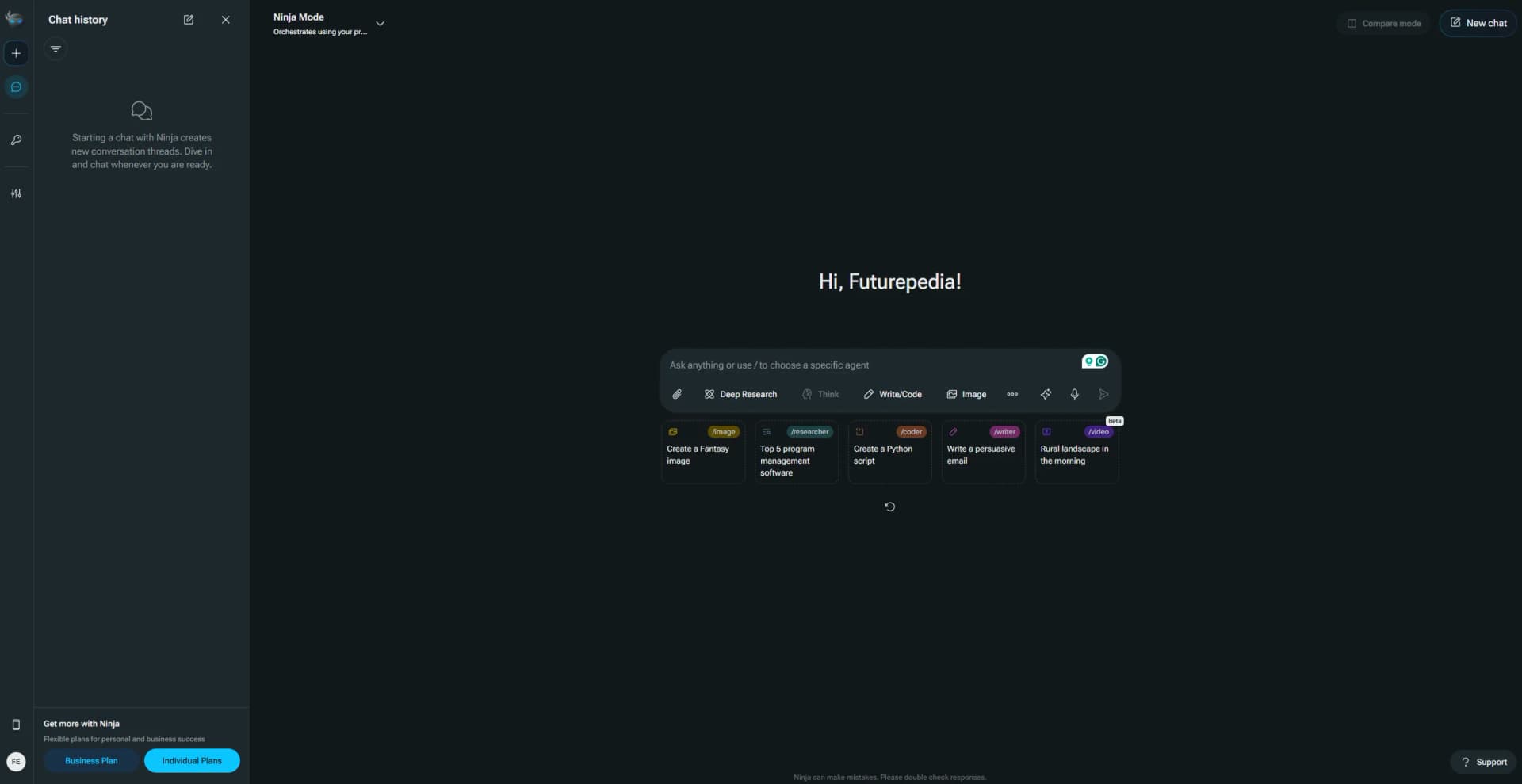
Ninja AI is a comprehensive AI assistant designed to streamline productivity by integrating over 25 leading AI models from providers like OpenAI, Anthropic, Google, Meta, and Amazon. It offers a unified platform where users can perform tasks ranging from research and writing to coding and image generation. With its multi-agent system, Ninja AI adapts to various complexities, ensuring efficient task execution for individuals, businesses, and developers alike.
Ninja AI stands out by pioneering Compound AI models—an advanced method that blends multiple flagship LLMs (from OpenAI, Anthropic, Google & others) into a single, optimized engine. These models are available to developers via API, delivering unmatched inference speed and accuracy at an affordable cost. The proprietary Ninja-LLM 3.0, Deep Research 2.0, and Reasoning 2.0 models regularly outperform competitors on key benchmarks like Arena-Hard, AIME, and GPQA. With this approach, Ninja AI offers not just a product but a powerful AI infrastructure for builders and professionals alike.
Who is Using Ninja AI?
Content Creators
Generate articles, social media posts, and multimedia content.
Software Developers
Leverage APIs and in-app coding agents for development and debugging.
Researchers & Academics
Use autonomous agents for in-depth research and data synthesis.
Business Professionals
Optimize scheduling, analytics, and document workflows.
Uncommon Use Cases
Educators use it for interactive learning material; legal professionals employ it for drafting and reviewing documentation.
Key Features
Rating Breakdown
Pricing Plans
Free
Free
- Includes 6 tasks per day using Ninja AI models. Great for testing simple queries and basic AI functionality
Standard
$5 per month. Unlocks unlimited tasks with Ninja AI
- Medium-quality image generation
- Podcast creation
- Access to 2 AI models (auto-selected)
Ultra
$15 per month. Grants unlimited tasks
- High-quality image and video generation
- File analysis
- Reasoning via SuperAgent-R 2.0
- Access to over 20 AI models including GPT-4.1
- Claude 3.7 Sonnet
- DeepSeek R1
Which Ninja AI plan should you pick?
Start with Free to evaluate Ninja; upgrade to Pro for regular individual use, Business for shared workspaces, or Enterprise for SSO and custom deployment.
Free
Good for trying Ninja with limited credits, models, image models, and one parallel task.
Pro
Good for individuals or small teams who need premium models, connectors, editors, and multiple seats.
Business
Good for teams that need unlimited seats, shared credits, workspace management, and unlimited parallel tasks.
Enterprise
Good for organizations needing dedicated support, custom deployment, enterprise security, and SSO.
Ninja AI Use Cases
File and document analysis
Upload documents, spreadsheets, images, or code and ask questions, extract data, compare files, or generate content.
Outcome: Faster summaries, insights, and actionable outputs.
Autonomous software development
Describe an application, then let SuperNinja write code, run tests, fix bugs, and deploy it.
Outcome: Production-ready applications with less manual development work.
Sales operations automation
Enrich leads, update CRM records, research accounts, and draft proposals.
Outcome: Cleaner pipelines and faster preparation for sales activity.
Customer support operations
Triage tickets, draft grounded replies, route edge cases, and update help-center content.
Outcome: Reduced support backlog and more consistent responses.
Research and content production
Conduct research, synthesize sources, and turn uploaded materials into structured drafts.
Outcome: Research-backed content produced more efficiently.
Workflow Ideas with Ninja AI
Document-to-report workflow
- 1Upload PDFs, spreadsheets, or other source files
- 2Ask Ninja to extract and analyze the relevant information
- 3Generate a report, email, presentation, or follow-up task
GitHub development workflow
- 1Connect a GitHub repository
- 2Describe the feature or issue to Ninja
- 3Review the generated branch, tests, and pull request
Support-ticket workflow
- 1Connect the support system
- 2Have Ninja triage and categorize incoming tickets
- 3Review drafted replies and route escalations
How Ninja AI fits into your stack
Browser
Ninja runs as a web-based AI workforce and can operate through a full browser on dedicated cloud computers, completing multi-step tasks end to end.
Team chat and tickets
Teams can assign work to Ninja from Slack, Microsoft Teams, or WhatsApp, then review and steer the work directly in the conversation thread.
Knowledge and files
Ninja processes uploaded documents and media, including PDFs, images, videos, and audio, and can analyze files for summaries and insights.
Automation and APIs
Ninja connects to tools such as Salesforce, HubSpot, GitHub, Jira, Notion, Gmail, and Slack, orchestrating workflows across them; its API supports programmatic chat-completion requests.
Desktop / IDE
Ninja provides downloadable macOS and Windows apps, while SuperNinja can work inside a dedicated virtual computer with a full VS Code IDE for coding tasks.
Pros
- +Comprehensive Functionality: Combines advanced AI agents, writing tools, coding assistants, and image generation into one seamless platform—eliminating the need for multiple AI subscriptions.
- +Cost-Effective Plans: Offers unlimited task execution starting at just $5 per month, delivering exceptional value for individuals and professionals alike.
- +User-Friendly Interface: Clean, intuitive layout makes it easy to switch between tasks, manage projects, and explore new AI features without friction.
- +Developer-Ready APIs: Provides access to high-performance Compound AI models via API, empowering developers to build faster, smarter AI applications at lower cost.
- +Regular Feature Updates: Continuously adds new tools, capabilities, and integrations based on user feedback and evolving AI trends.
Cons
- −Initial Learning Curve: The depth of features and range of AI models may be overwhelming for new users, requiring some time to fully master.
- −Limited Offline Functionality: Many of the advanced tools, including multi-agent workflows and research capabilities, are not available without internet access.
Limitations & when to consider alternatives
Known limitations
- Free plan has limited usage. The Free plan includes limited credits, limited models, and one parallel task.
- File uploads have size limits. Individual uploaded files can be no larger than 50 MB.
- Multiple uploads are capped. Ninja supports up to 10 files simultaneously.
- API usage requires purchased credits. API users must enable on-demand billing and purchase credits, with a stated minimum purchase of $50.
Look elsewhere when
- You need a browser extension rather than an installed app.
How to Use Ninja AI
- 1
Create an account
Start with the Free plan to access Ninja without a credit card.
- 2
Choose an agent or mode
Use coding, research, writing, image, scheduling, or general agent capabilities based on the task.
- 3
Upload context when needed
Add documents, spreadsheets, images, code, or audio so Ninja can analyze and work from source material.
- 4
Connect your tools
Authorize services such as GitHub, Slack, Salesforce, Jira, Notion, Gmail, or other supported integrations.
- 5
Delegate the task
Describe the desired outcome and let Ninja plan, execute, check, and return the completed work.
- 6
Upgrade or add API credits
Move to Pro, Business, or Enterprise for higher capacity, or purchase API credits for programmatic use.
Who is Ninja AI For?
Finance and accounting teams
Automate invoice processing, account reconciliation, month-end preparation, expense reports, and accounts-payable follow-ups.
Sales and revenue operations
Use Ninja for lead enrichment, CRM hygiene, account research, and proposal or RFP drafting.
Marketing teams
Repurpose content, schedule campaigns, retrieve campaign metrics, and monitor competitors.
Customer support teams
Triage tickets, draft responses, route escalations, maintain knowledge bases, and report CSAT.
Software engineering teams
Generate, test, review, and deploy code while connecting repositories and development tools.
Frequently Asked Questions
What is Ninja AI?
Ninja is a multi-agent AI platform that delegates and orchestrates tasks across coding, research, writing, image generation, and scheduling.
What can Ninja help me accomplish?
Ninja supports coding, research, writing, image and video generation, meeting scheduling, file analysis, and related productivity tasks.
What files can I upload?
Supported formats include PDFs, Word documents, spreadsheets, images, presentations, code files, audio, and plain text.
How does Ninja analyze images?
Its AI vision can perform OCR, identify visual elements, describe images, and extract structured data from charts, diagrams, and screenshots.
How many files can I upload at once?
Ninja supports up to 10 files simultaneously and can analyze or cross-reference them in one conversation.
What is the maximum file size?
Individual uploaded files can be up to 50 MB; larger datasets can be split or processed through the API.
Community reviews
Be the first to share your experience.
Sign in to leave a review for Ninja AI.
Ninja AI Alternatives
Looking for alternatives to Ninja AI? Here are similar tools in the same category:
Learn to Master Ninja AI
With Skill Leap courses
Get in-depth training on Ninja AI and 50+ other AI tools with our expert-led video courses.
Start 7-Day Free Trial