
NanoMaker AI
Shared credits for creators making images, videos, music, and voiceovers.
Key Takeaways
- What it is
- Shared credits for creators making images, videos, music, and voiceovers.
- Pricing
- Freemium · $19.99 per month · $39.99 per month · $79.99 per month
- Best for
- Multi-Model Image Generation
- AI Video Workspace
- Nano Banana Video
- Rating
- 4.1/5
What is NanoMaker AI?
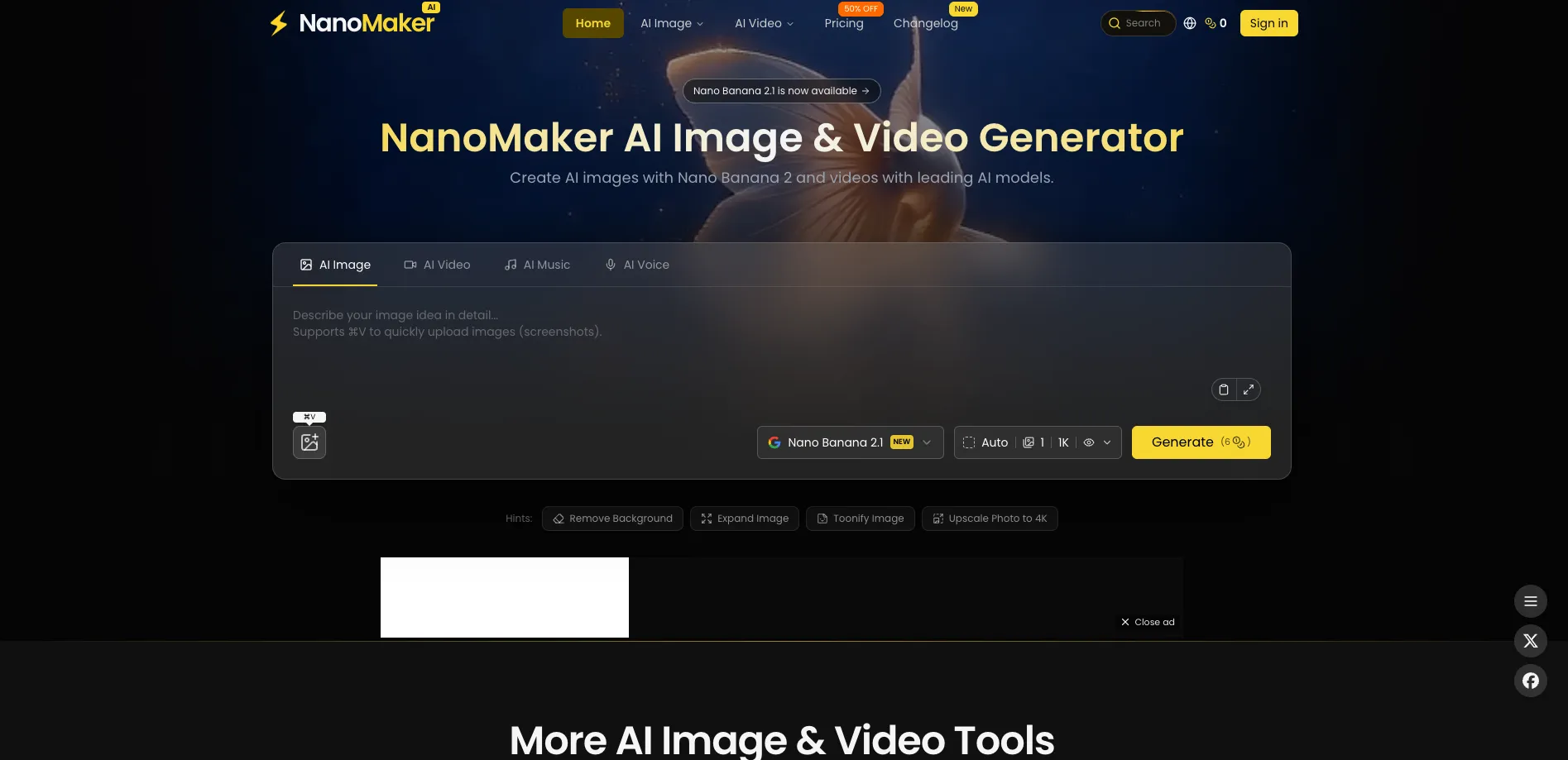
NanoMaker AI brings image, video, music, and text-to-speech generation into one browser workspace. It gives creators access to models such as Nano Banana 2, GPT Image 2, Seedance 2.5, Gemini Omni, Veo 3.1, Kling, and ElevenLabs voices through a shared credit balance. The main problem it solves is paying for and learning several separate creative tools.
NanoMaker's clearest distinction is its credit system across different media types, so the same subscription can cover a product image, a short video, background music, and a voiceover.
It fits content creators, marketers, YouTubers, designers, and small production teams that need quick creative drafts or finished social assets. High-end video generation can consume hundreds or thousands of credits, and generated content expires after 14 days, so it is less suitable as a long-term media library or predictable video production pipeline.
Who is Using NanoMaker AI?
YouTube Creators
Thumbnail generation, short video models, music, and voiceover tools help assemble a complete video package.
Social Media Managers
Prompt-based images, image-to-video clips, product visuals, and voice content support frequent campaign output.
Product Marketers
Uploaded product photos can become cleaner studio-style images, promotional scenes, and short demonstrations.
Graphic Designers
Style transformation, background replacement, relighting, upscaling, and image combination speed up visual exploration.
Podcast and Audio Producers
Text-to-speech voices and generated music provide narration and supporting audio for episodes or clips.
Uncommon Use Cases
Manga panel translation with speech-bubble detection; first-last-frame animation for turning two still images into a motion sequence.
Key Features
Rating Breakdown
Pricing Plans
Free
Free
- Up to 6 credits after first sign-in
- Up to 1 image
- No included videos, songs, or audio
- Commercial use license
- Private generation and batch generation
Lite
$19.99 per month
- $84 per year billed yearly, shown as $7 per month
- 4,500 credits per year
- Up to 900 images, 260 videos, 220 songs, or 450 audios
- Commercial use license, private generation, batch generation, and faster generation
- Phone-to-PC upload and ad-free browsing
Premium
$39.99 per month
- $100 per year billed yearly, shown as $8.33 per month
- 9,600 credits per year
- Up to 1,920 images, 552 videos, 480 songs, or 960 audios
- Commercial use license, private generation, batch generation, and faster generation
- Phone-to-PC upload and ad-free browsing
Max
$79.99 per month
- $240 per year billed yearly, shown as $19.99 per month
- 36,000 credits per year
- Up to 7,200 images, 2,112 videos, 1,800 songs, or 3,600 audios
- Commercial use license, private generation, batch generation, and faster generation
- Phone-to-PC upload and ad-free browsing
One-time credit packs
- Lite: 450 credits for $29.99
- Premium: 2,000 credits for $49.99
- Max: 6,000 credits for $99.99
- One-time credits never expire according to the documentation
Which NanoMaker AI plan should you pick?
Start with Free for a small test, choose Lite for occasional image work, and move to Premium or Max when video generation and larger credit pools matter.
Free
Good for testing the interface and creating up to one image.
Lite
Good for occasional creators who need 4,500 yearly credits and commercial-use output.
Premium
Good for regular creators who need 9,600 yearly credits plus access to higher-demand video models.
Max
Good for heavy users who need 36,000 yearly credits for frequent image, video, music, and audio work.
NanoMaker AI Use Cases
YouTube Video Package
A creator can combine a thumbnail, intro clip, background track, and voiceover in the same credit-based workspace.
Outcome: A starter video package from roughly 165 to 175 credits, according to NanoMaker's example.
Product Photography
An uploaded product image becomes a cleaner studio composition with background cleanup, lighting, and presentation changes.
Outcome: More polished product visuals for stores, ads, and catalogs.
Short Social Video
A still image or text prompt becomes a vertical or landscape clip through models such as Seedance, Veo, Kling, or Grok.
Outcome: Short-form video suitable for social posts and campaign drafts.
Voiceover and Narration
A script becomes spoken audio through 26 voice options, with pricing based on character count.
Outcome: An MP3 voiceover for videos, podcasts, explainers, or accessibility content.
Image Translation and Editing
Specialized tools handle manga translation, color changes, background removal, restoration, and portrait transformations.
Outcome: Faster versions of repetitive image-editing tasks.
Workflow Ideas with NanoMaker AI
Product Ad Starter
- 1Upload a product photo and remove the background.
- 2Generate a polished product scene or lifestyle image.
- 3Turn the image into a short video with a selected model.
YouTube Short
- 1Create a thumbnail or opening image with Nano Banana 2.
- 2Animate it with Nano Banana Video or another video model.
- 3Add generated music and a text-to-speech voiceover.
Manga Localization
- 1Upload a manga panel or page.
- 2Run the AI Manga Translator with multi-language output.
- 3Review the translated speech bubbles and download the result.
How NanoMaker AI fits into your stack
Browser workspace
NanoMaker runs from the web and includes a workspace for moving among image, video, and model tools.
Creative production
It sits near the beginning of a content workflow for generating concepts, campaign visuals, thumbnails, clips, music, and narration.
Files and references
Images, videos, audio, and some documents can act as source material or references for supported generators.
Final editing
Outputs can be downloaded for finishing in a video editor, design app, podcast tool, or publishing platform.
Pros
- +Model choice: Compare several image and video models from the same workspace.
- +Shared credits: Spend one credit balance across images, videos, music, and audio.
- +Creative range: Move from a prompt or uploaded image to a broader content package.
- +Commercial license: Paid plans include commercial use rights.
- +Prompt gallery: Ready-made prompts give new users concrete starting points.
Cons
- −Credit volatility: A video can cost far more credits than an image.
- −Short storage window: Generated content expires after 14 days.
- −Browser-first workflow: The product does not offer a confirmed native desktop or mobile app.
Limitations & when to consider alternatives
Known limitations
- Generated content expires. Images, videos, music, and audio are stored for 14 days, so important files need to be downloaded.
- Video access varies by plan. Seedance 2.5 and Gemini Omni require Premium or Max and are not available on Lite or the free plan.
- Text-to-speech input limit. Each text-to-speech generation accepts a maximum of 5,000 characters.
- Credit costs vary widely. The exact cost depends on the selected model, resolution, duration, and generation settings.
- Upload limits vary by tool. The homepage lists image uploads up to 5MB, while some video tools accept larger reference files with their own limits.
Look elsewhere when
- You need a permanent cloud media library for generated assets.
- You need a documented developer API or custom integrations.
- You need shared team workspaces with roles, invites, and enterprise identity controls.
- Your production budget cannot absorb variable credit costs for longer or higher-resolution video.
How to Use NanoMaker AI
- 1
Create an account
Sign up with Google to receive up to 7 free credits and access the generator dashboard.
- 2
Choose a media type
Open Image, Video, Music, or Text to Speech based on the asset you need.
- 3
Pick a model or tool
Select a model such as Nano Banana 2, GPT Image 2, Seedance, Veo, or an effect-specific tool.
- 4
Write the prompt
Describe the subject, style, motion, voice, or music direction in natural language.
- 5
Add reference media
Upload supported images, videos, audio, or documents when the selected tool accepts them.
- 6
Review the credit cost
Check the displayed cost before generating because pricing changes by model, resolution, duration, and input type.
Who is NanoMaker AI For?
Content Creators
Useful for producing thumbnails, social graphics, short clips, music, and voiceovers from one account.
Marketers and Businesses
Product photography, ad visuals, branded images, and demo videos can be drafted without a full production team.
YouTubers
Thumbnail tools, image-to-video generation, music, and narration support a repeatable video publishing workflow.
Designers
Image editing tools handle style changes, lighting, color changes, background replacement, and concept exploration.
Creative Hobbyists
The free plan provides a small trial allocation for testing image generation and specialized effects.
Frequently Asked Questions
Is NanoMaker AI free?
Yes. The Free plan provides up to 6 credits after first sign-in, with up to one image and no included video, music, or audio generations.
How does NanoMaker pricing work?
Usage is based on credits. Different models and generation settings consume different amounts, and the interface shows the cost before generation.
Do unused credits expire?
Subscription credits roll over according to the pricing page, while one-time credits are listed as never expiring in the documentation.
Can I use NanoMaker creations commercially?
The listed Free, Lite, Premium, and Max plans include a commercial use license.
Can NanoMaker generate video from an image?
Yes. Nano Banana Video can use a prompt or uploaded image, and the video tools support image-to-video generation with several models.
How long can a text-to-speech request be?
Text-to-speech supports up to 5,000 characters per generation and charges 10 credits per 1,000 characters.
Community reviews
2 reviews from people who use NanoMaker AI.
Sign in to leave a review for NanoMaker AI.
Gil Ariel
Thibault BM
NanoMaker AI Alternatives
Looking for alternatives to NanoMaker AI? Here are similar tools in the same category:
Learn to Master NanoMaker AI
With Skill Leap courses
Get in-depth training on NanoMaker AI and 50+ other AI tools with our expert-led video courses.
Start 7-Day Free Trial