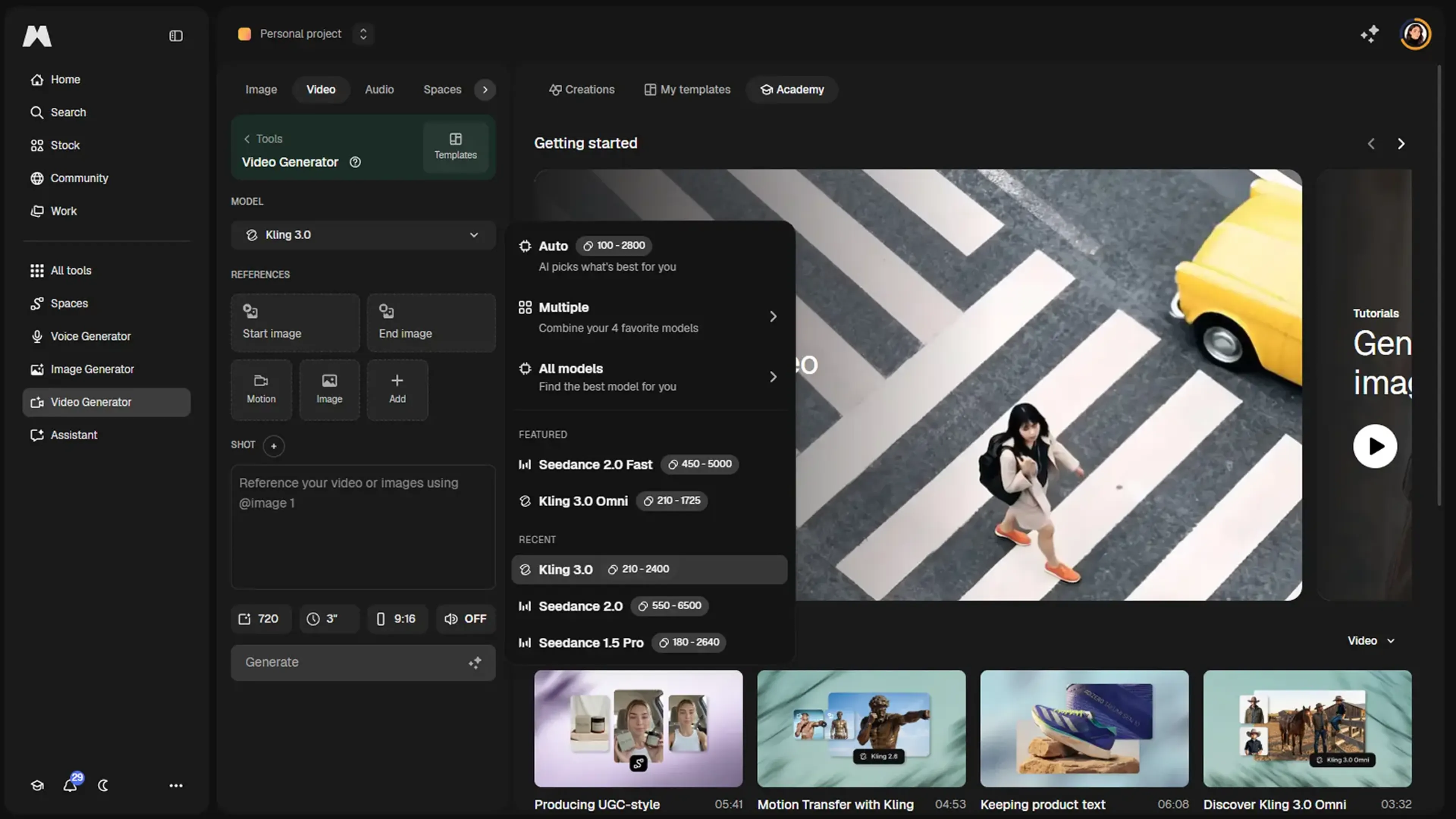
Magnific (formerly Freepik) AI Video Generator is part of the broader Magnific creative platform that combines image, video, and audio creation in one environment. It focuses on AI text to video and image to video generation, backed by several state-of-the-art models, plus an AI video upscaler that pushes footage up to 4K while adding or refining detail intelligently.
Key Features:
Multi-model video generation: Generate short videos from text prompts or images using models such as Kling and WAN, with durations roughly in the 2 to 15 second range and resolutions up to 1080p.
Unified async workflow and API: Submit video jobs, receive a task ID, then poll or use webhooks for results, making it suitable for both the web UI and integration into pipelines.
AI video upscaling to 4K: Upscale videos to 720p, 1K, 2K, or 4K with controls for FPS boost, sharpening, grain, and creativity, plus Standard and Turbo processing modes.
Creative platform extras: Works inside Magnific’s ecosystem that offers 20+ AI tools, precision camera and lighting controls, 3D environments, a massive asset library, and collaborative Spaces for shared projects.
Pros
High-end visual quality: Access to modern video models and an advanced upscaler yields crisp, detailed clips suitable for professional outputs.(docs.magnific.com)
Short-form flexibility: Multiple models and durations give creators options for teasers, ads, loops, and motion studies without switching tools.(docs.magnific.com)
Deep control over look and feel: Parameters for resolution, frame rate, sharpness, and detail help avoid the generic “AI look” that plagues some rivals.(docs.magnific.com)
Team-friendly ecosystem: Shared Spaces, real-time collaboration, and 250M+ assets make it attractive for studios and enterprise teams already living in Magnific.(producthunt.com)
Cons
Can feel complex at first: Multiple models, modes, and quality controls create a learning curve, especially for casual users.(docs.magnific.com)
Short clip focus: Official model durations top out around 10 to 15 seconds, so it is not a full long-form editor replacement.(docs.magnific.com)
Premium positioning: External reviews consistently describe Magnific as a higher-priced option, which may deter budget-sensitive creators.(tooldirectory.ai)
Who is Using Magnific AI Video Generator?
Creative Studios and Production Agencies: Using it to prototype shots, motion tests, and high-detail shots for commercials and social campaigns.
Marketing and Brand Teams: Creating snappy product clips and social assets while keeping everything inside one creative platform.
Photographers, Illustrators, and 3D Artists: Turning stills into animated sequences and then refining them with familiar Magnific upscaling controls.
Developers and SaaS Builders: Embedding text to video and image to video creation directly into apps via the Magnific API.
Uncommon Use Cases: Adopted in design and media schools to teach motion promptcraft; explored by small game studios for rapid storyboard-style cutscene explorations.
Pricing:
Premium: $20 per month; billed monthly, includes 20,000 credits per month, 250M+ premium stock assets, image/video/audio models, shared workflow spaces, editing tools, music and sound effects generation, commercial AI license, and 250M+ photos, videos, vectors, and PSDs.
Premium+: $45 per month; billed monthly, includes 45,000 credits per month, unlimited use on selected models, everything in Premium plus top-up credits anytime, music rights, and early access to AI features.
Pro: $280 per month; billed monthly, includes 300,000 credits per month, unlimited use plus 20% cheaper credits, everything in Premium+ plus early AI feature access.
Business: $69 per seat per month; billed monthly, screenshot shows 2 users selected, with 90,000 credits per month total for the team, plus shared team credit pool, 8 parallel generations per user, 3-month credit rollover, basic legal indemnification, SSO and usage reporting, company-wide certifications, and shared team spaces and projects.
Disclaimer: Please note that pricing information may not be up to date. For the most accurate and current pricing details, refer to the official Magnific AI Video Generator website.
What Makes Magnific AI Video Generator Unique?
Magnific AI Video Generator stands out by pairing strong generative video models with its signature detail-oriented upscaling in a single creative stack. Users can generate clips from text or images, then refine them with precise control over resolution, frame rate, grain, and sharpness, instead of treating upscaling as a separate afterthought.
How We Rated It:
Accuracy and Reliability: 4.6/5
Ease of Use: 4.1/5
Functionality and Features: 4.8/5
Performance and Speed: 4.3/5
Customization and Flexibility: 4.7/5
Data Privacy and Security: 4.2/5
Support and Resources: 4.0/5
Cost-Efficiency: 3.8/5
Integration Capabilities: 4.3/5
Overall Score: 4.3/5
High-Detail AI Video Creation For Serious Visual Storytellers:
Magnific AI Video Generator offers a powerful mix of short-form generative video, 4K upscaling, and deep creative control, wrapped inside a broader platform that already serves demanding visual professionals. It is not the cheapest or simplest option, but for teams that care a lot about image quality and owning a single environment for images, video, and audio, it earns serious consideration.