
Machined
Automate SEO content creation, boosting organic traffic effortlessly.
Watch Machined in Action
Key Takeaways
- What it is
- Automate SEO content creation, boosting organic traffic effortlessly.
- Pricing
- Freemium · $49 per month. provides unlimited clusters and articles
- Best for
- Automated Keyword Research
- SEO-Optimized Content Clusters
- Human-Like Content Generation
- Rating
- 4.5/5
What is Machined?
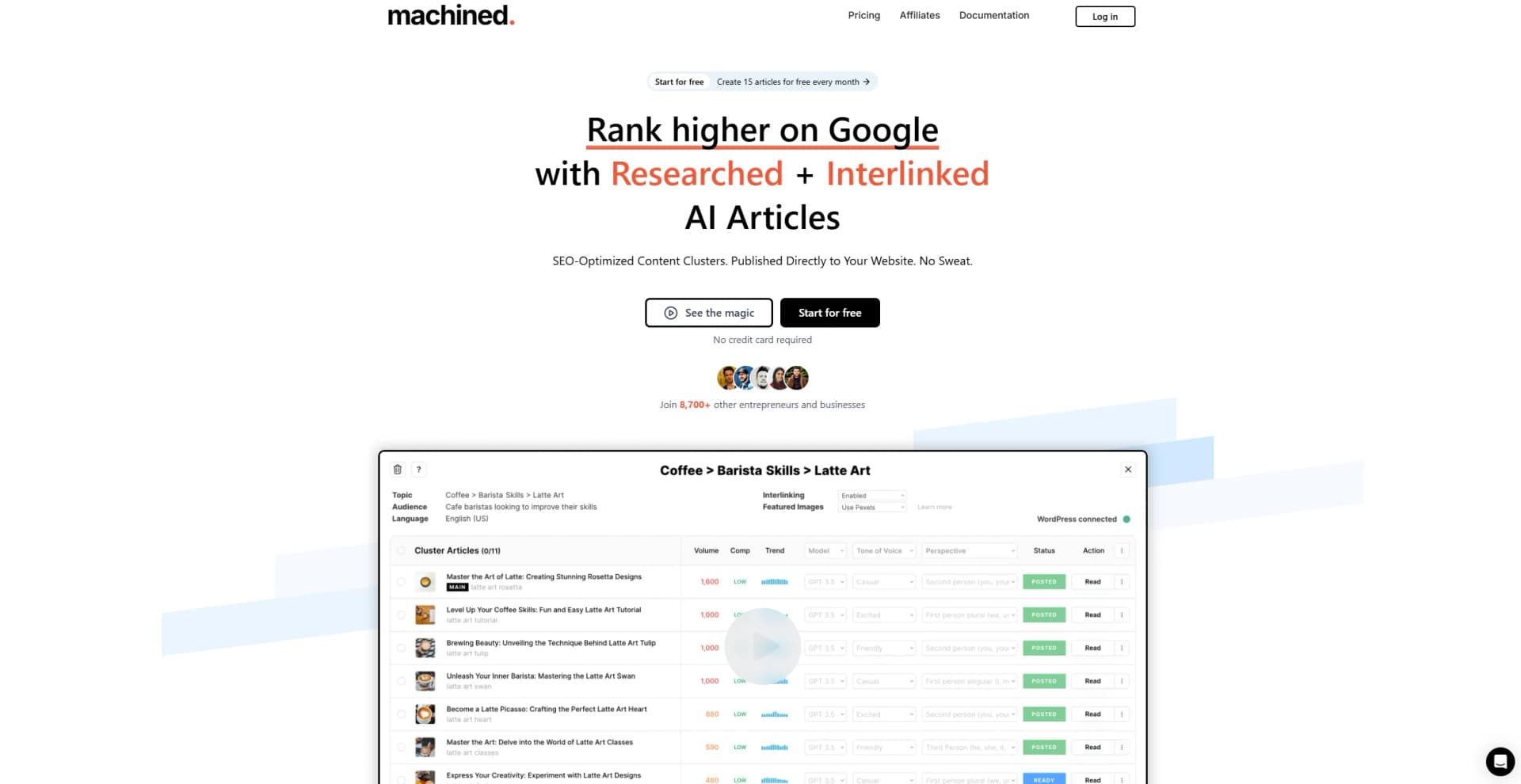
Machined is an innovative AI tool designed to revolutionize content creation by automating the development of SEO-optimized content clusters. This tool is crafted to assist entrepreneurs, digital marketers, and content creators in generating a large number of informational articles that are meticulously researched, interlinked, and ready to be published directly to websites. By automating keyword research, clustering, and internal linking, Machined simplifies the complex process of enhancing organic search rankings and increasing web traffic.
Machined stands out with its ability to automate the creation of SEO-optimized content clusters, a feature that is invaluable for enhancing organic search rankings. Its seamless integration with popular CMS platforms and support for over 120 languages make it a versatile tool for global content strategies. Additionally, the "bring-your-own-key" model offers a cost-effective solution for users who wish to leverage their own OpenAI API accounts.
Machined effectively transforms the landscape of content creation by automating complex SEO tasks and enabling large-scale content production. Its robust features, combined with a user-friendly interface and cost-effective pricing model, make it an excellent choice for businesses and individuals looking to enhance their digital presence and drive organic traffic. Whether you're a seasoned marketer or a budding content creator, Machined offers the tools needed to elevate your content strategy and achieve impactful results.
Who is Using Machined?
Digital Marketing Agencies
Leveraging the tool for creating SEO-optimized content that enhances client visibility and engagement.
Content Creators and Bloggers
Utilizing Machined to streamline content production and focus on quality and consistency.
E-commerce Businesses
Employing content clusters to improve product visibility and attract more organic traffic.
SEO Specialists
Using Machined to automate keyword research and content interlinking for better search engine rankings.
Uncommon Use Cases
Adopted by educational institutions for teaching SEO strategies; utilized by real estate agencies for creating informative property listings.
Key Features
Rating Breakdown
Pricing Plans
Free Plan
Free
- Automated keyword research
- Clustering
- Featured image generation.*
Unlimited Plan
$49 per month. provides unlimited clusters and articles
- Along with advanced features like WordPress integration and API webhook automations.*
*Both plans require an OpenAI API key.
Which Machined plan should you pick?
Start with Launch after the trial for small publishing volumes, upgrade to Growth, Pro, or Scale as monthly article needs increase, and choose BYOK for high-volume generation with your own provider keys.
Launch
Good for small SEO projects needing 30 articles per month, unlimited projects, two team members, research, images, and CMS connections.
Growth
Good for growing content programs needing 100 articles per month and three team members.
Pro
Good for established teams needing 250 articles per month and five team members.
Scale
Good for larger publishing operations needing 750 articles per month and ten team members.
BYOK
Good for high-volume users needing up to 2,000 articles per month and the ability to manage AI-provider costs directly.
Machined Use Cases
Build topical-authority content clusters
Enter a topic and audience, research related keywords, and generate pillar and supporting articles.
Outcome: A connected content library targeting related search intents.
Automate internal linking
Have Machined analyze cluster articles and insert contextual, keyword-optimized links.
Outcome: A structured internal-link architecture with less manual work.
Publish SEO content to a CMS
Connect WordPress or Webflow, configure categories, tags, authors, and status, then publish articles or clusters.
Outcome: Formatted content, images, metadata, and links are sent directly to the CMS.
Create research-backed articles
Use automatic or directed research to gather facts from web sources and add inline references or footnotes.
Outcome: Articles supported by source links and citations.
Match a brand writing style
Upload representative articles or paste content, review the generated voice profile, and save it to a project.
Outcome: Generated content follows a reusable brand voice and tone.
Workflow Ideas with Machined
Topic-to-published content cluster
- 1Enter the main topic, target audience, language, and cluster size
- 2Create the cluster in Auto-Pilot mode and review the generated articles
- 3Connect WordPress or Webflow and publish the cluster
Research-backed article workflow
- 1Create a single article or cluster and enable Research in Advanced Settings
- 2Use automatic research or provide up to five specific source URLs
- 3Review citations and verify the article before publishing
Brand-consistent bulk generation
- 1Create and save a Brand Voice from sample articles or pasted content
- 2Configure content type, custom instructions, research, length, and image settings
- 3Apply the settings to bulk generation of up to 50 articles
How Machined fits into your stack
Browser
Machined is a web-based SEO content platform used through its website and app. It supports keyword research, content clustering, research, editing, and publishing in the browser.
Docs and writing
Machined provides an in-app content editor for creating long-form SEO articles, custom briefs, brand voices, research-backed content, and automated metadata.
Automation and APIs
Machined sits in an automated publishing workflow through WordPress and Webflow integrations, plus custom webhooks connected to Zapier, Make, n8n, or other platforms.
Pros
- +Time Efficiency: Automates the entire content creation process, significantly reducing the time required to produce and publish articles.
- +Cost-Effective: Operates on a pay-per-use model, allowing users to pay only for the content they generate, eliminating unnecessary costs.
- +Scalable Content Production: Capable of generating hundreds or even thousands of articles simultaneously, catering to large-scale content needs.
- +Direct Publishing Capability: Integrates seamlessly with platforms like WordPress and Webflow for automated content publishing.
Cons
- −Initial Learning Curve: Users may need some time to familiarize themselves with the tool's advanced features and integrations.
- −Dependency on External API Costs: Requires users to have an OpenAI account, which incurs additional costs based on API usage.
- −Limited Free Features: The free plan restricts some advanced features, necessitating an upgrade for full functionality.
Limitations & when to consider alternatives
Known limitations
- Trial converts to a paid-plan decision. The pricing page documents a 7-day free trial, after which users must choose a paid plan to continue generating and publishing new content.
- Monthly article limits on standard plans. Launch, Growth, Pro, and Scale provide 30, 100, 250, and 750 articles per month respectively.
- English generally produces the best results. Machined states that English has the most training data and refinement in the underlying models, so other-language quality may vary.
- Research citations require verification. Machined warns that citations and links can contain errors and should be reviewed before publishing.
- Provider-side outages and rate limits can affect generation. When using provider APIs, outages or repeated rate-limit failures can cause articles to fail.
Look elsewhere when
- You need a native mobile or desktop application
- You need a developer API for programmatic access
- You need image analysis or computer vision
- You need broad marketing copy beyond SEO articles
How to Use Machined
- 1
Start the workspace
Sign up to automatically create a workspace and first project, then begin with the Launch trial.
- 2
Create a brand voice
Open Brand Voice, provide up to three representative URLs or pasted text, review the generated profile, and save it to the project.
- 3
Connect a publishing destination
Connect WordPress or Webflow if you want direct publishing; otherwise export the generated content.
- 4
Choose a content workflow
Create either a content cluster for topical authority or a single article for a one-off piece.
- 5
Configure generation settings
Set the audience, language, research mode, content type, length, images, internal-linking strategy, and AI model as needed.
- 6
Review and publish
Edit content in the WYSIWYG editor, verify research citations, then publish directly or export as HTML or Markdown.
Who is Machined For?
Local businesses
Machined helps local businesses create locally tailored SEO content designed to attract nearby customers and leads.
Marketing agencies
Marketing agencies can use Machined to scale SEO content production across client websites and publishing workflows.
SaaS startups
SaaS startups can use content clusters, research, internal linking, and CMS publishing to grow content marketing.
Frequently Asked Questions
What is Machined?
Machined is an AI-powered SEO content platform for keyword research, content clustering, article generation, internal linking, research citations, and CMS publishing.
How do I create a content cluster?
Enter a topic, target audience, language, and cluster size, then create the cluster in Auto-Pilot mode. Machined researches keywords and generates the article cluster.
Can Machined publish directly to a CMS?
Yes. Connect WordPress or Webflow, configure publishing settings, and publish individual articles or entire clusters with one click.
What is BYOK?
BYOK lets you connect your own OpenRouter, OpenAI, Anthropic, Google, or Perplexity API key and pay the provider directly.
Does Machined support multiple languages?
Yes. Machined officially supports 58 languages, with language selected when creating a cluster or single article.
Can I customize the generated content?
Yes. You can use brand voices, custom instructions, directed research, content types, custom outlines, length controls, image settings, and AI model selection.
Community reviews
6 reviews from people who use Machined.
Sign in to leave a review for Machined.
Simo Mrav
Tin Novakovic
Thibault BM
MUSTAAR AAF
Abdulrahman Alhasso
Yusef
Machined Alternatives
Looking for alternatives to Machined? Here are similar tools in the same category:
Learn to Master Machined
With Skill Leap courses
Get in-depth training on Machined and 50+ other AI tools with our expert-led video courses.
Start 7-Day Free Trial