
Luminal
Unlock productivity with AI-driven automation, analytics, and scalable workflows.
Key Takeaways
- What it is
- Unlock productivity with AI-driven automation, analytics, and scalable workflows.
- Best for
- Automation Capabilities
- Intelligent Analytics
- Customizable Workflows
- Rating
- 4.4/5
What is Luminal?
Luminal is an innovative AI tool designed to illuminate the path toward efficient digital workflows. At its core, Luminal serves as a powerful assistant, adept at automating a range of tasks that traditionally demand considerable time and effort. It's built with a focus on enhancing productivity and streamlining processes, making it a go-to solution for professionals and organizations keen on optimizing their operations.
What sets Luminal apart is its commitment to user-centric design, allowing for a high degree of customization. This ensures that regardless of the industry or size of the operation, Luminal can be tailored to meet specific needs, making it not just a tool but a personalized solution.
Luminal stands out as a robust AI tool that excels in boosting productivity and streamlining operations. It's particularly noteworthy for its customizable workflows and scalable nature, making it an indispensable asset for a variety of users. With its strong focus on automation and analytics, Luminal is more than just a tool; it's a strategic partner in achieving efficiency and growth.
Who is Using Luminal?
Small to Medium Enterprises (SMEs)
Utilizing Luminal for automating administrative tasks.
Startups
Leveraging Luminal's scalability to support rapid growth.
Marketing Teams
Using Luminal to analyze campaign data and optimize strategies.
Project Managers
Employing Luminal to streamline project coordination and communication.
Uncommon Use Cases
Non-profits use Luminal to manage donor databases; Independent researchers for data compilation and analysis.
Key Features
Rating Breakdown
Pricing Plans
Basic Plan
- Ideal for individuals or small teams starting with Luminal
Professional Plan
- Geared towards growing businesses requiring advanced features
Which Luminal plan should you pick?
Start with Free to test spreadsheet workflows, then upgrade to Plus or Professional when you need more monthly assistant interactions; contact Luminal for Enterprise needs.
Free
Good for trying Luminal with up to 5 assistant interactions.
Plus
Good for regular users who need up to 150 assistant interactions per month.
Professional
Good for heavier spreadsheet users who need up to 500 assistant interactions per month.
Enterprise
Good for organizations requiring a custom plan tailored to their business.
Luminal Use Cases
Clean and format spreadsheets
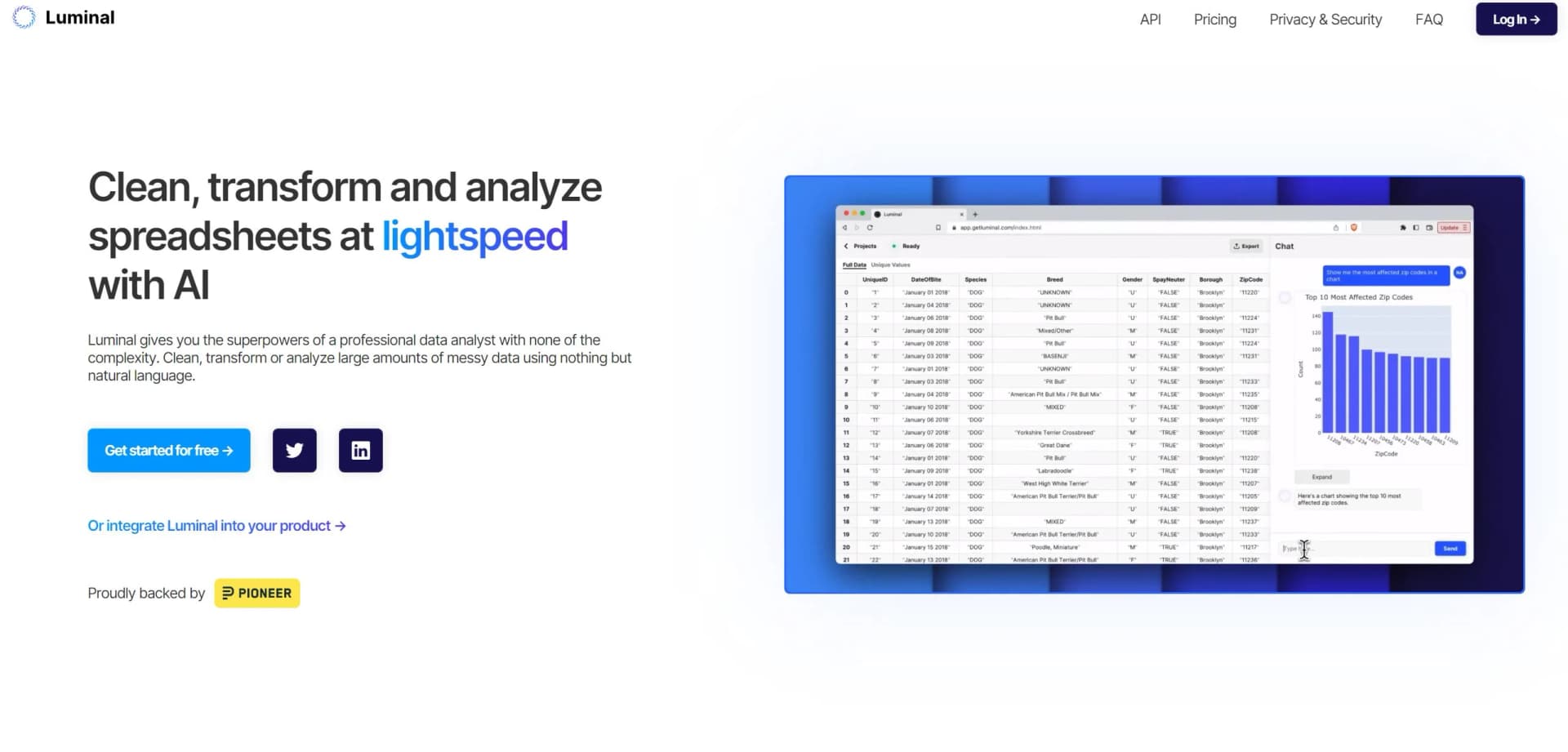
Use natural-language instructions to clean, categorize, organize, and reformat spreadsheet data.
Outcome: Cleaner, more consistently formatted datasets.
Analyze spreadsheet data
Ask questions about spreadsheet contents and request calculations or analysis.
Outcome: Faster answers and insights from spreadsheet data.
Create data visualizations
Request graphs, charts, or maps from the uploaded dataset.
Outcome: Visual representations of spreadsheet data.
Process large datasets
Use Luminal to work with spreadsheets containing tens of thousands of rows or more.
Outcome: Reduced manual effort on large spreadsheet tasks.
Workflow Ideas with Luminal
Clean a spreadsheet
- 1Upload a CSV, XLSX, XLS, or XLSM file
- 2Describe the cleaning or formatting task in natural language
- 3Review Luminal's changes and explanation
Analyze a dataset
- 1Upload the spreadsheet
- 2Ask questions or request calculations
- 3Review the generated answers and actions performed
Visualize spreadsheet data
- 1Upload the dataset
- 2Ask Luminal to create a graph, chart, or map
- 3Inspect the resulting visual elements
How Luminal fits into your stack
Cloud Services Compatibility
Luminal works seamlessly with popular cloud storage providers.
CRM Integration
It integrates with major CRM platforms to enhance customer relationship management.
API Access
Offers API options for businesses looking to build custom integrations.
Collaboration Tools
Luminal supports various collaboration tools to improve team workflows.
Pros
- +Increased Productivity: Luminal significantly reduces the time spent on manual tasks.
- +User Empowerment: Its intuitive interface empowers users to harness its full potential without extensive training.
- +Cost Savings: By automating tasks, Luminal helps cut down on operational expenses.
- +Adaptable: It easily adapts to various industries and sectors, making it a versatile tool.
Cons
- −Learning Curve: Some users may require time to get accustomed to all the features.
- −Integration Limitations: While Luminal offers several integrations, it may not support every third-party tool out there.
- −Resource Intensity: For smaller operations, Luminal's comprehensive features might be more than necessary.
Limitations & when to consider alternatives
Known limitations
- Free plan interaction limit. The Free plan includes up to 5 assistant interactions.
- Plus plan interaction limit. The Plus plan includes up to 150 assistant interactions per month.
- Professional plan interaction limit. The Professional plan includes up to 500 assistant interactions per month.
- Custom enterprise pricing. Enterprise pricing is not published and requires contacting Luminal.
How to Use Luminal
- 1
Luminal provides a suite of tutorials to help users maximize the tool's potential, ranging from beginner guides to advanced usage tips.
Who is Luminal For?
Professional users
Luminal is positioned as a professional data analyst assistant for spreadsheet work.
Personal users
The site says Luminal is suitable for both professional and personal use.
People working with large datasets
Luminal is designed for users handling large or complex spreadsheets.
Frequently Asked Questions
What file formats does Luminal support?
Luminal supports CSV, XLSX, XLS, and XLSM spreadsheet files.
How does Luminal work?
Upload a spreadsheet, submit a natural-language prompt, and review the actions Luminal performs.
What can Luminal do with spreadsheets?
It can clean, organize, reformat, calculate, analyze, and visualize spreadsheet data.
How much data can Luminal handle?
The site says Luminal can handle spreadsheets with tens of thousands of rows and references datasets of up to one million rows.
What visualizations can Luminal create?
Users can ask Luminal to create graphs, charts, and maps from their data.
Does Luminal support multiple languages?
Yes. The site lists Chinese, French, Hindi, Spanish, Japanese, Turkish, Polish, Korean, Thai, and other languages.
Community reviews
3 reviews from people who use Luminal.
Sign in to leave a review for Luminal.
Isaac Duncanof
Adil Dahya
Sofia Vargas
Luminal Alternatives
Looking for alternatives to Luminal? Here are similar tools in the same category:
Learn to Master Luminal
With Skill Leap courses
Get in-depth training on Luminal and 50+ other AI tools with our expert-led video courses.
Start 7-Day Free Trial