Lido
Finance teams turn recurring invoices and statements into spreadsheet-ready data automatically.
Key Takeaways
- What it is
- Finance teams turn recurring invoices and statements into spreadsheet-ready data automatically.
- Pricing
- $29 per month · $7,000 per year
- Best for
- Data Extractor
- Workflow Builder
- AI Columns
- Rating
- 4.3/5
What is Lido?
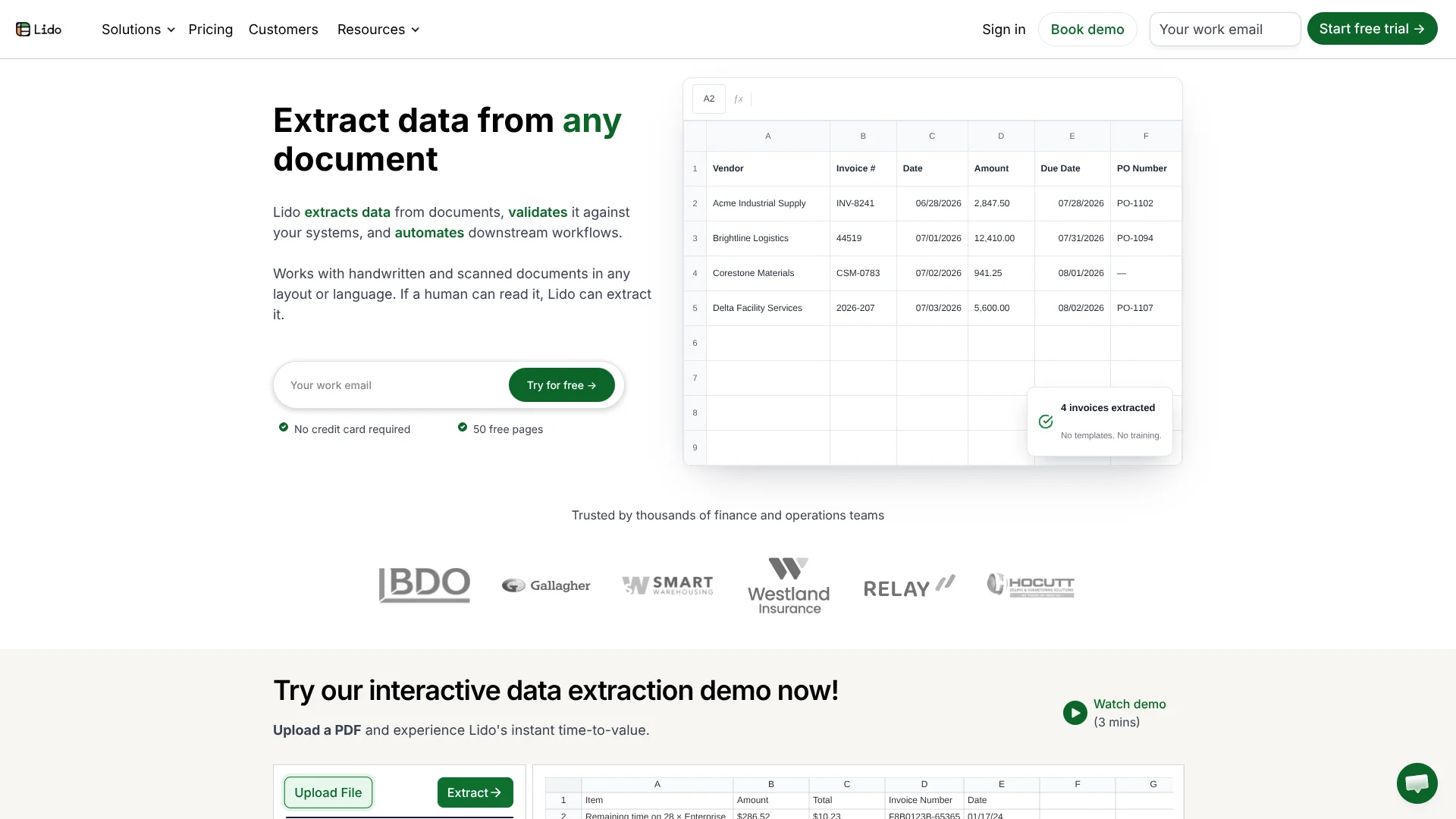
Lido turns PDFs, scans, photos, emails, and other files into structured rows and columns for Excel, CSV, Google Sheets, or downstream systems. It is built for finance and operations teams that need to replace recurring manual data entry, especially for invoices, receipts, purchase orders, bank statements, and medical forms. Its extraction works across changing layouts and does not require template setup.
Lido can watch a Google Drive folder, OneDrive folder, mailbox, or Outlook inbox, extract requested fields, validate the results, and send the data to another system through a visual workflow. That makes it useful for repeatable document pipelines rather than one-off OCR jobs.
Finance, healthcare, accounting, and operations teams are the strongest fit, particularly when documents arrive in volume. It is less suitable when you need mobile access, source-PDF editing, plain-text transcription, or extraction of embedded image files. Lido is best understood as a document-to-data engine with automation built around the spreadsheet output.
Who is Using Lido?
Accounts payable managers
Invoice fields and line items arrive in structured tables instead of requiring repeated manual entry.
Billing managers
Recurring billing documents can be extracted and routed while teams spend less time checking layouts by hand.
Operations managers
Folder and mailbox triggers keep document intake moving when new files arrive.
Healthcare administrators
Medical forms and other sensitive documents can be processed within HIPAA-oriented workflows.
Developers
The API places Lido extraction inside an existing backend and returns structured JSON for application use.
Uncommon Use Cases
Filling PDF forms from spreadsheet rows; splitting and renaming incoming files before sending them to another system.
Key Features
Rating Breakdown
Pricing Plans
Standard
$29 per month
- 100 pages per month
- 1 user
- Convert any file type
- Export to Excel and CSV
- 50 free pages are available with no credit card required
Scale
$7,000 per year
- 42,000 pages per year
- Up to 10 users
- API and Workflow access
- Priority email and chat support
Enterprise
- Custom page limits
- Custom ERP integrations
- Dedicated US-based account manager
- Live US-based onboarding and support
Which Lido plan should you pick?
Start with Standard for occasional document extraction, move to Scale when you need shared access, API or workflow features, and choose Enterprise for custom integrations or high-volume processing.
Standard
Good for one user who needs template-free extraction, 100 pages per month, and Excel or CSV export.
Scale
Good for teams that need up to 10 users, 42,000 pages per year, API access, workflow automation, and priority support.
Enterprise
Good for high-volume operations that need custom page limits, ERP integrations, dedicated account management, or live onboarding and support.
Lido Use Cases
Invoice processing
Vendor invoices become rows containing fields such as vendor name, invoice number, amount, due date, and purchase order number.
Outcome: A searchable invoice tracker with less manual data entry.
Purchase order intake
Purchase orders from different suppliers can be read into consistent columns despite layout changes.
Outcome: Structured purchase order data ready for review or export.
Email attachment automation
A mailbox or forwarded email starts extraction whenever a document arrives with the right intake pattern.
Outcome: Incoming attachments move into a repeatable processing queue.
Document validation
Extracted values are checked against internal systems or reference data before they reach an ERP or reporting sheet.
Outcome: Cleaner records with fewer downstream corrections.
PDF form filling
Spreadsheet rows supply the values needed to create batches of completed PDF forms.
Outcome: Filled forms produced from structured data at scale.
Workflow Ideas with Lido
Invoice inbox to tracker
- 1Watch a Google Drive folder or Lido Mailbox for new invoices.
- 2Extract vendor, invoice, amount, due date, and purchase order fields.
- 3Insert the results into an invoice tracker and notify the accounting team.
Purchase order validation
- 1Start the workflow when a purchase order arrives in OneDrive.
- 2Extract the order details and match them against reference records.
- 3Send validated data to a spreadsheet or external system through the API.
Form generation pipeline
- 1Collect structured values from incoming documents.
- 2Map each row to a PDF form template.
- 3Generate completed forms and save them to Google Drive or OneDrive.
How Lido fits into your stack
Document intake
Lido accepts uploads and can monitor Google Drive, OneDrive, Lido Mailbox, and Outlook for new files or attachments.
Spreadsheet workspace
Extracted fields land in Lido sheets as rows and columns. Results can be exported to Excel, CSV, or Google Sheets.
Workflow automation
The Workflow Builder connects triggers, extraction, validation, spreadsheet actions, file handling, and output steps.
Business communication
Gmail, Outlook, Slack, and SMS actions can send notifications or extracted results as part of a workflow.
External systems
API Request nodes, webhooks, and the Lido API pass structured data to other applications, ERPs, or internal services.
Pros
- +No-template extraction: Handles changing document layouts without configuring a separate template for every vendor.
- +Strong workflow path: Moves from incoming file to validated data and an external destination inside the same workflow.
- +Broad document support: Reads typed, scanned, photographed, and handwritten documents in many languages.
- +Developer access: The API returns structured JSON and supports asynchronous processing and webhooks.
- +Security controls: Offers AES-256 at rest, TLS 1.2 or higher in transit, SOC 2 Type II, and HIPAA support with an Enterprise BAA.
Cons
- −Desktop-only access: There is no iOS or Android app, and mobile browsers are not supported.
- −Business pricing: The Scale and Enterprise tiers are priced for organizations with substantial document volume.
- −Structured output focus: Results are organized into rows and columns rather than delivered as free-form text.
Limitations & when to consider alternatives
Known limitations
- No mobile support. Lido is available on desktop web only. iOS, Android, and mobile browser use are not supported.
- API results expire. API extraction results expire after 24 hours, so applications need to save the results when they arrive.
- Embedded images are not extracted. Lido extracts text and data from documents but does not pull embedded photos or image files out as separate files.
- No source-PDF editing. Lido can extract data and fill PDF forms, but it does not edit the original PDF itself.
- Workflow ownership affects access. Only the spreadsheet owner can add automations and use connected integration credentials for that sheet.
Look elsewhere when
- You need a native iOS or Android app for document processing.
- You need to edit the original PDF or extract embedded image files.
- Your workflow requires free-form text transcription instead of structured columns.
- Your team needs a public API with results retained longer than 24 hours by default.
How to Use Lido
- 1
Start with a document type
Create a Lido sheet and define the columns you want extracted, such as vendor, date, amount, or account number.
- 2
Test the extraction
Run a sample document in the spreadsheet interface first so you can adjust field instructions before automating the process.
- 3
Choose an intake source
Upload files manually or connect Google Drive, OneDrive, a Lido Mailbox, Gmail forwarding, or Outlook.
- 4
Add validation and actions
Place validation, transformation, notification, export, or form-filling steps after the Data Extractor node.
- 5
Activate the workflow
Turn on the workflow so scheduled or event-based triggers process new documents without manual clicks.
- 6
Move to the API when needed
Reuse the tested extraction configuration in the API when another application or backend should submit documents and receive structured JSON.
Who is Lido For?
Finance and accounting teams
Recurring invoice, receipt, purchase order, and statement work can move from manual entry into structured spreadsheets.
Operations teams
Teams handling regular document intake can route files through extraction, validation, and downstream actions.
Healthcare organizations
HIPAA-focused teams can process sensitive forms and records with Enterprise BAA support.
High-volume document operations
Organizations processing thousands of pages can use workflow and API access to support larger pipelines.
Frequently Asked Questions
Does Lido have a free plan?
Yes. Every plan includes 50 free pages with no credit card required, and the free pages do not expire.
How much does Lido cost?
The Standard plan costs $29 per month for 100 pages and one user. Scale costs $7,000 per year for 42,000 pages and up to 10 users. Enterprise starts at $35,000 per year with custom page limits and integrations.
Does Lido require document templates?
No. Lido extracts requested fields from changing document layouts without requiring a separate template for each document source.
Can Lido connect to Google Drive or Outlook?
Yes. Workflows can watch Google Drive and OneDrive folders, receive documents through a Lido Mailbox, and connect with Gmail or Outlook for email actions and triggers.
Does Lido have an API?
Yes. The Lido API accepts documents and returns structured JSON. API access is included with the Scale plan and higher.
Is Lido available on mobile?
No. Lido currently supports desktop web use only and does not offer native iOS or Android apps.
Community reviews
6 reviews from people who use Lido.
Sign in to leave a review for Lido.
Keith Kan
Tarang Patel
Adrian
Andres Balcazar
Vikas Kumar
Laura Diazgranados
Lido Alternatives
Looking for alternatives to Lido? Here are similar tools in the same category: