Journey.io
Package sales materials into one branded, self-guided buying experience.
Watch Journey.io in Action
Key Takeaways
- What it is
- Package sales materials into one branded, self-guided buying experience.
- Pricing
- $9 per user per month · $29 per user per month · $59 per user per month
- Best for
- AI Chatbot
- AI Content Creation
- Buyer Insights
- Rating
- 4.0/5
What is Journey.io?
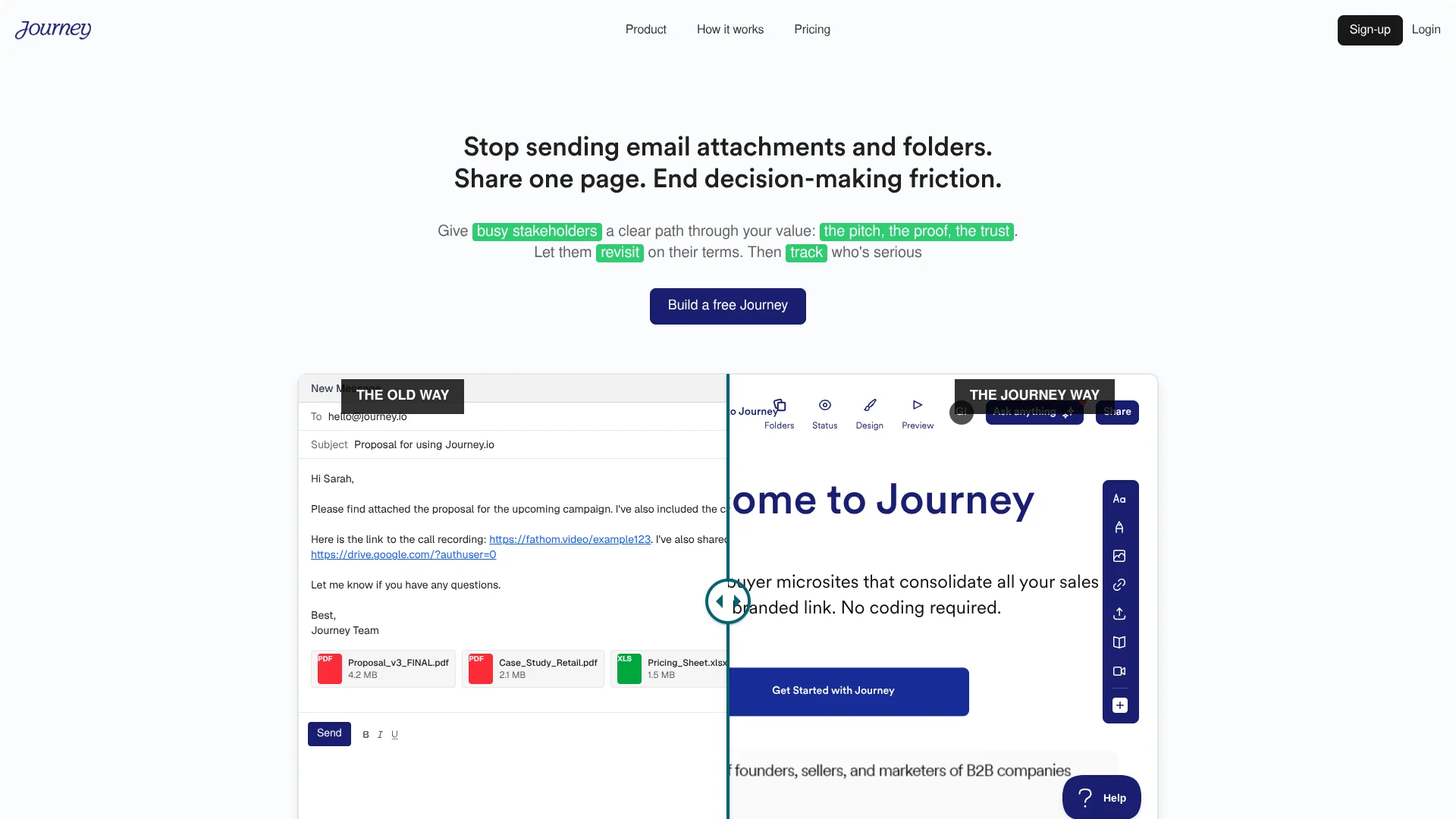
Journey turns sales materials into one branded, shareable page for buyers and stakeholders. Sales teams can arrange a pitch, executive summary, case studies, pricing, videos, documents, and other content into a guided buying experience instead of sending scattered links and attachments. Its AI features help create content, answer buyer questions, and personalize Journeys for specific prospects.
Journey gives each shared page a clear structure while showing how recipients interact with it. Buyers can follow the story at their own pace, skip to sections such as pricing or security, and ask the AI Chatbot questions about the content.
It fits sales teams, founders, agencies, and customer-facing professionals who need a polished follow-up after a call or proposal. The main gap is that advanced integrations, session replays, and deeper analytics require the Scale plan, while several planned features are not available yet. Journey is best when the sale depends on helping several stakeholders understand the same story.
Who is Using Journey.io?
Account Executives
A single Journey keeps the pitch, proof, pricing, and next steps together after a sales call.
Founders
Personalized pages help founders explain a company, product, or proposal to several decision-makers.
Sales Development Representatives
AI-generated copy and personalized Journey fields support more tailored outbound follow-ups.
Marketing Consultants
Branded pages give clients a clear way to review recommendations, examples, and campaign materials.
Customer Success Managers
Organized onboarding or review content gives customers a shared place to revisit guidance and resources.
Uncommon Use Cases
Investor updates with supporting files and videos; recruiting presentations that organize company information for candidates
Key Features
Rating Breakdown
Pricing Plans
Start
$9 per user per month
- $7 per user per month when billed annually
- Up to 2 Journeys
- 14-day free trial
- Password protection
- Basic content and visitor insights
- Email notifications
- Made in Journey branding
Grow
$29 per user per month
- $24 per user per month when billed annually
- 14-day free trial
- Unlimited Journeys
- AI Chatbot
- Advanced content and visitor insights
- Email tracking
- Unlimited workspaces
- Remove Made in Journey branding
Scale
$59 per user per month
- $49 per user per month when billed annually
- 14-day free trial
- Clay and Zapier integrations
- Session replays
- Custom NDA
- Slack notifications
- Journey Analytics
- Organizational templates
Enterprise
- Contact Journey for pricing
- Unlimited Journeys
- Advanced insights
- Slack and email notifications
- Other integrations
- Session replays
- Organizational templates
Which Journey.io plan should you pick?
Start with Start for a small number of branded follow-ups, move to Grow for unlimited Journeys and the AI Chatbot, and choose Scale when integrations, session replays, Slack notifications, or Journey Analytics matter.
Start
Good for individuals or small sales efforts that need up to 2 Journeys, password protection, basic insights, and Journey branding.
Grow
Good for regular sales work that needs unlimited Journeys, the AI Chatbot, advanced insights, email tracking, and unlimited workspaces.
Scale
Good for teams that need Clay and Zapier integrations, session replays, Slack notifications, organizational templates, and Journey Analytics.
Enterprise
Good for organizations that need the Enterprise offering and are prepared to request custom pricing.
Journey.io Use Cases
Post-Call Sales Follow-Up
A post-call Journey brings the executive summary, supporting documents, pricing, and proof into one buyer-facing page.
Outcome: Stakeholders get a clear path through the material instead of a long email thread.
Proposal Delivery
Proposal content, case studies, videos, and next steps can live together in a branded presentation.
Outcome: Buyers can review and share the full proposal from one link.
Personalized Outbound
Prospect details and AI-generated copy help create more relevant pages for individual recipients.
Outcome: Each prospect receives a follow-up that reflects their company and conversation.
Buyer Self-Service
The AI Chatbot responds to questions about the content while recipients explore the Journey.
Outcome: Prospects can find answers during asynchronous review.
Engagement Review
Visitor insights, notifications, and session replays reveal which materials received attention.
Outcome: Salespeople can make follow-up decisions using buyer engagement signals.
Workflow Ideas with Journey.io
Sales Call to Personalized Follow-Up
- 1Create a Journey with an executive summary and the main proposal.
- 2Add the prospect's materials, relevant case studies, pricing, and a custom message.
- 3Share the link and review visitor insights before the next conversation.
Proposal Review for Multiple Stakeholders
- 1Arrange the pitch, proof, security information, and pricing into clear sections.
- 2Add a table of contents so recipients can move to the topics they need.
- 3Use comments or the AI Chatbot to support questions during review.
Engagement-Led Follow-Up
- 1Send a Journey containing the content needed for a buying decision.
- 2Watch content and visitor insights for views, time spent, and section interest.
- 3Follow up with material that matches the sections each stakeholder reviewed.
How Journey.io fits into your stack
Sales Follow-Up
Journey sits after a sales call or demo as the buyer-facing destination for the materials discussed. It replaces a bundle of attachments and separate links with one organized page.
Documents and Media
Existing PDFs, documents, videos, links, slides, and embeds can be added as content blocks. This lets teams reuse material they already send.
Personalization
The site demonstrates fields for a company website, prospect name, and custom message, including AI-generated copy. Clay is available as an integration on Scale.
Analytics
Journey provides content and visitor insights, with session replays and Journey Analytics on Scale. These features help sales teams connect buyer activity to follow-up.
Automation and Notifications
Scale includes Clay and Zapier integrations plus Slack notifications. Email notifications are available on the listed plans.
Pros
- +Structured follow-ups: Replaces scattered sales links and attachments with one guided page.
- +AI buyer support: The AI Chatbot can answer questions about the material while prospects review it.
- +Engagement visibility: Insights show which content received attention and how long buyers stayed.
- +Flexible content: Existing PDFs, documents, videos, links, and embeds can become part of a Journey.
- +Brand control: Paid plans can remove Journey branding and support custom styling and domains.
Cons
- −Higher-tier features: Integrations, session replays, and Journey Analytics start on Scale.
- −No free plan: Journey offers a 14-day free trial rather than a free tier.
- −Planned features: User roles, webhooks, and personalized video recording are listed as coming soon.
Limitations & when to consider alternatives
Known limitations
- User roles are not available yet. The pricing page lists User Roles as coming soon.
- Webhooks are not available yet. The pricing page lists Webhooks as coming soon.
- Personalized video recording is not available yet. The pricing page lists Personalized Video Recording in Journeys as coming soon.
- Journey Analytics requires Scale. The pricing page places Journey Analytics, Session Replays, and organizational templates on the Scale plan.
Look elsewhere when
- You need a native mobile or desktop app.
- You need a documented public developer API.
- Your team needs SSO or user roles now.
- You need a free plan rather than a trial.
How to Use Journey.io
- 1
Choose a starting point
Begin with a template, Pitch Mode, Microsite Mode, or Create with AI based on the kind of buyer experience you need.
- 2
Build the story
Place the executive summary first, then add supporting documents, videos, links, pricing, security details, and other content blocks.
- 3
Add buyer context
Personalize the Journey with a prospect name, company details, custom message, or recipient logo when relevant.
- 4
Set access rules
Add password protection or other available access controls when the content should not be public.
- 5
Share one link
Send the branded Journey instead of separate attachments and links so recipients have one place to review and share.
- 6
Review engagement
Check insights, notifications, and session replays on eligible plans to decide what follow-up makes sense.
Who is Journey.io For?
Sales Teams
Sales teams can give prospects one organized destination for proposals, proof, pricing, and follow-up material.
Founders
Founders can turn a post-call email into a polished buying page without assembling several separate links.
Agencies
Agencies can package recommendations, examples, deliverables, and next steps into a branded client experience.
Customer-Facing Teams
Teams working with buyers or clients can share content asynchronously and see which sections receive attention.
Frequently Asked Questions
Does Journey have a free plan?
No. The current pricing page lists a 14-day free trial for Start, Grow, and Scale, but no free plan.
How much does Journey cost?
Start costs $9 per user per month when billed monthly, Grow costs $29, and Scale costs $59. Annual prices are $89, $289, and $589 per user.
Do recipients need a Journey account?
The site presents Journeys as shareable buyer-facing pages and does not describe recipient account creation as required.
What integrations does Journey support?
The site names Clay and Zapier integrations on Scale and shows content connections for tools such as Box, Loom, YouTube, Calendly, Notion, Vimeo, Airtable, Typeform, DocuSign, Figma, Miro, Canva, PowerPoint, Gamma, and Tella.
Can Journey protect private content?
Start and Grow include password protection. Higher plans list broader access permissions, and Journey's security page confirms encryption in transit with TLS 1.2 and encryption at rest with AES-256.
Can Journey create content with AI?
Yes. The product pages describe Create with AI, AI-generated text and images, AI-generated branded themes, and an AI Chatbot for recipients.
Community reviews
Be the first to share your experience.
Sign in to leave a review for Journey.io.
Journey.io Alternatives
Looking for alternatives to Journey.io? Here are similar tools in the same category: