
HubSpot AEO Sensor
Tracks how AI answer engines shift your website’s visibility.
Key Takeaways
- What it is
- Tracks how AI answer engines shift your website’s visibility.
- Pricing
- $50 per month
- Best for
- Answer Engine Volatility Tracker
- AI-Referred Traffic Trends
- AI Visibility Benchmarks by Industry
- Rating
- 4.4/5
What is HubSpot AEO Sensor?
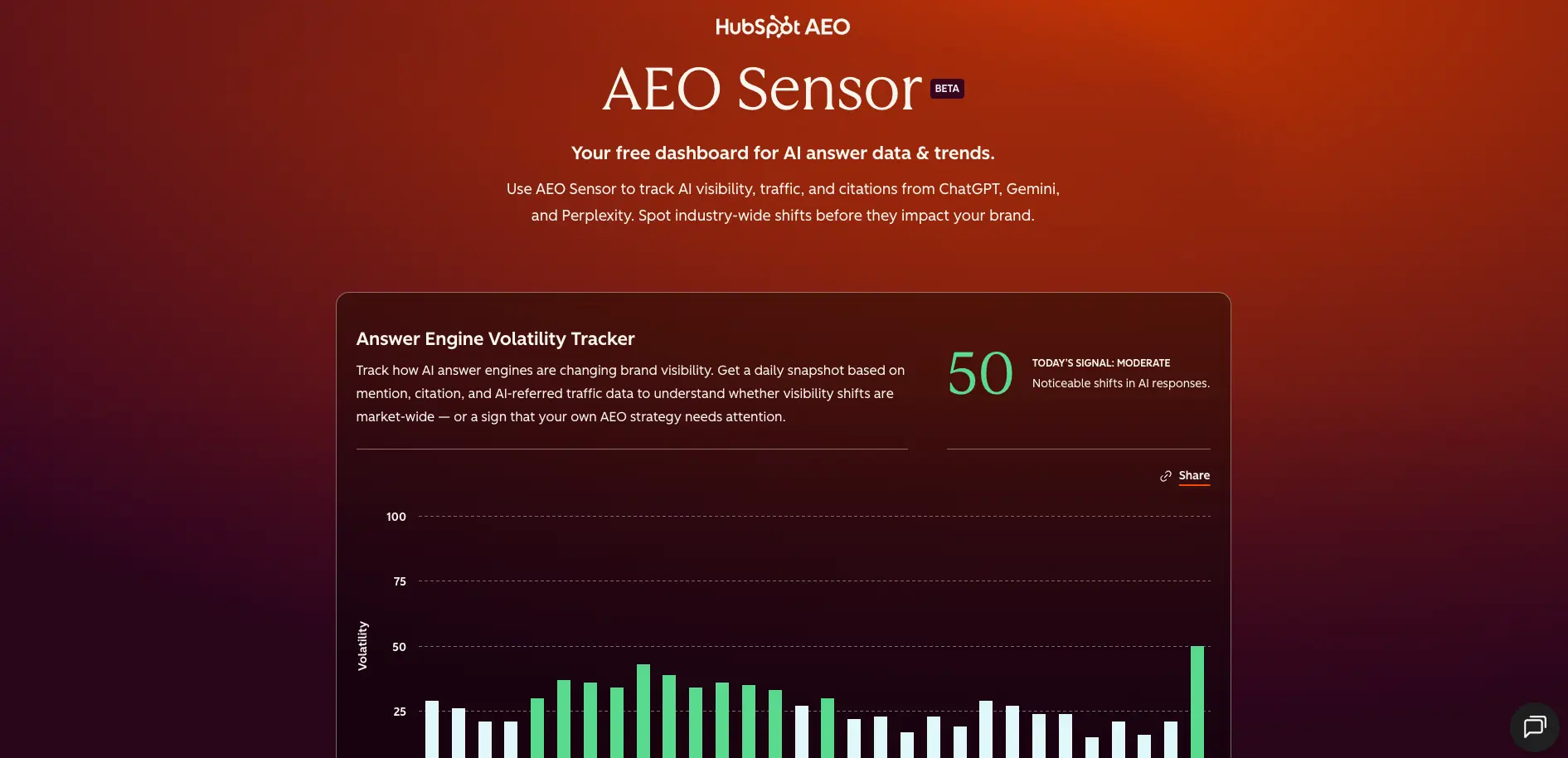
HubSpot AEO Sensor is a free public beta dashboard that tracks how AI answer engines like ChatGPT, Gemini, and Perplexity are changing over time. Instead of guessing why citations shift or traffic from AI answers suddenly spikes or drops, teams can see volatility scores, AI-referred traffic patterns, and industry benchmarks to understand whether a change is isolated to their brand or driven by broader answer engine behavior. It sits at the “macro” level of answer engine optimization (AEO), giving marketers a live pulse on AI visibility trends.
HubSpot AEO Sensor stands out by treating AI answer engines as a measurable channel, not just a mystery. It blends anonymized customer data and public signals into volatility scores, traffic trends, and industry benchmarks that speak the language of marketers. Few tools give a cross-engine, time-series view of answer engine behavior alongside a curated feed of model updates, then plug that context into a larger AEO toolkit that includes AEO Grader and the paid HubSpot AEO product. The result is a rare top-down view of how AI is reshaping discovery.
HubSpot AEO Sensor gives marketers and SEO professionals a clear, data-driven signal on how AI answer engines are shifting, packaged in a fast, approachable dashboard. It will not replace full analytics or brand-level AEO tools, but as a free early-warning system for AI volatility it is surprisingly powerful. Teams that care about where AI sends traffic, how often brands get cited, and when to adjust AEO strategy will find it a timely addition to their monitoring stack, especially when paired with AEO Grader and the paid HubSpot AEO product.
Who is Using HubSpot AEO Sensor?
Marketing and growth leaders
Tracking how AI-driven discovery is shifting before those shifts hit pipeline and revenue.
SEO and content teams
Using volatility and benchmark charts to guide AEO roadmaps alongside traditional SEO metrics.
Digital and performance agencies
Reporting AI visibility trends to clients and justifying AEO and content investments with directional data.
Product and analytics teams
Comparing internal traffic dashboards against AI-referred traffic trends to interpret anomalies.
Uncommon Use Cases
Used by investor relations teams to monitor how AI answers may influence market narratives around public companies; adopted by PR and communications teams to anticipate reputational swings as answer engines change what they cite.
Key Features
Rating Breakdown
Pricing Plans
AEO Sensor
- Free public dashboard for AI visibility trends and volatility tracking
AEO Grader
- Free tool that provides a snapshot of how ChatGPT
- Gemini
- Perplexity currently represent a specific brand
HubSpot AEO
$50 per month
- Brand-level tracking
- Competitive analysis
- Prioritized AEO recommendations
Marketing Hub Pro and Enterprise
- AEO capabilities tied directly into HubSpot’s broader marketing and content tools at their respective subscription prices
Which HubSpot AEO Sensor plan should you pick?
Start with the free AI Search Sensor for market-level trends, then upgrade to HubSpot AEO when you need brand-specific tracking and recommendations.
AI Search Sensor
Good for marketers who need free, industry-wide visibility, citation, traffic, and answer-engine volatility benchmarks.
HubSpot AEO
Good for teams who need ongoing brand visibility tracking, competitor analysis, citation analysis, and prioritized recommendations.
HubSpot AEO Sensor Use Cases
Monitor AI-referred traffic trends
Review weekly aggregate traffic trends from ChatGPT, Gemini, and Perplexity.
Outcome: Understand whether AI-generated traffic is increasing or declining across the market.
Benchmark industry visibility
Compare representative companies’ estimated visibility scores and citation shares within an industry.
Outcome: Establish a baseline for typical AI visibility in a category.
Analyze citation trends
Review which content types and source channels are cited in AI answers over time.
Outcome: Identify formats and channels that may deserve greater AEO investment.
Track answer-engine volatility
Use daily volatility signals to monitor changes in mentions, citations, citation types, and AI-referred traffic.
Outcome: Distinguish market-wide answer-engine changes from possible brand-specific performance issues.
Workflow Ideas with HubSpot AEO Sensor
Weekly AEO market review
- 1Open AI Search Sensor and review AI-referred traffic trends.
- 2Compare visibility and citation-share benchmarks for the relevant industry.
- 3Record notable changes and use them to inform the next AEO planning cycle.
Citation opportunity scan
- 1Review Citation Share Trends by content type.
- 2Switch to the Channel view and identify growing earned, review, affiliate, peer, or UGC sources.
- 3Prioritize content or off-site efforts that align with the strongest current citation patterns.
Volatility investigation
- 1Check the Answer Engine Volatility Tracker for the current signal.
- 2Compare the signal with traffic, visibility, and citation-share trend charts.
- 3If volatility is elevated, wait for additional data before attributing changes to your own strategy.
How HubSpot AEO Sensor fits into your stack
Browser
Used as a public web dashboard to monitor AI-referred traffic, industry visibility benchmarks, citation share, and answer-engine volatility.
Pros
- +Free industry signal: No-cost dashboard that gives marketing and SEO teams access to AI visibility trends that would otherwise be hidden inside proprietary answer engines.
- +Cross-engine visibility: Covers ChatGPT, Gemini, and Perplexity together, so users are not stuck interpreting data from just one AI source.
- +Actionable context for AEO work: Helps teams decide when a traffic dip is a strategy problem versus a market-wide model change, which can prevent a lot of unnecessary scrambling.
- +Strong educational ecosystem: Tight connection to AEO Grader, the AEO Guide, and the State of AEO report gives users plenty of playbooks to turn insights into action.
- +Low friction adoption: No complex implementation or tagging required; users can open the dashboard and start reading the charts immediately.
Cons
- −No brand-level reporting: AEO Sensor does not show a specific company’s visibility; users need HubSpot AEO for detailed brand and competitor tracking.
- −Beta data quality caveats: Daily scores can shift during short processing windows, and recent data may be less stable than historical trends.
- −Limited customization: The dashboard focuses on standardized views, which may feel restrictive for teams that want deep slicing, exporting, or programmatic access.
Limitations & when to consider alternatives
Known limitations
- No brand-specific visibility. AI Search Sensor does not show an individual brand’s visibility or traffic; it provides industry-level estimates.
- Aggregated and anonymized data. Traffic and citation trend charts are based on anonymized HubSpot customer data and modeled aggregates.
- Estimated benchmarks. Industry visibility and citation-share benchmarks are estimates based on representative companies and publicly available information.
- Limited answer-engine coverage. The documented Sensor coverage is ChatGPT, Gemini, and Perplexity.
- Data may change after publication. Daily volatility scores may fluctuate for up to three days while final data is received.
Look elsewhere when
- You need to measure your own brand’s visibility.
- You need competitor analysis and prioritized recommendations.
- You need prompt-level tracking.
How to Use HubSpot AEO Sensor
- 1
Open the public dashboard
Go to AI Search Sensor to view current AEO market-level data without setting up a HubSpot account.
- 2
Review AI-referred traffic
Inspect weekly aggregate traffic trends from ChatGPT, Gemini, and Perplexity to understand broader referral behavior.
- 3
Select an industry benchmark
Choose an industry and compare estimated visibility scores and citation shares across representative brands.
- 4
Analyze citation patterns
Toggle between Content Type and Channel to see which formats and source categories are appearing in AI citations.
- 5
Check volatility
Review the daily volatility signal and engine-specific views to identify market-wide changes in AI responses.
- 6
Move to HubSpot AEO when needed
Use HubSpot AEO if you need brand-specific visibility, prompt tracking, competitor analysis, citation analysis, or recommendations.
Who is HubSpot AEO Sensor For?
Marketers
Use industry benchmarks and trend data to understand how answer engines are changing and inform AEO strategy.
AEO strategists
Monitor citation, mention, visibility, and AI-referred traffic shifts across major answer engines.
Businesses evaluating AI search
Use the public dashboard to establish context before investing in brand-specific visibility tracking.
Frequently Asked Questions
What is AI Search Sensor?
AI Search Sensor is a free public dashboard showing shifts in answer-engine behavior. It monitors daily volatility, weekly AI-referred traffic, and industry visibility and citation data from ChatGPT, Gemini, and Perplexity.
Does AI Search Sensor show my brand’s visibility?
No. AI Search Sensor provides industry-level estimates and does not show a specific brand’s visibility. HubSpot AEO is the product for brand-specific tracking.
How often is AI Search Sensor data updated?
The Sensor uses a daily refresh cadence. Each chart includes a Last Updated timestamp, and refresh timing can vary because of answer-engine and data-processing delays.
What data does AI Search Sensor use?
AI-referred traffic and citation trends use anonymized HubSpot customer data. Industry visibility benchmarks use estimates based on public information and representative companies.
Which answer engines does AI Search Sensor monitor?
The Sensor monitors ChatGPT, Gemini, and Perplexity.
What is the difference between AI Search Sensor and HubSpot AEO?
AI Search Sensor is a free, high-level view of the AEO landscape. HubSpot AEO tracks a specific brand, compares competitors, and provides prioritized recommendations.
Community reviews
Be the first to share your experience.
Sign in to leave a review for HubSpot AEO Sensor.
HubSpot AEO Sensor Alternatives
Looking for alternatives to HubSpot AEO Sensor? Here are similar tools in the same category:
Learn to Master HubSpot AEO Sensor
With Skill Leap courses
Get in-depth training on HubSpot AEO Sensor and 50+ other AI tools with our expert-led video courses.
Start 7-Day Free Trial