FleetWorks
Freight matching and broker negotiations for trucking carriers.
Key Takeaways
- What it is
- Freight matching and broker negotiations for trucking carriers.
- Pricing
- Freemium
- Best for
- Sofia load matching
- Broker calls and bidding
- Direct bids to connected brokers
- Rating
- 4.0/5
What is FleetWorks?
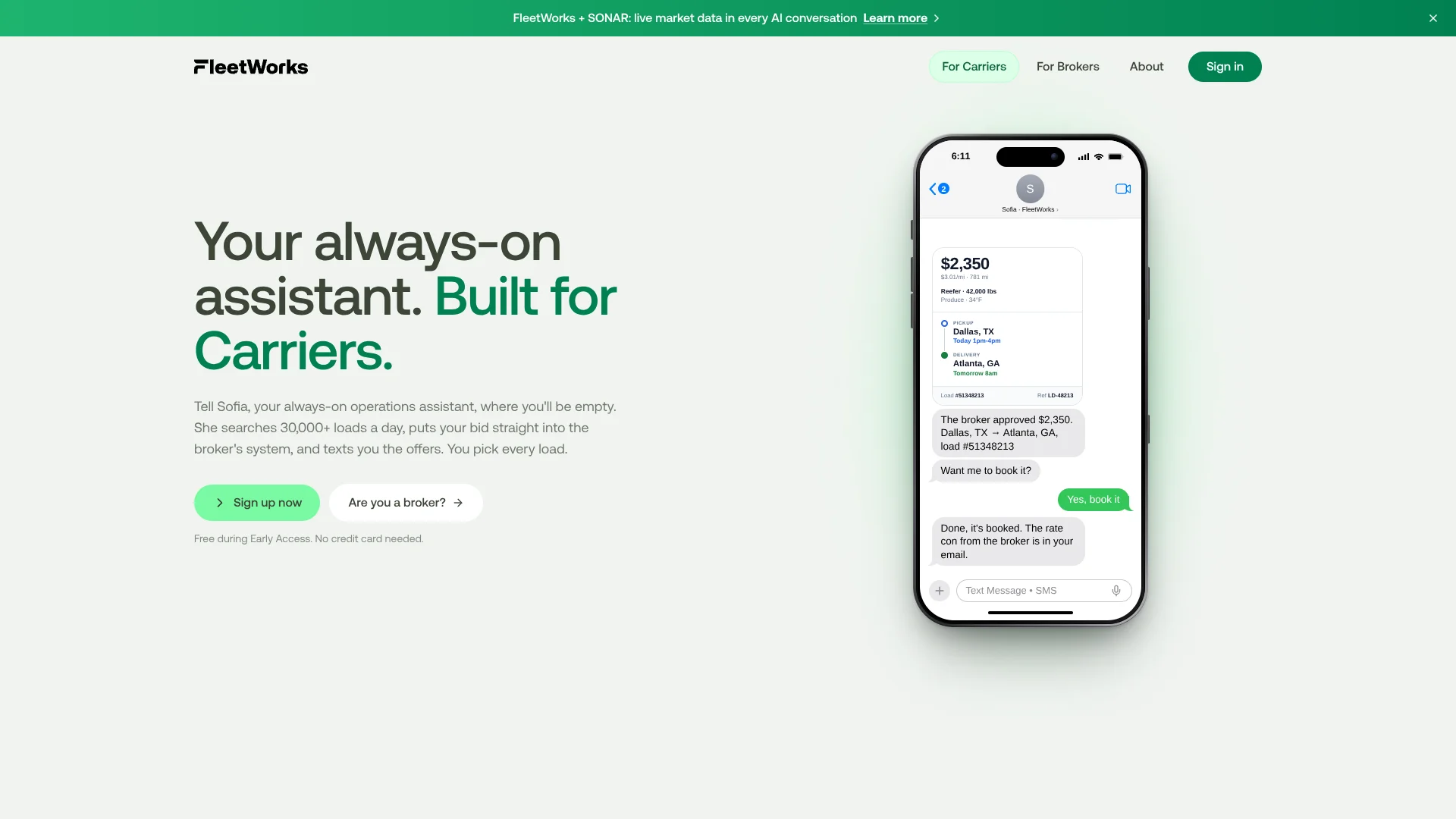
FleetWorks helps trucking carriers find freight and handle the calls that can come with booking it. Its AI agent, Sofia, searches loads based on a carrier’s equipment and preferred lanes, then contacts brokers to place bids or negotiate. Carriers receive offers by text and decide whether to accept, counter, or pass, keeping the final load choice in their hands.
For connected brokers, Sofia can place a carrier’s bid directly into the broker’s system and send it to the carrier desk for approval; with other brokers, she calls and negotiates. That path can take a bid from placement to a rate confirmation without the carrier making the call.
FleetWorks is a fit for owner-operators and fleet dispatchers looking to spend less time searching for loads and calling brokers, as well as brokers handling carrier requests. It is not a hands-off booking service: the carrier still reviews each offer and chooses what to book.
Who is Using FleetWorks?
Owner-operators
A solo truck operator can give Sofia their lanes and equipment so she can look for suitable loads.
Fleet dispatchers
Dispatchers can receive offers by text and keep the carrier’s preferred lanes and rates in mind.
Carrier sales representatives
Carrier sales staff can review incoming bids in a connected broker’s Teams workflow.
Broker carrier-desk staff
The carrier desk can review and approve bids Sofia places in a connected broker’s system.
Uncommon Use Cases
Drivers can share location only while hauling a load; carriers can block brokers they do not want offers from.
Key Features
Rating Breakdown
Pricing Plans
Free during Early Access
Free
- Free for carriers during Early Access.
- No credit card needed.
- FleetWorks says it will give at least 30 days’ notice before paid plans launch.
Which FleetWorks plan should you pick?
Start with free carrier access during Early Access; revisit the choice when FleetWorks publishes paid-plan terms.
Free during Early Access
For carriers who want Sofia to find loads and contact brokers while the service is in Early Access.
FleetWorks Use Cases
Finding loads for a truck
A carrier’s lanes and equipment guide Sofia’s load search and the offers she sends.
Outcome: Load offers arrive by text for the carrier to accept, counter, or pass.
Negotiating with brokers
When a broker is outside FleetWorks’ connected network, Sofia can call and negotiate on the carrier’s behalf.
Outcome: The carrier avoids making that broker call.
Submitting a bid to a connected broker
A bid can go directly into a connected broker’s system for carrier-desk approval.
Outcome: An approved bid can proceed to booking and a rate confirmation.
Sharing load progress
A driver can share location from pickup through delivery and send proof of delivery in the iPhone app.
Outcome: Brokers receive load updates without tracking between loads.
Workflow Ideas with FleetWorks
Set up a carrier load search
- 1Sign up with your MC or DOT number.
- 2Tell Sofia your equipment, preferred lanes, and when to contact you.
- 3Review texted offers and accept, counter, or pass.
Move a connected-broker bid toward booking
- 1Sofia places the carrier’s bid in the connected broker’s system.
- 2The broker’s carrier desk reviews the bid in Teams.
- 3After approval, the offer reaches the carrier by text.
Share progress on a booked load
- 1Open the tracking link sent by the broker.
- 2Start location sharing for the load.
- 3Send proof of delivery from the iPhone app.
How FleetWorks fits into your stack
Load discovery
Sofia searches for loads based on a carrier’s lanes and equipment, then sends offers by text.
Broker communication
Calls and bids connect carriers with brokers, including Uber Freight, 123Loadboard, and C.H. Robinson.
Broker approvals
At connected brokers, carrier-desk approvals can happen in Microsoft Teams.
Load tracking
The iPhone app shares location during a load and supports proof-of-delivery submission.
Pros
- +Fewer broker calls: Sofia can call and negotiate for carriers.
- +Carrier choice: Carriers can accept, counter, or pass on texted offers.
- +Connected broker bidding: Some bids go straight into the broker’s system for review.
- +Load-specific tracking: The iPhone app stops sharing location when the load ends.
Cons
- −Early Access pricing: The carrier service is free now, but future paid-plan terms are not published.
- −Carrier-focused workflow: The main load-finding experience is built around trucking carriers and their freight preferences.
- −iPhone app listing: The official mobile app listing found is for iPhone.
Limitations & when to consider alternatives
Known limitations
- Future paid-plan terms. FleetWorks says carrier access is free during Early Access and that users will receive at least 30 days’ notice before paid plans launch; the site does not state those future prices.
Look elsewhere when
- You need a published long-term subscription price before choosing a load-search service.
How to Use FleetWorks
- 1
Register your carrier
Start with your MC or DOT number so FleetWorks can look up your carrier information.
- 2
Set your freight preferences
Tell Sofia what equipment you run, which lanes you prefer, and when you want her to check in.
- 3
Review matching offers
Offers arrive by text with details such as rate, miles, and pickup window; accept, counter, or pass.
- 4
Track a load when needed
Open the broker’s tracking link and start sharing location for that load; tracking ends at delivery.
- 5
Send proof of delivery
Capture and send your proof of delivery through the FleetWorks iPhone app.
Who is FleetWorks For?
Carriers
Carriers can have Sofia search for freight and contact brokers based on their lanes and equipment.
Truckers
Drivers can receive load offers by text and use the iPhone app for location sharing and proof of delivery.
Freight brokers
Broker teams can review carrier bids placed into connected systems and approve bookings.
Frequently Asked Questions
Is FleetWorks free?
FleetWorks says it is free for carriers during Early Access and requires no credit card. It says users will get at least 30 days’ notice before paid plans launch.
Does FleetWorks choose loads for the carrier?
No. Sofia sends offers, and the carrier chooses whether to accept, counter, or pass.
Which load sources does Sofia search?
FleetWorks names Uber Freight, 123Loadboard, and C.H. Robinson among its broker sources.
Is there a FleetWorks mobile app?
Yes. FleetWorks has an iPhone app for load tracking, status updates, and proof of delivery.
Can FleetWorks work with a carrier’s existing setup?
FleetWorks says it can fit workflows ranging from Gmail and Google Sheets to a full transportation management system.
Community reviews
Be the first to share your experience.
Sign in to leave a review for FleetWorks.
FleetWorks Alternatives
Looking for alternatives to FleetWorks? Here are similar tools in the same category: