Exoname
Find available domain names tailored to your website, brand, or business idea.
Key Takeaways
- What it is
- Find available domain names tailored to your website, brand, or business idea.
- Pricing
- Freemium
- Best for
- AI Domain Suggestions
- Live Availability Checks
- Manual Prefix and Suffix Builder
- Rating
- 3.8/5
What is Exoname?
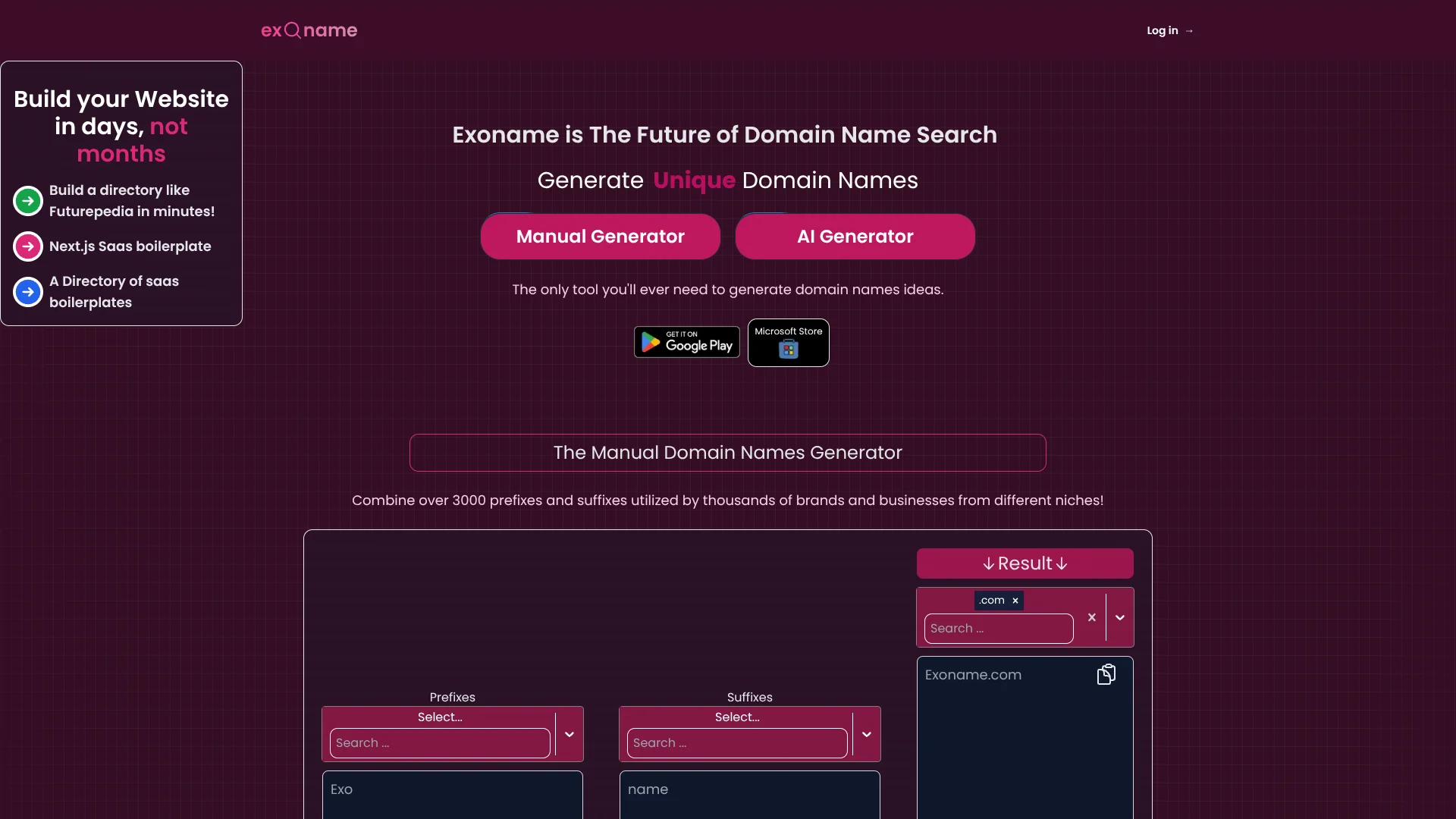
Exoname turns a short description of a website, brand, or business into up to 40 domain name ideas, then checks availability in real time. It suits founders, bloggers, and anyone choosing an address for a new site who wants suggestions shaped around a niche. A manual generator also builds names by combining prefixes, suffixes, and keywords.
The manual generator draws on more than 3,000 prefixes and suffixes, showing name combinations as you make selections.
Exoname is best for early-stage website naming, when a list of possible domain names is more useful than a full brand research process. The free usage limit is 20 AI generations a day, and each description can be up to 500 characters, so detailed briefs may need trimming.
Who is Using Exoname?
Startup Founders
A short description of the venture can turn an early branding idea into available domain candidates.
Bloggers
Niche-based suggestions help them explore a web address for a new publication.
Marketing Consultants
The manual builder offers a quick way to explore prefix-and-suffix combinations for a client project.
Web Designers
Domain suggestions give clients options to consider while planning a new website.
Uncommon Use Cases
Comparing domain ideas for a podcast website; brainstorming an address for a personal portfolio.
Key Features
Rating Breakdown
Pricing Plans
Free Tier
Free
- Offers regular users up to 20 domain name generations per day without charge
Pro Tier
- Pricing details for extensive use are not specified on the website
Exoname Use Cases
Naming a New Business Website
A description of the business gives the AI context for domain ideas tied to its niche.
Outcome: Up to 40 suggestions per generation, with availability checks.
Finding a Blog Address
Blog topics and audience details can guide ideas toward a more relevant domain.
Outcome: A set of domain suggestions to review and compare.
Building Names by Hand
Prefix, suffix, and keyword combinations offer a more controlled route to domain brainstorming.
Outcome: Name combinations appear as selections change.
Reworking an Initial Search
A follow-up feedback prompt can redirect suggestions when the first set misses the intended style.
Outcome: A new set of ideas guided by additional feedback.
Workflow Ideas with Exoname
Find an Available Website Name
- 1Describe the website in up to 500 characters.
- 2Choose a domain extension.
- 3Review the generated names and availability results.
Compare AI and Manual Ideas
- 1Generate domain suggestions from a website description.
- 2Build additional options from prefixes, suffixes, and keywords.
- 3Save favorites to compare later.
Refine a Naming Direction
- 1Review the first set of AI-generated names.
- 2Send a feedback prompt describing the direction you want.
- 3Save the strongest new suggestions.
How Exoname fits into your stack
Web-Based Naming
The website is the main place to generate AI domain ideas or build names manually. The AI form accepts a description of up to 500 characters.
Windows App
Exoname also offers a Windows app through the Microsoft Store for people who prefer a downloadable version.
ChatGPT
The Exoname site links to a ChatGPT GPT called The Domainer as another way to explore domain ideas.
Pros
- +Two naming approaches: AI suggestions and a manual prefix-and-suffix builder serve different brainstorming styles.
- +Availability checks: Suggested domains can be checked as part of the naming process.
- +Saved ideas: Favorites and search history help keep promising names in view.
- +Free daily use: The site offers 20 AI generations per day for regular use.
Cons
- −Daily generation cap: Twenty AI generations may feel tight during a naming sprint.
- −Short brief field: A 500-character limit can make nuanced brand context harder to include.
Limitations & when to consider alternatives
Known limitations
- Daily AI Generation Limit. The site describes regular free use as 20 generations a day and says extensive use may require an upgrade.
- Prompt Length. The AI Generator allows up to 500 characters for a website description.
- Suggestions Per Generation. The AI Generator can suggest up to 40 domain names in one generation.
How to Use Exoname
- 1
Choose a Generator
Start with the AI Generator for ideas based on a description, or choose the Manual Generator for prefix and suffix combinations.
- 2
Set the Naming Context
In the AI Generator, describe the website, brand, or business in no more than 500 characters and select a domain extension.
- 3
Review Suggestions
Check the generated names and availability results before deciding which ones to investigate further.
- 4
Refine or Save Ideas
A feedback prompt can steer later AI suggestions, while favorites and search history help preserve candidates.
Who is Exoname For?
New Website Owners
People choosing a domain for a future website can compare available ideas based on their project.
Business and Brand Builders
A business or brand description gives the AI context for generating relevant domain suggestions.
Bloggers
Bloggers can explore names that reflect their subject or niche.
Personal Brand Creators
People building a personal site can brainstorm domain options around their intended online presence.
Frequently Asked Questions
Is Exoname free?
The site says regular use is free for 20 AI generations a day. It says extensive use may require an upgrade, but does not publish a price for that upgrade on the homepage.
How many domain ideas can Exoname generate at once?
The AI Generator can suggest up to 40 domain names in a single generation.
Can Exoname check whether a domain is available?
Yes. The site says the AI generator checks domain availability in real time.
Does Exoname have a Windows app?
Yes. Exoname links to its Domain Name Generator in the Microsoft Store.
Can I make domain names without the AI Generator?
Yes. The Manual Generator combines selected prefixes and suffixes with keywords and shows the resulting names as selections change.
Community reviews
Be the first to share your experience.
Sign in to leave a review for Exoname.
Exoname Alternatives
Looking for alternatives to Exoname? Here are similar tools in the same category: