
EbSynth
Turn painted keyframes into stylized video while preserving the original motion.
Key Takeaways
- What it is
- Turn painted keyframes into stylized video while preserving the original motion.
- Pricing
- Freemium · $20 per month · $200 per month per seat
- Best for
- Keyframe Propagation
- Retouch and Colorize
- Painted Animation Styles
- Rating
- 4.1/5
What is EbSynth?
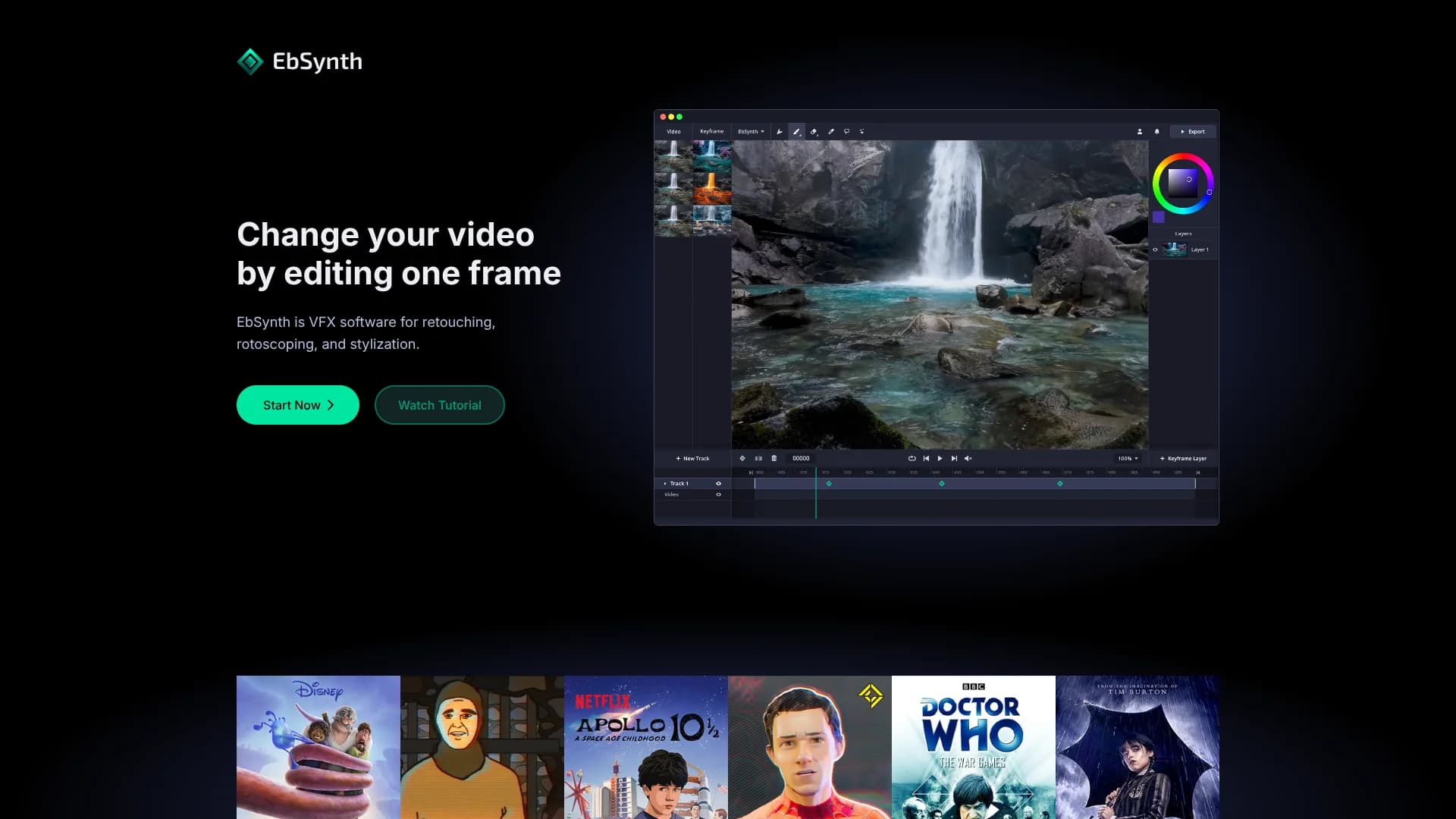
EbSynth turns changes made to selected video frames into edits that carry across a shot. Artists can paint a keyframe, retouch a face, add color, or apply a drawn style, then let the texture-synthesis system fill in the surrounding frames. It is built for VFX work where preserving the original motion matters more than generating an entirely new video.
Its defining workflow is changing one frame instead of manually editing every frame in the sequence. The core propagation process does not use generative AI or models trained on external datasets, while the optional Generate Image feature can create AI-generated keyframes with SDXL 1.0.
EbSynth fits animators, VFX artists, filmmakers, and editors who want direct control over stylized footage. The browser workflow requires temporary uploads for rendering, and visual errors can appear when keyframes do not match the guiding video. Its strength is controlled propagation from artist-made frames, not automatic video generation from a text prompt.
Who is Using EbSynth?
VFX Artist
A controlled keyframe workflow helps with digital makeup, cleanup, color changes, and stylized effects.
Animator
Painted frames carry an illustration style through motion without requiring a hand-painted frame for every moment.
Rotoscope Artist
Separate tracks and transparent keyframes support targeted work on moving areas such as faces, eyes, or backgrounds.
Filmmaker
Live-action footage can become painterly or hand-drawn while keeping the original acting and camera movement.
Post-Production Supervisor
Studio supports local processing when footage needs an offline workflow and tighter data control.
Uncommon Use Cases
Correcting eye movements on a separate alpha track; turning line art into a textured painterly animation
Key Features
Rating Breakdown
Pricing Plans
Free
Free
- All core functions
- 720p video export
- MP4 format output
- No time or functional limitations
Pro
$20 per month
- 1080p and 4K exports
- PNG with alpha output
- Priority processing
Studio
$200 per month per seat
- Run EbSynth locally
- Desktop app for Windows
- Footage never leaves your machines
- Full data privacy and NDA-friendly processing
- Command line access
Which EbSynth plan should you pick?
Start with Free to learn the keyframe workflow, move to Pro for higher-resolution or alpha exports, and choose Studio when footage must stay on local machines.
Free
Good for learning the workflow and creating 720p MP4 exports with the core functions.
Pro
Good for creators who need 1080p or 4K output, PNG with alpha, or priority processing.
Studio
Good for productions that need local Windows processing, command line access, and offline handling of private footage.
EbSynth Use Cases
Painted Video Animation
A few painted keyframes guide the look of a performance across the rest of the shot.
Outcome: Hand-drawn-looking motion with the original performance preserved.
Digital Makeup and Retouching
Face edits, touch-ups, or cleanup spread through footage instead of being repeated frame by frame.
Outcome: Faster video retouching with consistent changes across the shot.
Video Colorizing
A corrected or recolored frame becomes the visual reference for nearby frames.
Outcome: Color changes that follow the movement in the footage.
Stylized Animation
Painterly texture or a custom illustration treatment begins with an artist-made keyframe.
Outcome: A more coherent visual style across animated footage.
AI-Assisted Keyframe Creation
Generate Image can create a starting keyframe with SDXL 1.0 before the propagation pass.
Outcome: A generated visual starting point that can be corrected and carried through the shot.
Workflow Ideas with EbSynth
Retouch a Moving Face
- 1Choose a clear frame with the face fully visible.
- 2Paint or correct the makeup and cleanup on that keyframe.
- 3Run propagation and fix remaining problem areas with additional keyframes.
Create a Painted Performance
- 1Prepare the guiding video with clear motion and limited blur.
- 2Paint the keyframes in the desired hand-drawn style.
- 3Propagate the artwork and review areas where the shapes drift.
Stylize Separate Elements
- 1Divide the shot into areas such as the background, face, and eyes.
- 2Place each element on its own track with transparent keyframes where needed.
- 3Synthesize each track separately and combine the finished result.
How EbSynth fits into your stack
Browser-Based Rendering
The main workflow runs in a web browser, with Chrome recommended for large or high-resolution projects. Videos and keyframes are temporarily uploaded for rendering and deleted after the result is returned.
Painting and Image Editing
EbSynth fits after an artist creates or edits keyframes in a painting or image-editing workflow. The resulting frames become the visual instructions for the video.
Video Post-Production
It slots into VFX and editing work for retouching, colorizing, rotoscoping, and stylization before the finished footage returns to the broader edit.
AI Image Generation
Generate Image provides an optional SDXL 1.0 step for creating keyframes. Artists can correct generated artifacts before propagation.
Offline Production
Studio provides local Windows processing and command line access for teams handling private or NDA-sensitive footage.
Pros
- +Artist control: A painted or retouched frame drives the look instead of a black-box video transformation.
- +Free access: The Free plan includes the core functions with no time or functional limitation.
- +VFX focus: Retouching, rotoscoping, colorizing, and stylization are built around real footage and existing motion.
- +Privacy option: Studio can process footage locally for offline and NDA-sensitive work.
Cons
- −Hands-on setup: Strong results depend on careful keyframe timing, shape alignment, and shot preparation.
- −Browser dependence: Large or high-resolution projects rely on a memory-intensive Chrome workflow unless you use Studio.
- −Artifact risk: Poorly matched keyframes or difficult motion can produce stretching and ripple-like errors.
Limitations & when to consider alternatives
Known limitations
- Temporary Uploads in the Browser Workflow. The browser version sends video and keyframes to EbSynth servers for rendering, then deletes them after the result is returned.
- Propagation Is Not Generative Video. The core process uses a texture-synthesis algorithm and the guiding video rather than a generative model trained on external datasets.
- Motion and Shape Matching Matter. Keyframes that do not align with the guiding footage can create stretching or ripple-like artifacts.
- Studio Is the Offline Option. Fully offline processing and local Windows operation are offered through Studio rather than the standard browser workflow.
Look elsewhere when
- You need text-to-video generation from a prompt rather than keyframe-driven editing.
- You need a native mobile app for video work.
- Your workflow requires documented third-party integrations or a public developer API.
- Your footage cannot be uploaded and you do not have access to Studio.
How to Use EbSynth
- 1
Prepare the Guiding Video
Choose footage with soft lighting, useful texture, and enough frame rate for fast movement because optical flow affects the result.
- 2
Select the First Keyframe
Start with a frame that shows a clear pose and plenty of the subject rather than a frame taken in the middle of motion.
- 3
Edit the Keyframe
Paint, retouch, colorize, or generate the visual change you want to carry through the shot.
- 4
Run the Synthesis
Let EbSynth propagate the edited frame across the timeline, then inspect the output for stretching or ripple-like artifacts.
- 5
Add Targeted Corrections
Fix broken areas in synthesized frames and add more keyframes or separate tracks for elements that move independently.
- 6
Choose an Export Plan
The Free plan exports 720p MP4, Pro adds 1080p, 4K, PNG with alpha, and priority processing, while Studio supports local Windows processing.
Who is EbSynth For?
VFX Artists
Retouching and stylization work benefits from frame-level control without manually tracking every change.
Animators
Painted keyframes can turn live-action performance or line art into a hand-drawn-looking sequence.
Filmmakers
Shot-based edits such as digital makeup, color changes, and visual fixes can follow the original performance.
Video Editors
EbSynth adds a focused way to alter selected visual elements while preserving the footage underneath.
Frequently Asked Questions
Is EbSynth an AI tool?
The core keyframe propagation process is not AI and does not use generative models trained on external datasets. The optional Generate Image feature uses SDXL 1.0 to create keyframes.
Can I use EbSynth for free?
Yes. The Free plan includes all core functions, 720p video export, and MP4 output with no time or functional limitation.
What does Pro add?
Pro adds 1080p and 4K exports, PNG output with alpha, and priority processing.
Does EbSynth store my projects?
The browser workflow temporarily uploads video and keyframes for rendering. The files are deleted after the result is sent back, and the company says they are not used for AI training.
What browser does EbSynth recommend?
EbSynth recommends Chrome, especially for large projects and long or high-resolution videos.
Can EbSynth run offline?
Studio supports local processing through a Windows desktop app and command line access.
Community reviews
1 review from people who use EbSynth.
Sign in to leave a review for EbSynth.
Prompter Geek
EbSynth Alternatives
Looking for alternatives to EbSynth? Here are similar tools in the same category:
Learn to Master EbSynth
With Skill Leap courses
Get in-depth training on EbSynth and 50+ other AI tools with our expert-led video courses.
Start 7-Day Free Trial