Durable AI
Turns enterprise workflows into monitored software that adapts as requirements change.
Key Takeaways
- What it is
- Turns enterprise workflows into monitored software that adapts as requirements change.
- Best for
- Plain-English Requirements
- System Analysis
- Production Code and Deployment
- Rating
- 4.1/5
What is Durable AI?
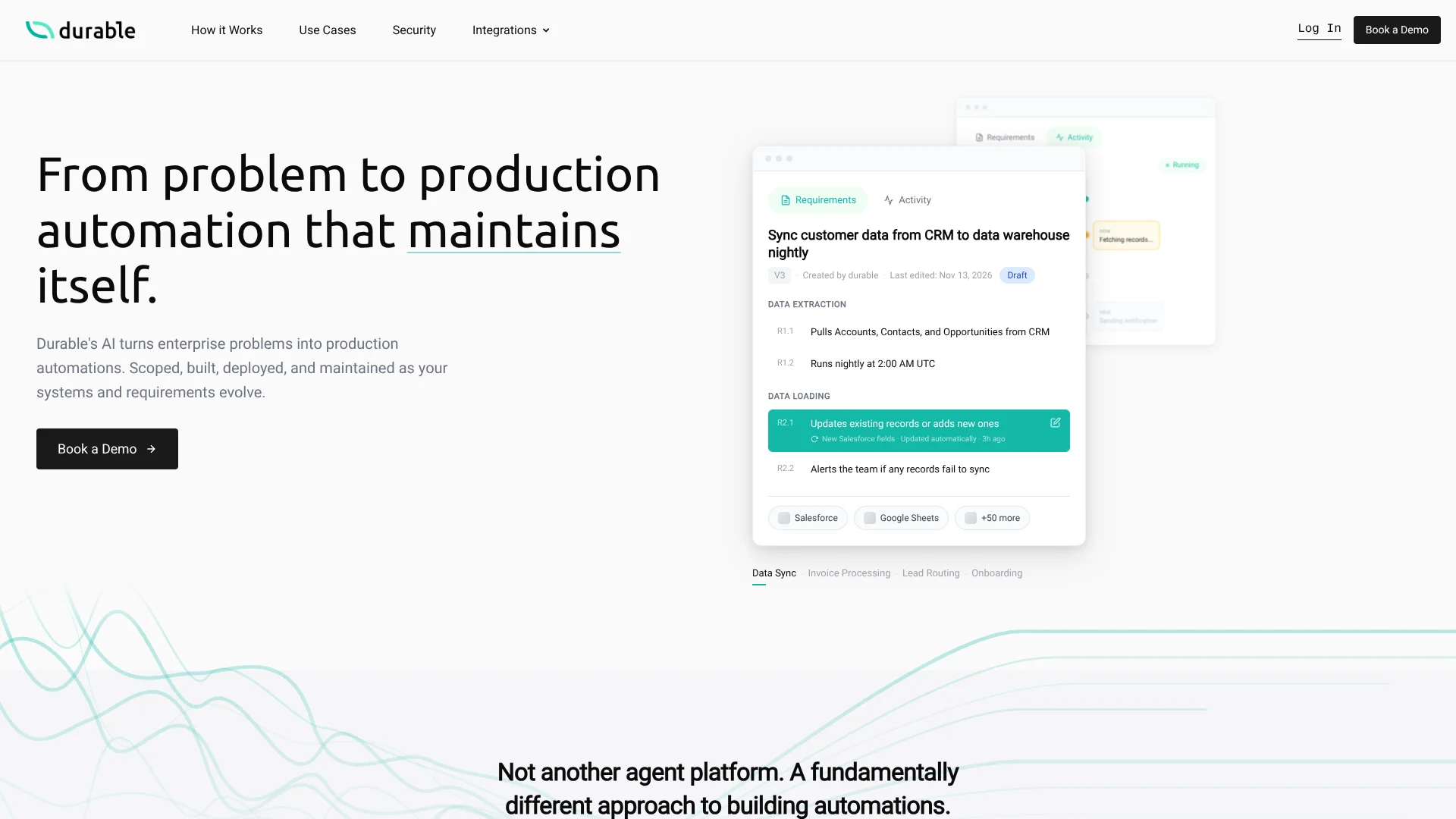
Durable turns a company’s workflow problem into production software: it examines connected systems, asks clarifying questions, and drafts requirements for a team to review. Once approved, it writes and deploys code, with an activity feed showing what the automation is doing. It is aimed at enterprise teams that need reliable processes across tools such as Salesforce, Slack, and Google Sheets.
Rather than leaving teams with a visual workflow to maintain, Durable keeps plain-English requirements tied to the code they describe. When someone changes a requirement, the code updates to match, and the team can review the change before approval.
Operations teams and engineers may find it useful for recurring work such as data syncs, invoice processing, and lead routing. It is less suited to personal AI tasks or buyers seeking a self-serve product with published prices. Durable is built for turning company processes into monitored software that can change as requirements do.
Who is Using Durable AI?
Operations Manager
Recurring work such as onboarding or invoice processing can be translated into an automation the team can review.
Data Engineer
Scheduled data transfers can sync records between a CRM and a data warehouse.
Sales Operations Manager
Lead-routing processes can connect CRM records with the tools used by the sales team.
Software Engineer
Versioned code and plain-English requirements make it easier to inspect and update company automations.
Uncommon Use Cases
Summarizing documents with an Anthropic integration; monitoring application metrics with Datadog
Key Features
Rating Breakdown
Pricing Plans
Contact for Pricing
- Pricing details are not explicitly listed on the website. Interested users are encouraged to contact Durable AI directly for a quote tailored to their specific needs and project requirements
Which Durable AI plan should you pick?
Start with Free to test a business website, upgrade to Launch for a custom domain and core AI tools, and choose Grow for team members, higher usage, and onboarding support.
Free
Good for testing a business idea with a free subdomain, basic SEO and hosting, five monthly images, ten AI chat messages, and up to ten CRM customers.
Launch
Good for businesses needing a professional website, custom domain, analytics, advanced SEO, lead capture, bookings, CRM, AI agents, and higher content limits.
Grow
Good for growing teams needing unlimited team members, personalized onboarding, dedicated support, higher AI-agent limits, 500 monthly images, and unlimited AI chat.
Durable AI Use Cases
CRM-to-Warehouse Data Sync
Nightly syncs move selected Salesforce records into a data warehouse and can alert the team when records fail.
Outcome: A scheduled data transfer with visible activity and failure alerts.
Invoice Processing
A recurring invoice process can be described, turned into requirements, and deployed as an automation.
Outcome: An automated invoice workflow.
Lead Routing
Lead-routing rules can become a monitored process connected to CRM and sales tools.
Outcome: A deployed lead-routing automation.
Employee Onboarding
Onboarding steps across connected business systems can be captured as requirements and automated.
Outcome: An automated onboarding workflow.
Workflow Ideas with Durable AI
Sync CRM Records to a Data Warehouse
- 1Describe which CRM records should move and how often.
- 2Review the system analysis and proposed requirements.
- 3Approve the requirements and deploy the automation.
Route New Sales Leads
- 1Explain how new leads should be assigned.
- 2Review the proposed requirements with the sales team.
- 3Deploy the automation and monitor its activity.
Process Invoices
- 1Describe the invoice process and connected systems.
- 2Review the requirements and any follow-up questions.
- 3Approve deployment and review the workflow monitor.
How Durable AI fits into your stack
Business Systems
Durable connects to tools such as Salesforce, Slack, Google Sheets, and HubSpot. Its integration library also covers areas such as CRM, productivity, finance, and development.
Requirements and Approvals
Plain-English specifications give teams a readable record of what each automation should do, with version history and approvals for changes.
Production Monitoring
After deployment, an activity feed and workflow monitor show process activity and run status.
Security and Access
Durable states that integration data is processed in isolated containers and encrypted at rest. Its listed enterprise controls include SSO/SAML and role-based access control.
Pros
- +Readable requirements: Teams can understand and change what an automation is meant to do.
- +Code-based workflows: Durable generates production code rather than relying on visual workflow chains.
- +Change tracking: Version history and approvals help teams review updates.
- +API monitoring: Durable detects API changes and errors and can propose fixes.
Cons
- −No public pricing: Buyers need to book a demo to discuss cost.
- −Enterprise focus: The product is built for company workflows, not everyday personal AI tasks.
Limitations & when to consider alternatives
Look elsewhere when
- You need a self-serve product with public plan prices.
- Your main need is a personal AI tool rather than company workflow automation.
How to Use Durable AI
- 1
Book a Demo
Durable directs prospective customers to book a demo to discuss the product and enterprise pricing.
- 2
Describe the Workflow
Explain the business problem in plain English so Durable can ask questions and inspect connected systems.
- 3
Review Requirements
Check the proposed steps and system details, then request changes where the requirements do not match the process.
- 4
Approve and Deploy
Once the requirements are ready, approve the automation for deployment.
- 5
Monitor and Review Changes
Follow runs in the activity feed and review proposed updates when errors or API changes arise.
Who is Durable AI For?
Enterprise Teams
Teams with recurring processes across business systems can turn those processes into monitored automations.
Operations Teams
Operations staff can describe a process in plain English and review its requirements before deployment.
Engineering Teams
Engineers can delegate repeatable integrations while retaining readable requirements, code, and change approvals.
Frequently Asked Questions
How does Durable build an automation?
It investigates connected systems, asks clarifying questions, and drafts requirements for review. Once approved, it writes, tests, and deploys the code.
Can teams change an automation after deployment?
Yes. Teams can edit its plain-English requirements, review the updated code, and approve changes. Durable also provides version history.
Which tools can Durable connect to?
Its integration library lists tools including Salesforce, Slack, Google Sheets, GitHub, HubSpot, and Notion. Durable says it can connect to systems with an API.
How much does Durable cost?
Durable does not publish plan prices on its site. It directs enterprise customers to book a demo to discuss pricing.
What security controls does Durable list?
The site lists SSO/SAML, role-based access control, audit logging, data residency options, and dedicated infrastructure. It also says integration data is encrypted at rest.
Community reviews
Be the first to share your experience.
Sign in to leave a review for Durable AI.
Durable AI Alternatives
Looking for alternatives to Durable AI? Here are similar tools in the same category: