
Dante AI
Automate 24/7 customer support, lead capture, and bookings.
Key Takeaways
- What it is
- Automate 24/7 customer support, lead capture, and bookings.
- Pricing
- Freemium · $40 per month · $100 per month · $400 per month
- Best for
- Multichannel AI agents
- Fast training on your data
- Advanced LLM options
- Rating
- 4.6/5
What is Dante AI?
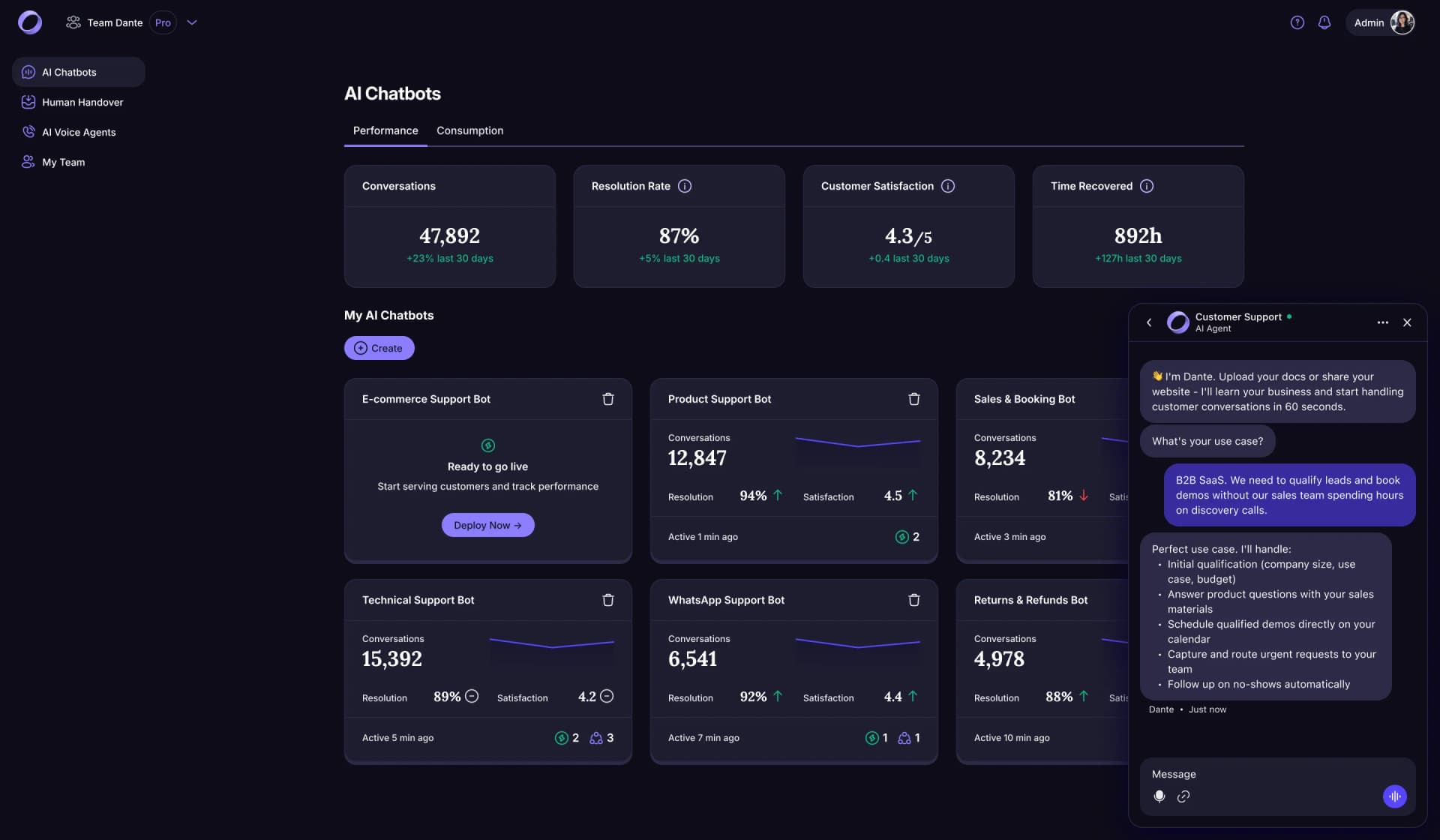
Dante AI focuses on AI customer service agents that sit on top of your website and communication channels to handle support, lead capture, and bookings around the clock. It trains on your existing content, then uses modern large language models to answer questions in natural language across chat, voice, and phone so visitors get instant, relevant help without waiting for a human. The tool targets businesses from scrappy startups to large enterprises that want 24/7 coverage and flat, predictable pricing instead of per-ticket fees.
Dante AI leans hard into real-world customer service outcomes rather than generic chatbots. Its flat, unlimited-conversation pricing is rare in this category and removes the guesswork around ticket-based billing. The product’s focus on retrieval-augmented answers from your own content, plus a premium Halo agent for more complex, high-stakes conversations, targets accuracy and resolution rather than just “chat.” Combined with practical writing on AI risks and best practices, it feels built by people who run their own AI support at scale, not just by tool builders.
Dante AI suits teams that want real, measurable relief on support queues and lead handling without turning into prompt engineers or paying surprise overage bills. It behaves much like a tireless support rep that lives everywhere your customers appear, speaks their language, and hands off cleanly when a human needs to step in. For organizations that care about fast deployment, strong privacy practices, and straightforward pricing, it is a very solid contender in AI customer service.
Who is Using Dante AI?
E-commerce Stores
Handling product questions, sizing, shipping, and returns while nudging visitors toward checkout.
SaaS and B2B Companies
Answering pricing, integration, and onboarding questions before prospects ever talk to sales.
Telecom and Utilities
Automating plan comparisons, billing queries, and basic troubleshooting for large subscriber bases.
Financial and Insurance Providers
Managing coverage questions, quote requests, and claim triage with human escalation for sensitive cases.
Car Dealerships and Automotive Retailers
Qualifying buyers, booking test drives, and routing hot leads straight to sales teams.
Uncommon Use Cases
Adopted for internal IT or HR helpdesks that answer employee questions from policy docs; used by educators and creators to power interactive FAQs for courses or digital products.
Key Features
Rating Breakdown
Pricing Plans
Free
Free
- Includes 1 AI chatbot, 100 credits per month, 250K characters of memory, sharing on unlimited websites, custom chatbot personality, and Discord support
Starter
$40 per month
- Includes everything in Free, plus 2 AI chatbots, 3,000 credits per month, 2.5M characters of memory per chatbot, saved conversations, voice input, analytics dashboard, Zapier integrations, priority support, and 1 custom domain
Advanced
$100 per month
- Includes everything in Starter, plus 10 AI chatbots, 12,500 credits per month, 50M characters of memory per chatbot, removal of “Powered by Dante,” AI lead generation, WhatsApp integration, custom CSS, human handover for 10 seats, team management for 3 seats, and 5 custom domains
Pro
$400 per month
- Includes everything in Advanced, plus 50 AI chatbots, 50,000 credits per month, 200M characters of memory per chatbot, API integration, a dedicated account manager, uptime SLA guarantee, use of your own OpenAI API, advanced LLM models, team management for 10 seats, and 50 custom domains
Enterprise
- Includes everything in Pro, plus unlimited AI chatbots, unlimited responses per month, unlimited memory, custom integrations, unlimited team seats, and unlimited custom domains
Which Dante AI plan should you pick?
Start with Free to build and test one website agent; upgrade to Starter for integrations, Advanced for lead capture and human handover, or Pro for API access and larger teams.
Free
Good for users who need one website agent, basic knowledge training, 100 monthly message credits, and one seat.
Starter
Good for small businesses that need more credits, two seats, advanced models, phone support, and Zapier integrations.
Advanced
Good for teams that need three agents, lead capture, human handover, file attachments, analytics, and advanced styling.
Pro
Good for teams and organizations that need API access, five seats, ten agents, larger knowledge limits, and white-label deployment.
Dante AI Use Cases
Website customer support
Train an agent on website content and documents, then embed it on a website to answer visitor questions.
Outcome: Visitors receive answers grounded in the business's own content.
Lead capture
Collect visitor names, emails, phone numbers, and qualifying answers inside the chat.
Outcome: Leads can be tracked, exported, or sent to a CRM through Zapier.
Human support handover
Let a support operator take over an AI conversation from the Inbox.
Outcome: A person can continue the conversation with its context preserved.
Appointment booking
Connect Calendly, Cal.com, Google Calendar, or Outlook and let the agent show availability and book meetings.
Outcome: Visitors can schedule meetings directly inside the chat.
Multichannel customer conversations
Deploy the same agent knowledge and personality on a website, phone, or WhatsApp.
Outcome: Customers can interact through the channels enabled by the selected plan.
Workflow Ideas with Dante AI
Route new leads to a CRM
- 1Capture a visitor's details with Dante AI lead capture
- 2Trigger a Zapier workflow when a new lead is created
- 3Create or update the contact in HubSpot, Salesforce, or another CRM
Notify a team when a conversation starts
- 1Use Dante AI's New conversation Zapier trigger
- 2Filter or format the conversation data
- 3Send an alert to Slack, email, or another connected team tool
Book a meeting from chat
- 1Connect Calendly, Cal.com, Google Calendar, or Outlook
- 2Enable the booking tools for an agent
- 3Let the agent show live availability and book the selected slot
How Dante AI fits into your stack
Browser
Dante is primarily a web-based AI agent builder and customer-support widget. Agents are tested in a browser sandbox and embedded into websites with a script or iframe.
Knowledge and files
Teams train agents on website URLs, uploaded files, pasted text, and Q&A pairs. Supported knowledge sources include PDFs, Word documents, slides, spreadsheets, and images.
Team chat and tickets
Human handover routes conversations into Dante’s shared Inbox, where teammates can take over live chats from website or WhatsApp conversations.
Automation and APIs
Zapier connects Dante with thousands of applications, including Slack, HubSpot, Salesforce, Google Sheets, Notion, and Make. Pro users can also call the Dante REST API directly.
Pros
- +Flat, predictable pricing: Unlimited conversations on every paid plan avoid painful cost spikes when support volume surges.
- +Very quick setup: Non-technical teams can go from URL to working chatbot in minutes, then embed it with a single line of code.
- +Strong customer feedback and support: Excellent public reviews, plus a responsive team and learning hub, make it approachable even for first-time AI adopters.
- +Human handoff done well: Clear escalation rules, live chat takeover, and full transcript visibility reduce friction when a conversation needs a real agent.
- +Serious privacy stance: Customer data is kept account-specific, not reused for model training, with SOC 2 compliance and EU or US processing options.
Cons
- −Knowledge quality dependence: Results mirror the quality and freshness of your website and documents, so neglected content means weaker answers.
- −Focused scope: It shines in customer-facing support, sales, and booking flows, but is not a full-blown general automation platform.
- −Flat plans may feel heavy for micro-sites: Very small projects with minimal traffic might prefer ultra-cheap usage-based pricing elsewhere.
Limitations & when to consider alternatives
Known limitations
- Free plan usage limits. The Free plan includes one AI agent, one seat, up to 100 message credits per month, and 150,000 characters of knowledge.
- Initial website crawling is bounded. The first crawl reads a capped set of core pages. Additional pages can be added later up to the plan's memory limit.
- Individual file size limit. Knowledge uploads are limited to 50 MB per file.
- Visitor attachments require human handover. Visitors can attach files only during a live human handover, not while the AI agent is answering.
- API access is restricted to Pro. Generating a Dante API key requires the Pro plan.
Look elsewhere when
- You need a native mobile or desktop application.
- You need SSO or SAML.
- You need model fine-tuning on your proprietary data.
How to Use Dante AI
- 1
Create an agent
Enter a website address or create a new AI agent from the dashboard, then give it a name.
- 2
Add knowledge
Choose Website, Files, Text, or Q&A and add the content the agent should use for answers.
- 3
Test in Sandbox
Ask test questions and adjust the agent's behavior, tone, or custom instructions before publishing.
- 4
Choose a model
Select an available model from the Sandbox or Publish page; paid plans unlock the full model catalog.
- 5
Publish to a website
Copy the embed snippet from Publish, restrict it to approved domains, and paste it into the website.
- 6
Add integrations
Open Integrations to connect WhatsApp, Zapier, calendar booking tools, or generate an API key on Pro.
Who is Dante AI For?
Small businesses
Dante AI provides website and phone agents that answer customer questions using the business's own website and documents.
Support teams
Support teams can use AI answers, human handover, inbox conversations, file attachments, and email transcripts.
Sales teams
Sales teams can capture leads, qualify visitors, export lead data, and send leads to CRMs through Zapier.
Teams and growing businesses
Paid plans provide multiple seats, role-based access, multiple agents, analytics, integrations, and API access.
Website owners
Website owners can embed a branded AI agent with a small script and restrict the widget to approved domains.
Frequently Asked Questions
Is there really a free plan?
Yes. Dante AI offers a free plan that does not expire, requires no card, and includes one website, one AI agent, 100 monthly message credits, and 150,000 characters of knowledge.
What can Dante AI use as knowledge?
You can provide website URLs, uploaded files, pasted text, and Q&A pairs. Supported files include PDFs, Word documents, spreadsheets, slides, structured files, and images.
How does Dante AI get added to a website?
Create an agent, add knowledge, test it in the Sandbox, then copy the embed snippet from the Publish page and paste it into your website.
Does Dante AI support integrations?
Yes. Dante AI supports WhatsApp, Zapier, booking integrations including Calendly, Cal.com, Google Calendar and Outlook, plus its own REST API.
What happens when Dante AI does not know the answer?
The agent answers from the knowledge sources supplied to it rather than guessing from general internet knowledge. Website sources, uploaded files, text, and Q&A pairs can be updated or removed.
Can visitors upload files in chat?
Yes, on the Advanced plan and above, when Human Handover is enabled. Visitor uploads are available only while a human has taken over the conversation.
Community reviews
Be the first to share your experience.
Sign in to leave a review for Dante AI.
Dante AI Alternatives
Looking for alternatives to Dante AI? Here are similar tools in the same category:
Learn to Master Dante AI
With Skill Leap courses
Get in-depth training on Dante AI and 50+ other AI tools with our expert-led video courses.
Start 7-Day Free Trial