
Couplelens
Turns couple photos into styled portraits.
Key Takeaways
- What it is
- Turns couple photos into styled portraits.
- Pricing
- Freemium · $2.99 per purchase
- Best for
- Template-Based AI Couple Portraits
- Wedding & Bridal Styles
- Portraits Beyond Couples
- Rating
- 3.9/5
What is Couplelens?
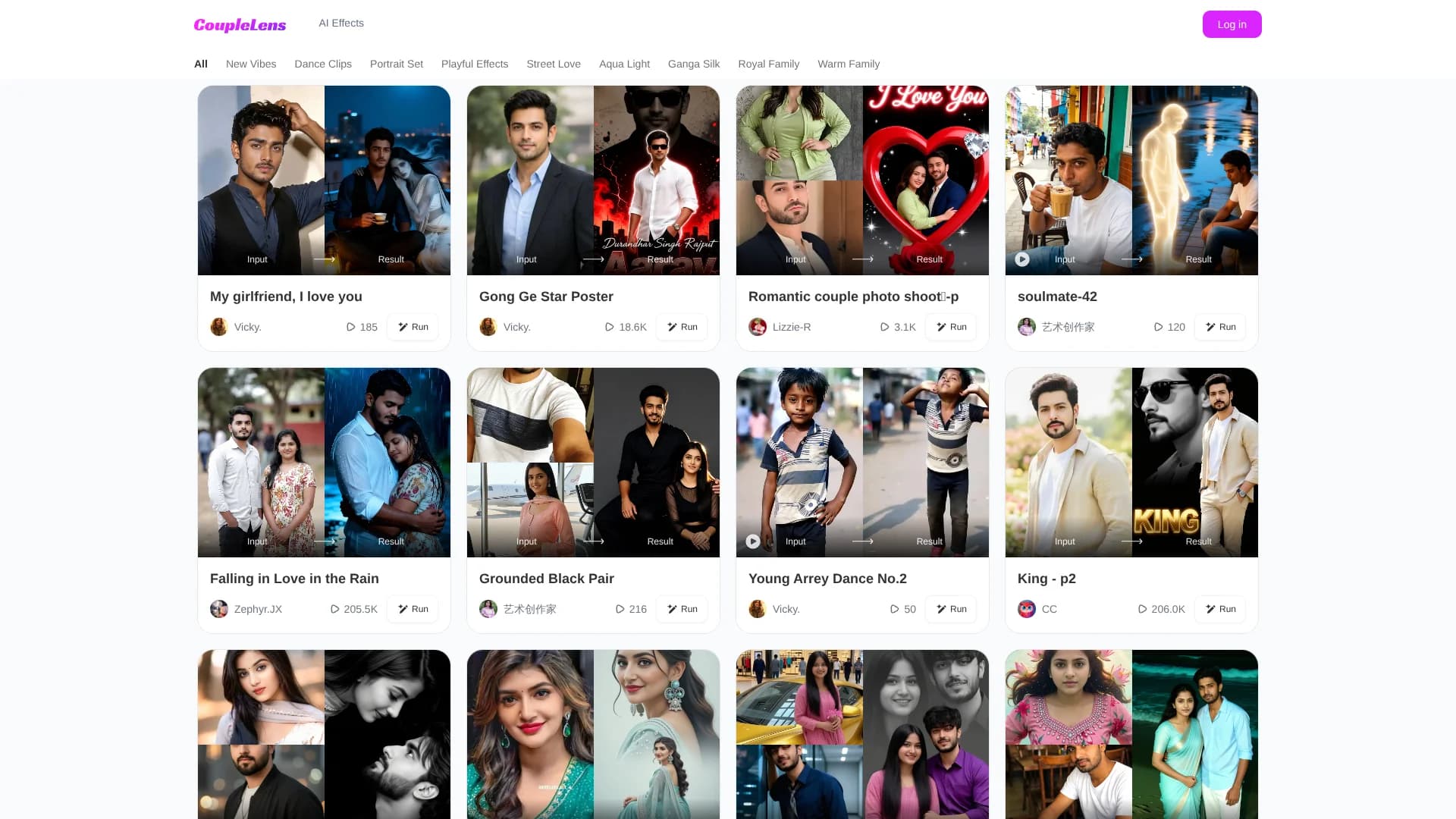
CoupleLens is an online AI image generator focused on couples and portrait-style photos. Users upload existing pictures, pick from named styles like “Main Tera Love,” “Bridal Wallpaper,” or “Golden Hour,” and receive transformed images that match that aesthetic. Third-party descriptions also highlight solo portraits and professional headshots, so the tool caters to couples, families, and individuals who want stylized visuals without arranging a full photoshoot.
CoupleLens stands out by organizing its entire experience around relationships and portraits, not generic art styles. The gallery leans into named emotional and cultural vibes such as “Heartbreak Walk,” “Royal Family,” “Warm Family,” and “10s Dance,” while still supporting solo professional headshots. That mix of romance, family, and work-ready portraits inside one style-driven AI studio gives it a distinct niche among more general image generators.
CoupleLens is best suited to couples, families, and individuals who want quick, themed portraits without managing complex prompts or editing tools. Its strength lies in curated relationship-focused styles that make romantic, wedding, and family images easy to generate, plus some utility for professional headshots. It is less suitable for teams that need APIs, deep control, or clear pricing, but as a template-first AI portrait studio it offers a focused way to turn ordinary photos into stylized memories.
Who is Using Couplelens?
Dating and long-term couples
Turn everyday selfies into romantic or playful couple portraits for sharing or printing.
Engaged couples and newlyweds
Create engagement-style and wedding-inspired images when a full professional shoot is not available or needs augmentation.
Job seekers and professionals
Generate cleaner, more formal headshots from casual photos for profiles and portfolios.
Content creators and social media managers
Produce fast, themed visuals for relationship-focused posts, campaigns, or thumbnails.
Uncommon Use Cases
Testing visual concepts for future real-world photoshoots; creating character-based couple or family artwork for stories using reference photos.
Key Features
Rating Breakdown
Pricing Plans
Free Tier
Free
- Free daily generation credits earned by opening the app and completing tasks
Basic Generation Tokens
$2.99 per purchase
- Pay-as-you-go credit bundles for additional generations
Premium Subscription
- Pricing varies by platform
- Region
- Promotion
- Unlimited or higher-usage access, additional styles, and reduced or no wait times
Couplelens Use Cases
AI avatar creation
Upload a clear front-facing photo, choose a style filter, and generate a consistent avatar image or video.
Outcome: A stylized avatar ready to save or share.
AI image generation
Choose from more than 25,000 style templates, upload a photo, and generate an image.
Outcome: A shareable AI-transformed image.
Hourly photo challenge reels
Upload two photos, choose a two-person filter or preset scenes, and generate a vertical reel.
Outcome: A 9:16 two-lives video ready for social posting.
AI wedding photos
Upload a portrait or separate couple photos, choose a wedding filter, and generate the scene.
Outcome: A romantic wedding portrait or kissing video.
Pet-to-human transformations
Upload a pet photo, select a pet-to-human filter, and generate an image or video.
Outcome: A stylized pet-and-human transformation to save or share.
Workflow Ideas with Couplelens
Create a stylized avatar
- 1Download and open CoupleLens from Google Play
- 2Browse the avatar filter list and upload one clear front-facing photo
- 3Generate, save the result, and share it to social media
Make a two-person challenge reel
- 1Open the hourly photo challenge filter
- 2Upload one photo of each participant and add an idea or choose preset scenes
- 3Generate the vertical video and download or share it
Create a wedding portrait
- 1Open the AI wedding workflow in the app
- 2Upload one portrait or two separate couple photos and choose a wedding filter
- 3Generate the result, then download or share it
How Couplelens fits into your stack
Browser
The official website provides a browser-accessible gallery of AI effects, filters, login, FAQ, and account links.
Mobile
The main creation workflow lives in the CoupleLens mobile app: choose a filter, upload photos, generate images or videos, then save or share them.
Pros
- +Relationship-centric styles: Many presets are tailored to couples, weddings, heartbreak, and family, which keeps results aligned with real-life relationship moments.
- +Low-friction workflow: A template-first approach means users can get stylized images without learning prompt engineering or editing tools.
- +Covers both personal and professional needs: Support for romantic portraits, family looks, and professional headshots gives the tool broader utility than a single-purpose couple filter.
- +Discovery via named vibes: Distinct style names and categories make it easier to browse for a look that fits a specific emotion or occasion.
Cons
- −Limited transparency on pricing: Public materials and directory listings mention a freemium model but do not clearly document plan names, limits, or exact prices.
- −Template-driven flexibility: Because the workflow centers on fixed styles, users who want fine-grained prompt control or custom compositions may find it restrictive.
- −Consumer focus only: There is no visible mention of APIs, integrations, or batch tools, so it does not currently suit production or agency pipelines.
Limitations & when to consider alternatives
Known limitations
- Generation can fail. The FAQ identifies unstable network conditions, sensitive content, and temporary server fluctuations as possible causes.
- Generation uses points. Paid users receive points with subscription and subsequent points every 24 hours; failed generations refund consumed points.
- Device bans can be permanent. Logging out two or more times on one device may trigger a device ban that cannot be lifted.
- Mobile-centered workflow. The documented creation flow is inside the mobile app and directs users to Google Play.
- Uploaded facial photos are processed temporarily. The privacy policy says uploaded facial photos are used for the requested effect, are not used for model training, and are not retained beyond processing.
How to Use Couplelens
- 1
Install the app
Download CoupleLens from Google Play and open the mobile app, where the documented generation workflows live.
- 2
Choose a filter
Browse the style library and select an image, avatar, couple, wedding, or video filter.
- 3
Upload source photos
Upload a selfie, couple photo, group photo, pet photo, or two separate portraits depending on the selected effect.
- 4
Generate the result
Tap Generate and wait for the image or short video to be produced.
- 5
Save or share
Download the finished result to your phone or share it to supported social platforms such as TikTok, Instagram, Reels, and Shorts.
Who is Couplelens For?
Content creators
Create short AI images and videos quickly for TikTok, Reels, Shorts, and other social platforms.
Social media managers
Generate multiple stylized profile images and short-form visual assets from selfies.
Wedding photographers
Create stylized couple and wedding images or videos from portrait photos.
Indie game developers
Create distinctive avatar and profile imagery without prompt-writing or design skills.
Frequently Asked Questions
How do I delete pictures or videos?
Uploaded images can be deleted by long-pressing within a filter. Generated images and videos can be deleted in batches from Profile → Generations.
Why did the generation fail?
Possible causes include an unstable network, sensitive content, or temporary server fluctuations. Points consumed by a failed generation are automatically refunded.
Why was my account banned?
Logging out twice or more on one device is treated as abnormal behavior and can result in a device ban that cannot be lifted.
How do I cancel my subscription?
Open Google Play Store, choose Subscriptions, select Couplelens APP, and tap Cancel subscription.
Why was my payment successful but the order was not delivered?
Network latency, needing to reopen the app, or insufficient points can prevent immediate access after payment.
Community reviews
Be the first to share your experience.
Sign in to leave a review for Couplelens.
Couplelens Alternatives
Looking for alternatives to Couplelens? Here are similar tools in the same category:
Learn to Master Couplelens
With Skill Leap courses
Get in-depth training on Couplelens and 50+ other AI tools with our expert-led video courses.
Start 7-Day Free Trial