Captain
Turn one content idea into a researched campaign that drives leads.
Watch Captain in Action
Key Takeaways
- What it is
- Turn one content idea into a researched campaign that drives leads.
- Pricing
- Freemium · $99/month · $279/month · $419/month · $529/month
- Best for
- Content Strategy and Calendar
- Automated Research
- Multi-Format Campaigns
- Rating
- 4.0/5
What is Captain?
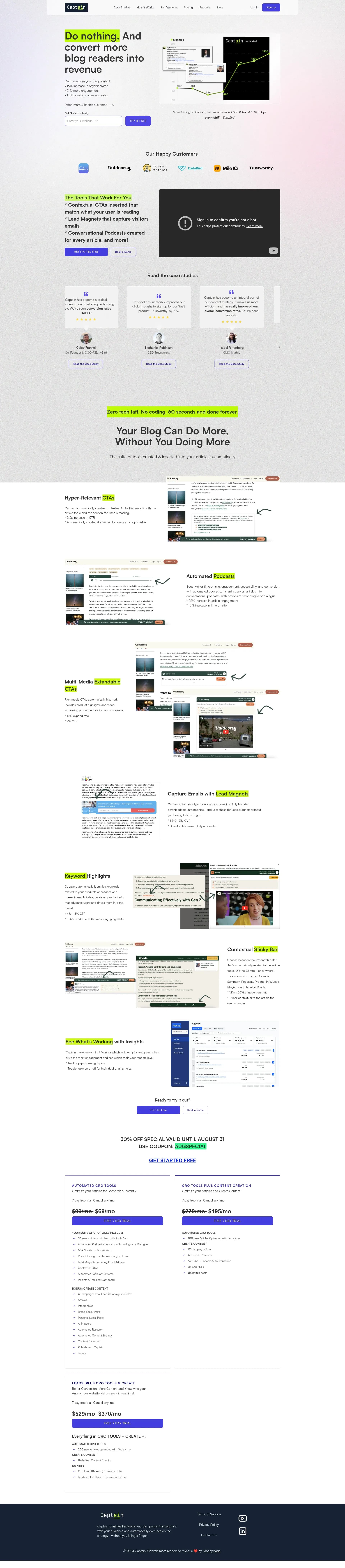
Captain provides an autogenerated podcast capability for content workflows.
It also offers automated Google research to support content creation.
Who is Using Captain?
Content Strategists
Topic performance data helps them decide what to publish next and where to focus research.
Marketing Managers
Campaign automation keeps articles, social posts, audio, and lead magnets aligned around one strategy.
Sales Development Representatives
Visitor details and Slack alerts help them respond when potential buyers show interest.
Agency Account Managers
Multi-format campaign output gives clients more deliverables from the same source material.
SEO and Organic Growth Specialists
Automated research and performance insights support a repeatable process for building traffic-driving content.
Uncommon Use Cases
Turning customer audio testimonials into case study campaigns; adding narrated versions of educational articles for accessibility.
Key Features
Rating Breakdown
Pricing Plans
Free Tier
Free
- Experience Captain with 2 free campaigns
Startup Plan
$99/month
- Includes 4 campaigns, audio commentary, automated research, and more
Growth Plan
$279/month
- Includes everything in Startup plus additional campaigns and onboarding
Growth Plus Plan
$419/month
- Includes everything in Growth plus lead identification and more
Unlimited Plan
$529/month
- Includes unlimited campaigns, personas, and extensive lead identification features
Which Captain plan should you pick?
Start with Startup if you need a small number of content campaigns, and move to Growth Plus when real-time visitor identification becomes important.
Free Tier
Good for exploring Captain's campaign workflow before paying.
Startup Plan
Good for smaller content programs that need four campaigns, automated research, and audio commentary.
Growth Plan
Good for growing marketing teams that need more campaign capacity and onboarding support.
Growth Plus Plan
Good for teams that want higher content capacity plus real-time lead identification.
Unlimited Plan
Good for agencies or large programs that need unlimited campaigns and personas.
Captain Use Cases
Research-Backed Articles
A new article can combine Google findings with selected material from webpages, PDFs, YouTube videos, and podcasts.
Outcome: Cited content with less manual research.
Article-to-Podcast Campaigns
Each article can become a narrated monologue or a host-and-guest discussion with optional product messages.
Outcome: An audio version that gives readers another way to consume the content.
Content Repurposing
One campaign can extend into social posts, infographics, newsletters, audiograms, and lead magnets.
Outcome: More distribution from the same core idea.
Website Conversion Support
Published articles gain contextual CTAs, clickable summaries, product-benefit keywords, and embedded media.
Outcome: More ways for readers to engage or take the next step.
Warm Lead Follow-Up
Sales teams can receive information about identified website visitors through the dashboard and Slack.
Outcome: Faster follow-up with people showing interest.
Workflow Ideas with Captain
Research to Published Campaign
- 1Create or select a content brief.
- 2Choose Google, webpage, PDF, YouTube, or podcast research sources.
- 3Review the article and publish the related campaign assets.
Article to Audio Experience
- 1Publish an article through Captain.
- 2Choose host and guest voices or add voice-cloned options.
- 3Set pre-roll, post-roll, and music settings for the automated podcast.
Engagement to Sales Follow-Up
- 1Add Captain's engagement tools to published articles.
- 2Review topic and visitor activity in the dashboard.
- 3Send eligible lead details to Slack for sales follow-up.
How Captain fits into your stack
Website Content
Captain sits close to the publishing workflow, adding audio, summaries, calls to action, and lead capture elements to articles.
Research and Knowledge Sources
The research workflow can draw from Google, webpages, PDFs, YouTube videos, and podcasts, with selected findings included in content.
Social and Audio Distribution
A campaign can extend beyond the article into social posts, audiograms, newsletters, and narrated podcasts.
Sales Alerts
Visitor identification data can appear in the Captain dashboard and be sent to Slack for quicker outreach.
Agency Delivery
Agencies can use campaign and white-label capabilities to present branded content marketing services to clients.
Pros
- +Campaign Repurposing: Turns one content strategy into written, social, visual, and audio assets.
- +Research Support: Pulls useful material from Google, videos, podcasts, webpages, and PDFs.
- +On-Page Engagement: Adds conversion elements directly to published articles.
- +Podcast Creation: Produces branded monologue or two-person podcast versions of articles.
- +Performance Feedback: Uses engagement data to guide future topic choices.
Cons
- −High Entry Price: Paid plans start at $99 per month.
- −Setup Complexity: Campaigns, personas, research sources, and engagement tools need careful configuration.
- −Advanced Lead Data: Visitor identification is reserved for higher-priced plans.
Limitations & when to consider alternatives
Known limitations
- Plan-Based Capacity. Campaign counts, optimized articles, personas, onboarding, and lead identification vary by plan.
- Lead Identification Availability. Visitor identification is not included in the Startup plan and is available only on higher tiers.
Look elsewhere when
- You need a native mobile or desktop application.
- You need a documented public API with endpoints and developer keys.
- Your team needs built-in SSO or detailed workspace roles.
How to Use Captain
- 1
Set up your brand
Create an account and provide the website, audience, topics, and personas Captain will use for campaign planning.
- 2
Create a brief
Choose a campaign type or define your own brief so Captain knows the subject, audience, and intended funnel stage.
- 3
Add research sources
Select automated Google research or add webpages, PDFs, YouTube videos, and podcasts that should inform the content.
- 4
Review the campaign
Check the article, social content, graphics, audio, citations, and calls to action before publishing.
- 5
Turn on engagement tools
Configure podcasts, lead magnets, summaries, product keywords, and contextual CTAs for the published article.
- 6
Watch performance
Use the Performance Dashboard to find winning topics and adjust the next content calendar.
Who is Captain For?
Content Marketing Teams
Teams that need a steady flow of researched articles and supporting campaign assets.
Digital Marketing Agencies
Agencies managing content campaigns for several brands or clients.
Sales-Led Brands
Companies that want website content to support both demand generation and sales follow-up.
E-Commerce Businesses
Online sellers looking to connect educational content with product-focused calls to action.
Content Creators
Creators who want to turn one idea into articles, social content, graphics, and audio.
Frequently Asked Questions
Does Captain have a free tier?
Captain offers a free tier with limited campaign access. The paid plans begin with Startup.
What content can Captain create?
Captain can create articles, social posts, infographics, newsletters, audiograms, narrated podcasts, and case study campaign assets.
Can Captain research sources outside Google?
Yes. Captain can use webpages, PDFs, YouTube videos, podcasts, and automated Google research as content sources.
Does Captain identify website visitors?
Higher plans can identify eligible website visitors and provide details such as name, company, title, email, and LinkedIn profile.
Does Captain connect to Slack?
Yes. Captain can send identified visitor information to Slack for sales follow-up.
Can Captain create two-person podcasts?
Yes. Its automated podcast feature can create a host-and-guest discussion from an article or campaign topic.
Community reviews
5 reviews from people who use Captain.
Sign in to leave a review for Captain.
brittany Fochtman
Richard McBeath
Denys Kravchenko
Ryan Fochtman
Stuart Sharpe
Captain Alternatives
Looking for alternatives to Captain? Here are similar tools in the same category: