
Argil
Create recurring AI videos with consistent characters, worlds, and visual style.
Key Takeaways
- What it is
- Create recurring AI videos with consistent characters, worlds, and visual style.
- Pricing
- $1,250 per month
- Best for
- AI Director
- Storyboard Planning
- Reusable Creative Library
- Rating
- 4.1/5
What is Argil?
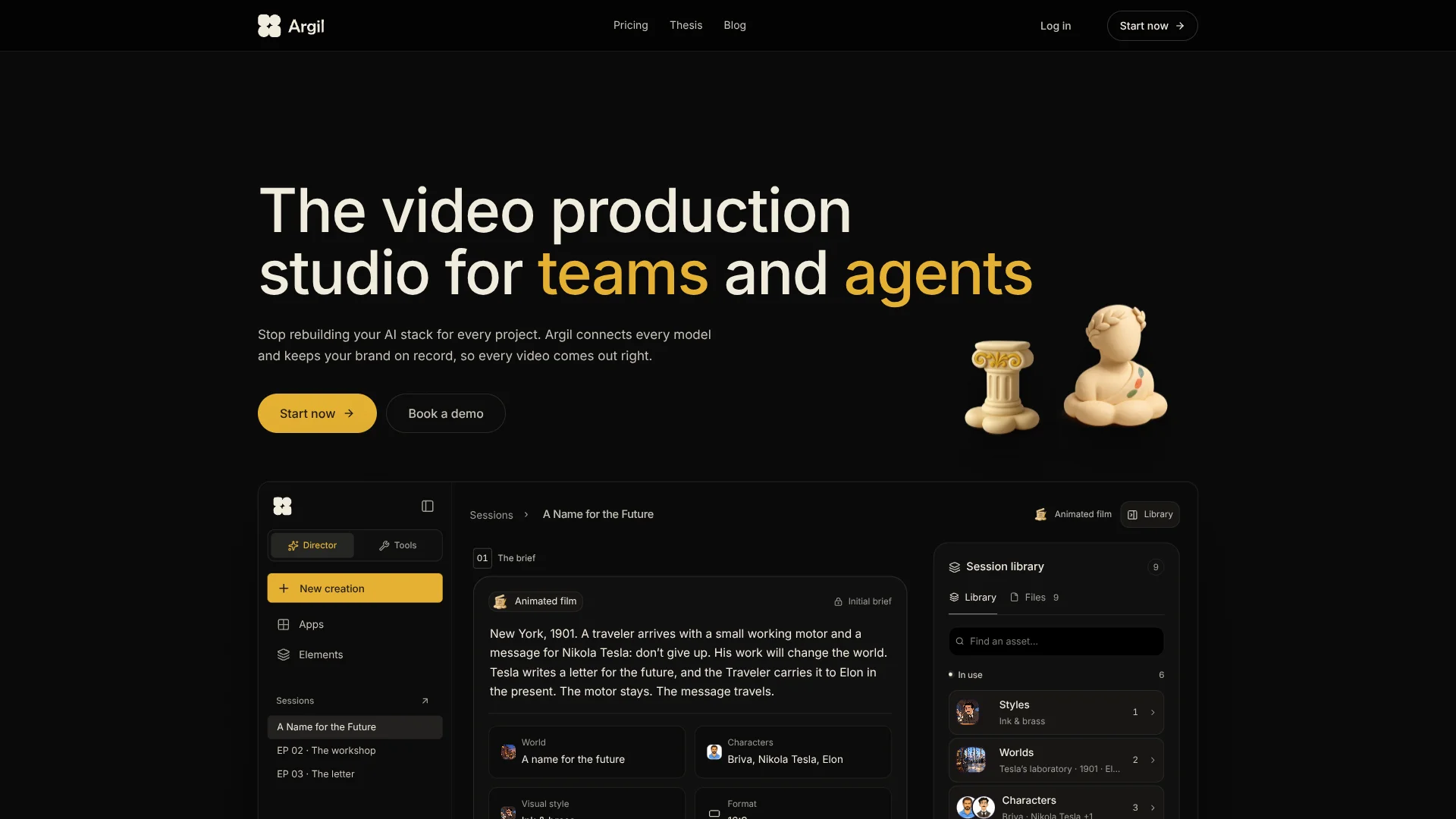
Argil turns a brief, script, or creative idea into a structured AI video workflow. It helps creators and teams define characters, locations, visual style, shot direction, dialogue, timing, and editing in one browser-based studio. The result can feature a custom avatar or a generic avatar, with images, videos, sounds, transitions, and captions added to the finished video.
Argil keeps reusable characters, worlds, locations, and visual styles in a library that can guide future videos. That gives recurring series a consistent cast and visual identity instead of making every AI generation start from a blank prompt.
Argil fits creators, marketers, educators, and teams producing repeated video content who want more control over narrative continuity than a basic avatar generator offers. It is less suitable when you need a native mobile app, a confirmed shared team workspace, or perfectly accurate avatar likenesses. Its strongest use is repeatable story production where the same creative elements need to carry from storyboard to final cut.
Who is Using Argil?
Video Creators
A reusable character and style library helps them produce episodes without rebuilding the creative setup.
Brand Strategists
Brand references, visual language, and recurring characters give campaigns a consistent foundation.
Creative Directors
Shot-by-shot storyboards provide a place to review framing, action, dialogue, and timing before generation.
Founders and Experts
A trained custom avatar lets them appear in scripted videos when filming each update is impractical.
Editors
The timeline combines cuts, motion, captions, transitions, and imported media in the final production pass.
Uncommon Use Cases
Historical short films with recurring characters and locations; serialized mascot videos with a locked visual style
Key Features
Rating Breakdown
Pricing Plans
Pro
Studio
$1,250 per month
Enterprise
Which Argil plan should you pick?
Start with the Free Plan to test Argil's video workflow, then choose Basic for occasional custom-avatar production or Pro for a larger avatar library.
Free Plan
Good for exploring Argil's AI video workflow when you do not need a custom avatar.
Basic Plan
Good for creators who need up to 3 custom avatars with one-time training.
Pro Plan
Good for higher-volume creators or teams that need up to 10 custom avatars with one-time training.
Argil Use Cases
Serialized Brand Videos
A recurring cast, setting, and style form the foundation for weekly episodes or campaign content.
Outcome: A consistent video series built from reusable creative elements.
Custom Avatar Updates
A trained avatar delivers scripts in the user's likeness for announcements, explainers, or personal-brand content.
Outcome: Scripted on-camera videos without filming every new segment.
Storyboarded Short Films
A brief becomes a sequence of directed shots with defined action, dialogue, framing, and timing.
Outcome: A finished short film with a clear creative plan behind each shot.
Product Launch Videos
Product ideas can move from a conversational brief to an AI-written script, shot plan, avatar performance, and edited cut.
Outcome: A structured launch video assembled from the original brief.
Localized Video Content
Generation language and subtitles can be customized for videos intended for different audiences.
Outcome: Video variations prepared for multiple languages or regions.
Workflow Ideas with Argil
From Brief to Finished Film
- 1Describe the story, conflict, or world you want to explore.
- 2Define characters, locations, props, and visual style.
- 3Review the storyboard, then generate and assemble the shots.
Recurring Avatar Series
- 1Record the source video required to train a custom avatar.
- 2Write or generate scripts for each episode.
- 3Reuse the avatar and visual elements across the series.
Campaign Variation Workflow
- 1Create a core world, style, and character library for the campaign.
- 2Build separate storyboards for different messages or audiences.
- 3Generate edited variations while keeping the campaign identity consistent.
How Argil fits into your stack
Creative Briefs
Argil sits at the idea-to-production stage, turning a short concept or existing script into a visual plan.
Brand and Story Assets
Characters, worlds, locations, props, and visual styles live in a reusable library for later videos.
Video Production
The AI Director connects scripting, storyboard planning, shot generation, avatar performance, and assembly.
Editing and Delivery
The timeline handles cuts, motion, captions, imported media, sounds, and transitions before the video is exported.
Developer Access
Argil documents an API for third-party applications that need access to its services.
Pros
- +Story continuity: Reusable characters, locations, worlds, and styles can carry across multiple videos.
- +Custom likeness: Your avatar can reproduce your voice, facial expressions, and movement from a training video.
- +Directed production: The storyboard gives you control over shot framing, action, dialogue, and timing before rendering.
- +Built-in editing: Captions, cuts, motion, images, sounds, and transitions are part of the video workflow.
Cons
- −Browser dependent: Argil does not currently offer a confirmed native desktop or mobile app.
- −Avatar imperfections: The company warns that generated avatars can show anomalies and are not perfect reproductions.
- −Plan limits: Custom avatar access is limited by plan, with the free plan excluding custom avatars.
Limitations & when to consider alternatives
Known limitations
- Avatar likeness is not perfect. Argil states that personalized avatars may contain anomalies or malfunctions and are not exact reproductions.
- Generated content needs review. The company warns that generated videos may differ from the requested script or fail to match the user's needs.
- Mobile app is under development. Argil's terms state that its mobile application is currently under development.
- Custom avatars are plan-limited. The free plan does not include custom avatars, while the Basic and Pro plans provide different custom avatar allowances.
Look elsewhere when
- You need a native iOS or Android app.
- Your workflow requires a confirmed shared workspace with user roles and invites.
- You need an exact human likeness with no possible generation anomalies.
- Your project depends on documented third-party integrations rather than API access alone.
How to Use Argil
- 1
Start with an Idea
Enter a sentence, character, conflict, world, or finished script so Argil has a creative starting point.
- 2
Build the Creative World
Define the characters, locations, props, and visual style that should guide the video.
- 3
Train an Avatar if Needed
Upload the required speaking-to-camera video and complete the identity checks for a personalized avatar.
- 4
Review the Storyboard
Check each shot's framing, movement, action, dialogue, timing, and transitions before production.
- 5
Generate the Video
Run the selected shots through Argil's production flow and review the assembled result.
- 6
Refine and Export
Adjust the creative direction, captions, media, sounds, or transitions, then download the generated video.
Who is Argil For?
Content Creators
Recurring video creators can keep a recognizable cast and visual style across episodes.
Marketing Teams
Marketing teams can turn product ideas, campaign briefs, and brand references into directed videos.
Personal Brands
Founders and experts can produce videos featuring a custom version of themselves without recording every take.
Educators
Educators can create narrated lessons and explainers with reusable characters, scenes, and visual direction.
Creative Studios
Studios can keep story elements and production decisions organized across a series of AI-generated films.
Frequently Asked Questions
Does Argil have a free plan?
Yes. The Free Plan is available at $0 per month, but it does not include custom avatars.
How does Argil create a custom avatar?
You provide a speaking-to-camera video that Argil analyzes for voice, facial expressions, and movement, then uses to create a personalized avatar.
Can Argil generate videos in different languages?
Yes. Generated content can use a selected generation language, and subtitles can be customized.
Can I upload my own media?
Yes. Argil allows users to import images and videos, and generated videos can also include sounds and transitions.
Do unused credits roll over?
Plan credits refresh each month and do not stack. Extra pay-as-you-go credits purchased in the workspace do not expire.
Does Argil have an API?
Yes. Argil documents an API that lets third-party sites or applications access its services.
Community reviews
Be the first to share your experience.
Sign in to leave a review for Argil.
Argil Alternatives
Looking for alternatives to Argil? Here are similar tools in the same category:
Learn to Master Argil
With Skill Leap courses
Get in-depth training on Argil and 50+ other AI tools with our expert-led video courses.
Start 7-Day Free Trial